# vtkTextActor3D looks weird
**URL:** https://discourse.vtk.org/t/vtktextactor3d-looks-weird/7591
**Category:** Support
**Created:** [January 7, 2022, 7:26am UTC](https://discourse.vtk.org/t/vtktextactor3d-looks-weird/7591 "2022-01-07T07:26:01Z")
**Posts on this page:** 8
**Page:** 1
### Author:  [@zhang-qiang-github](https://discourse.vtk.org/u/zhang-qiang-github)
#### Post date: [January 7, 2022, 7:26am UTC](https://discourse.vtk.org/t/vtktextactor3d-looks-weird/7591/1 "2022-01-07T07:26:01Z")
I am using `vtkTextActor3D` to display 3D text, but it look weird.The code to reproduce my question is:
```auto
import vtkmodules.all as vtk
if __name__ == ' __main__':
line = vtk.vtkLineSource()
line.SetPoint1(0, 0, 0)
line.SetPoint2(1, 0, 0)
line.Update()
mapper = vtk.vtkPolyDataMapper()
mapper.SetInputData(line.GetOutput())
actor = vtk.vtkActor()
actor.SetMapper(mapper)
txt3D = vtk.vtkTextActor3D()
txt3D.SetInput("vtkTextActor3D")
txt3D.SetPosition(1, 0, 0)
txt3D.GetTextProperty().SetBold(True)
txt3D.GetTextProperty().SetFontSize(2)
txt3D.GetTextProperty().SetColor(1, 0, 0)
ren = vtk.vtkRenderer()
ren.AddActor(actor)
ren.AddActor(txt3D)
renWin = vtk.vtkRenderWindow()
renWin.AddRenderer(ren)
iren = vtk.vtkRenderWindowInteractor()
iren.SetRenderWindow(renWin)
iren.Initialize()
iren.Start()
```
The result is:
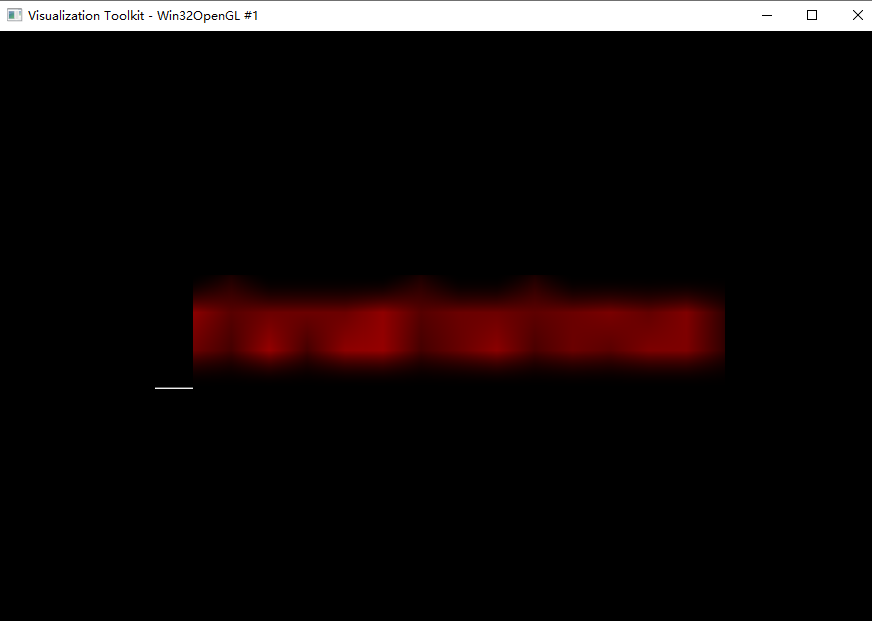
I can not figure out the 3D text in the above figure.
If I want to have a good 3D text, I need to give a larger font size:
```auto
txt3D.GetTextProperty().SetFontSize(20) ########### modify: 2 to 20
```
And the result is:
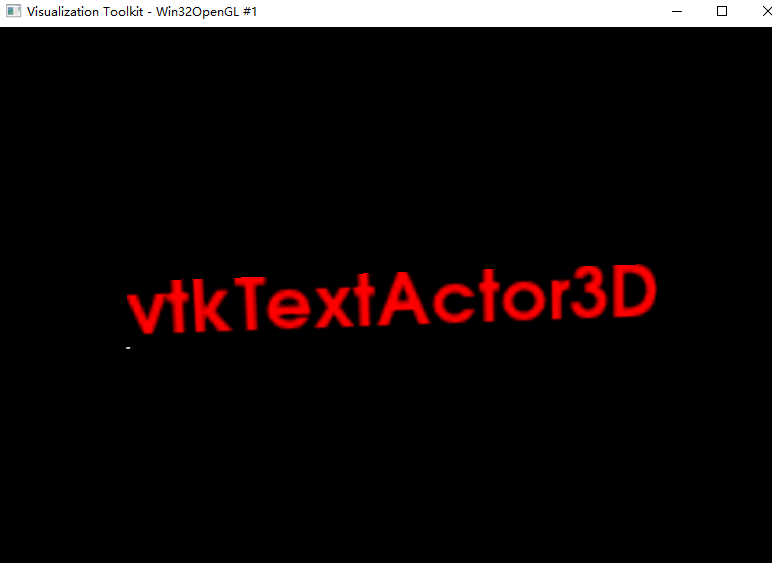
The text is clear, but I almost can not see the `line`.
Is there any thing wrong with my code? How can I correctly display the 3D text.
---
### Author:  [@Paulo\_Carvalho](https://discourse.vtk.org/u/Paulo_Carvalho)
#### Post date: [January 7, 2022, 9:18pm UTC](https://discourse.vtk.org/t/vtktextactor3d-looks-weird/7591/2 "2022-01-07T21:18:06Z")
I think the line must be resized accordingly:
```python
line = vtk.vtkLineSource()
line.SetPoint1(0, 0, 0)
line.SetPoint2(200, 0, 0) ####old value (1, 0, 0)
line.Update()
```
---
### Author:  [@zhang-qiang-github](https://discourse.vtk.org/u/zhang-qiang-github)
#### Post date: [January 8, 2022, 7:32am UTC](https://discourse.vtk.org/t/vtktextactor3d-looks-weird/7591/3 "2022-01-08T07:32:03Z")
> [@Paulo\_Carvalho](#):
>
> `line.SetPoint2(200, 0, 0) ####old value (1, 0, 0)`
It can make the result looks well.
But, I don’t want to change the position of the line. The position of (1, 0, 0) indicate a position in the real world, and the line has the reality meaning.
I want to display a 3D text for the line `( (0, 0, 0), (1, 0, 0) )`. How to display the 3D text?
I find the `vtkVectorText` can also display 3D text, but I can not change the display preporty for it: color, font size, font family. In a world, `vtkVectorText` do not have `vtkTextProperty`.
---
### Author:  [@Paulo\_Carvalho](https://discourse.vtk.org/u/Paulo_Carvalho)
#### Post date: [January 9, 2022, 1:38pm UTC](https://discourse.vtk.org/t/vtktextactor3d-looks-weird/7591/4 "2022-01-09T13:38:02Z")
`vtkTextActor3D` renders the text as a texture and the texture is applied to a rectangle. Being rendered as a texture means the text is rasterized according to the font settings. Setting its font size to 2, that would mean a very small text with very few pixels tall hence the bad results.
I’d keep the `txt3D.GetTextProperty().SetFontSize(20)` call, but I’d rescale the `txt3D` actor: `txt3D.SetScale(0.1)`. You’ll likely need to add code to compute an adequate scale factor that will fit your (0,0,0)-(1,0,0) line. Either this or use another class to render your text without involving the use of textures.
---
### Author:  [@zhang-qiang-github](https://discourse.vtk.org/u/zhang-qiang-github)
#### Post date: [January 9, 2022, 2:01pm UTC](https://discourse.vtk.org/t/vtktextactor3d-looks-weird/7591/5 "2022-01-09T14:01:03Z")
@Paulo_Carvalho Thank you for your kindly reply.
> [@Paulo\_Carvalho](#):
>
> txt3D.SetScale(0.1)
It is a good solution.
> [@Paulo\_Carvalho](#):
>
> Either this or use another class to render your text without involving the use of textures.
Is there any other class can render the 3D text?
---
### Author:  [@Paulo\_Carvalho](https://discourse.vtk.org/u/Paulo_Carvalho)
#### Post date: [January 9, 2022, 2:27pm UTC](https://discourse.vtk.org/t/vtktextactor3d-looks-weird/7591/6 "2022-01-09T14:27:27Z")
> [@zhang-qiang-github](#):
>
> Is there any other class can render the 3D text?
`vtkVectorText` can be used to generate a `vtkPolyData` object from a string. You won’t have texture issues, but you’ll have a more computationally expensive scene. If you expect to have too many characters in your scene, `vtkTextActor3D` is a better choice.
---
### Author:  [@zhang-qiang-github](https://discourse.vtk.org/u/zhang-qiang-github)
#### Post date: [January 9, 2022, 2:58pm UTC](https://discourse.vtk.org/t/vtktextactor3d-looks-weird/7591/7 "2022-01-09T14:58:34Z")
> [@Paulo\_Carvalho](#):
>
> `vtkVectorText` can be used to generate a `vtkPolyData` object from a string
I have tried `vtkVectorText`, but I can’t find how to set the `font size, font family, line spacing` and some properties which has been provided by `vtkTextProperty`. Can I use `vtkTextProperty` for `vtkVectorText`?
---
### Author:  [@Paulo\_Carvalho](https://discourse.vtk.org/u/Paulo_Carvalho)
#### Post date: [January 9, 2022, 10:15pm UTC](https://discourse.vtk.org/t/vtktextactor3d-looks-weird/7591/8 "2022-01-09T22:15:58Z")
You can try the `vtkCaptionActor2D` class. Its setup is more complex than those of the other two classes, but it accepts a `vtkTextProperty` to configure font settings: [https://vtk.org/doc/nightly/html/classvtkCaptionActor2D.html#details](https://vtk.org/doc/nightly/html/classvtkCaptionActor2D.html#details)