# vtkWarpScalar produces hexagonal peaks
**URL:** https://discourse.vtk.org/t/vtkwarpscalar-produces-hexagonal-peaks/5208
**Category:** Support
**Created:** [February 18, 2021, 1:20pm UTC](https://discourse.vtk.org/t/vtkwarpscalar-produces-hexagonal-peaks/5208 "2021-02-18T13:20:56Z")
**Posts on this page:** 8
**Page:** 1
### Author:  [@cricket](https://discourse.vtk.org/u/cricket)
#### Post date: [February 18, 2021, 1:20pm UTC](https://discourse.vtk.org/t/vtkwarpscalar-produces-hexagonal-peaks/5208/1 "2021-02-18T13:20:56Z")
Hi,
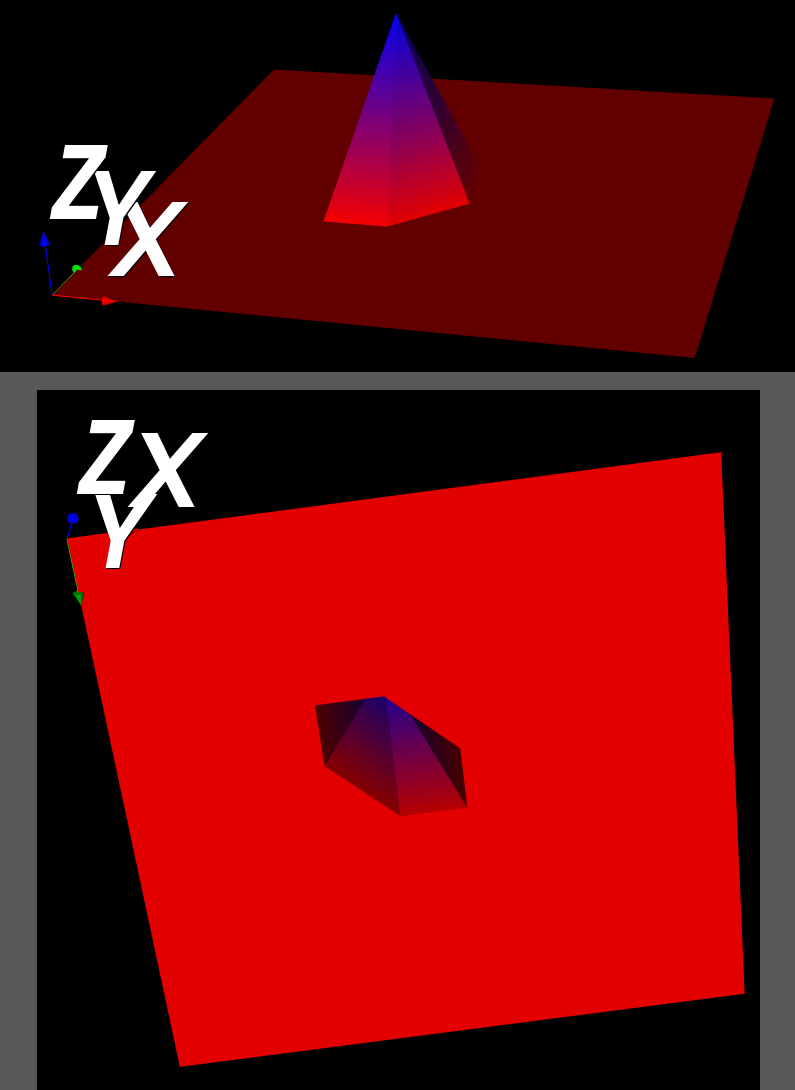
I am trying to create a simple height map from a numpy array. Everything is zero, except for a peak in the center. The peak is hexagonal, and tilted, and so it’s not symmetrical. I want to create a spectrogram, but hexagonal peaks are going to really skew the figure.
The code and resulting figure are given below. Help greatly appreciated. Please!
import numpy as np
import vtk
def main():
```
##############################
# 0. INITIALIZE
##############################
# data
imgImport = vtk.vtkImageImport()
imageData = vtk.vtkImageData() # data (image)
# processing (visualization pipline)
geometry = vtk.vtkImageDataGeometryFilter() # image->poly
warp = vtk.vtkWarpScalar() # filter
mapper = vtk.vtkPolyDataMapper() # mapper
# view (graphics pipeline)
actor_axes = vtk.vtkAxesActor() # actor: axes
actor = vtk.vtkActor() # actor: main
ren = vtk.vtkRenderer() # renderer
renWin = vtk.vtkRenderWindow() # window
iren = vtk.vtkRenderWindowInteractor() # interactor
##############################
# I. INPUT
##############################
data_matrix = np.zeros([10,10], dtype=np.float32)
data_matrix[4,4] = 3
sz = data_matrix.shape
R, C = sz[0], sz[1]
imgImport.SetImportVoidPointer(data_matrix) # len(data_string)
imgImport.SetDataScalarTypeToFloat()
imgImport.SetDataExtent(0, C-1, 0, R-1, 0, 0)
imgImport.SetWholeExtent(0, C-1, 0, R-1, 0, 0)
imgImport.Update()
imageData = imgImport.GetOutput()
##############################
# II. PROCESS
##############################
##############################
# IIIa. VISUALIZATION PIPELINE
##############################
# Filter 1: image data to polydata
geometry.SetInputData(imageData)
geometry.Update()
# Filter 2: warp
warp.SetInputConnection(geometry.GetOutputPort())
# Mapper
mapper.SetInputConnection(warp.GetOutputPort())
##############################
# IIIb. RENDER PIPELINE
##############################
# 1/4. Actor
actor.SetMapper(mapper)
# 2/4. Renderer
ren.AddActor(actor_axes)
ren.AddActor(actor)
ren.ResetCamera()
# 3/4. Window
renWin.AddRenderer(ren)
# 4/4. Interactor
iren.SetRenderWindow(renWin)
iren.Initialize()
iren.SetInteractorStyle(vtk.vtkInteractorStyleTrackballCamera())
iren.Start()
```
######################################
if **name** == ‘ **main** ’:
main()
---
### Author:  [@will.schroeder](https://discourse.vtk.org/u/will.schroeder)
#### Post date: [February 18, 2021, 1:29pm UTC](https://discourse.vtk.org/t/vtkwarpscalar-produces-hexagonal-peaks/5208/2 "2021-02-18T13:29:11Z")
If I understand correctly, this is a “resolution” effect due to the relative coarseness of the mesh. I assume that you are looking for a “smooth” peak. You might want to try something like vtkAdaptiveSubdivisionFilter or vtkButterflySubdivisionFilter. Alternatively / in conjunction with these filters, you might also try vtkWindowedSincPolyDataFilter to smooth the mesh.
---
### Author:  [@cricket](https://discourse.vtk.org/u/cricket)
#### Post date: [February 18, 2021, 2:32pm UTC](https://discourse.vtk.org/t/vtkwarpscalar-produces-hexagonal-peaks/5208/3 "2021-02-18T14:32:42Z")
Yes, I am looking for a ‘smooth’ peak. But more importantly, I am looking for something symmetric, even if it is coarse.
I will try the filters you mentioned, but I’m worried that a simple example like this gives a hexagonal base for the peak, rather than say a diamond shaped base.
---
### Author:  [@cricket](https://discourse.vtk.org/u/cricket)
#### Post date: [February 18, 2021, 3:40pm UTC](https://discourse.vtk.org/t/vtkwarpscalar-produces-hexagonal-peaks/5208/4 "2021-02-18T15:40:09Z")
> [@will.schroeder](#):
>
> vtkAdaptiveSubdivisionFilter
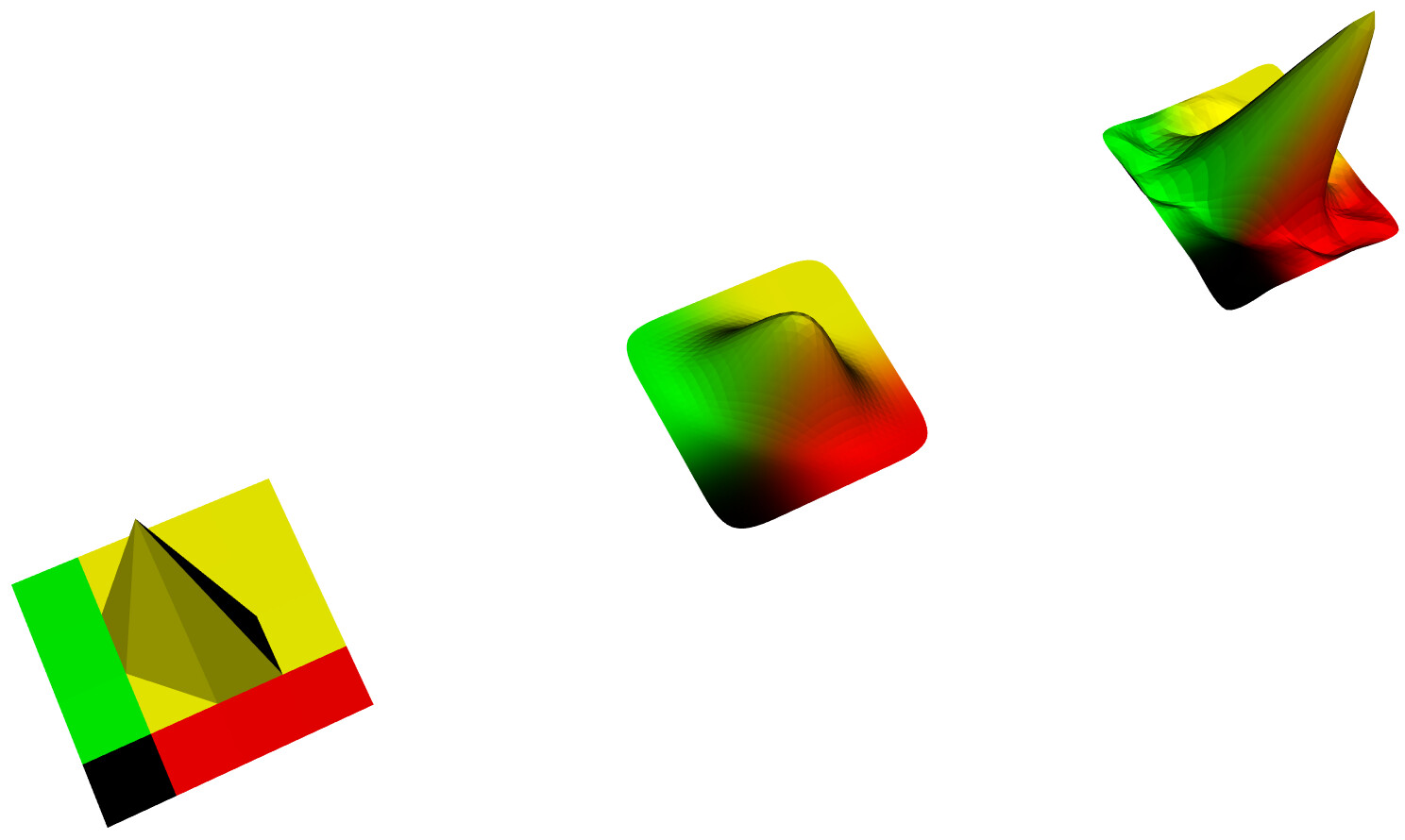
Yes, as expected, the subdivision creates smoothing, but doesn’t solve the asymmetry problem. Here is the code, modified from [https://vtk.org/Wiki/VTK/Examples/Python/PolyData/SubdivisionFilters](https://vtk.org/Wiki/VTK/Examples/Python/PolyData/SubdivisionFilters) to run on VTK 9, followed by the resultant image:
import vtk
import random
import numpy
# Make a 32 x 32 grid
size = 5
# Define z values for the topography (random height)
topography = numpy.zeros([size, size])
topography[2][2] = 5
‘’’
for i in range(size):
for j in range(size):
topography[i][j] = random.randrange(0, 5)
‘’’
# Define points, triangles and colors
colors = vtk.vtkUnsignedCharArray()
colors.SetNumberOfComponents(3)
points = vtk.vtkPoints()
triangles = vtk.vtkCellArray()
# Build the meshgrid manually
count = 0
for i in range(size-1):
for j in range(size-1):
```
z1 = topography[i][j]
z2 = topography[i][j+1]
z3 = topography[i+1][j]
# Triangle 1
points.InsertNextPoint(i, j, z1)
points.InsertNextPoint(i, (j+1), z2)
points.InsertNextPoint((i+1), j, z3)
triangle = vtk.vtkTriangle()
triangle.GetPointIds().SetId(0, count)
triangle.GetPointIds().SetId(1, count + 1)
triangle.GetPointIds().SetId(2, count + 2)
triangles.InsertNextCell(triangle)
z1 = topography[i][j+1]
z2 = topography[i+1][j+1]
z3 = topography[i+1][j]
# Triangle 2
points.InsertNextPoint(i, (j+1), z1)
points.InsertNextPoint((i+1), (j+1), z2)
points.InsertNextPoint((i+1), j, z3)
triangle = vtk.vtkTriangle()
triangle.GetPointIds().SetId(0, count + 3)
triangle.GetPointIds().SetId(1, count + 4)
triangle.GetPointIds().SetId(2, count + 5)
count += 6
triangles.InsertNextCell(triangle)
# Add some color
r = [int(i*10/float(size)*255),int(j*10/float(size)*255),0]
colors.InsertNextTuple(r)
colors.InsertNextTuple(r)
colors.InsertNextTuple(r)
colors.InsertNextTuple(r)
colors.InsertNextTuple(r)
colors.InsertNextTuple(r)
```
# Create a polydata object
trianglePolyData = vtk.vtkPolyData()
# Add the geometry and topology to the polydata
trianglePolyData.SetPoints(points)
trianglePolyData.GetPointData().SetScalars(colors)
trianglePolyData.SetPolys(triangles)
# Clean the polydata so that the edges are shared !
cleanPolyData = vtk.vtkCleanPolyData()
cleanPolyData.SetInputData(trianglePolyData)
# Use a filter to smooth the data (will add triangles and smooth)
# Use two different filters to show the difference
smooth\_loop = vtk.vtkLoopSubdivisionFilter()
smooth\_loop.SetNumberOfSubdivisions(3)
smooth\_loop.SetInputConnection(cleanPolyData.GetOutputPort())
smooth\_butterfly = vtk.vtkButterflySubdivisionFilter()
smooth\_butterfly.SetNumberOfSubdivisions(3)
smooth\_butterfly.SetInputConnection(cleanPolyData.GetOutputPort())
# Create a mapper and actor for initial dataset
mapper = vtk.vtkPolyDataMapper()
mapper.SetInputData(trianglePolyData)
actor = vtk.vtkActor()
actor.SetMapper(mapper)
# Create a mapper and actor for smoothed dataset (vtkLoopSubdivisionFilter)
mapper = vtk.vtkPolyDataMapper()
mapper.SetInputConnection(smooth\_loop.GetOutputPort())
actor\_loop = vtk.vtkActor()
actor\_loop.SetMapper(mapper)
actor\_loop.SetPosition(10, 0, 0)
# Create a mapper and actor for smoothed dataset (vtkButterflySubdivisionFilter)
mapper = vtk.vtkPolyDataMapper()
mapper.SetInputConnection(smooth\_butterfly.GetOutputPort())
actor\_butterfly = vtk.vtkActor()
actor\_butterfly.SetMapper(mapper)
actor\_butterfly.SetPosition(20, 0, 0)
# Visualise
renderer = vtk.vtkRenderer()
renderWindow = vtk.vtkRenderWindow()
renderWindow.AddRenderer(renderer)
renderWindowInteractor = vtk.vtkRenderWindowInteractor()
renderWindowInteractor.SetRenderWindow(renderWindow)
# Add actors and render
renderer.AddActor(actor)
renderer.AddActor(actor\_loop)
renderer.AddActor(actor\_butterfly)
renderer.SetBackground(1, 1, 1) # Background color white
renderWindow.SetSize(800, 800)
renderWindow.Render()
renderWindowInteractor.SetInteractorStyle(vtk.vtkInteractorStyleTrackballCamera())
renderWindowInteractor.Start()
---
### Author:  [@will.schroeder](https://discourse.vtk.org/u/will.schroeder)
#### Post date: [February 18, 2021, 4:00pm UTC](https://discourse.vtk.org/t/vtkwarpscalar-produces-hexagonal-peaks/5208/5 "2021-02-18T16:00:47Z")
Is there any way you can increase the underlying grid resolution?
Also, triangulating the underlying data so that edge incidence to a point is everywhere symmetric might help.
---
### Author:  [@cricket](https://discourse.vtk.org/u/cricket)
#### Post date: [February 18, 2021, 4:04pm UTC](https://discourse.vtk.org/t/vtkwarpscalar-produces-hexagonal-peaks/5208/6 "2021-02-18T16:04:33Z")
Yes, it looks like this is a known problem. This thread, I believe also addresses the same point. What do you think?
[https://discourse.paraview.org/t/unsymmetric-contour-rendered-by-symmetric-data/4118/18](https://discourse.paraview.org/t/unsymmetric-contour-rendered-by-symmetric-data/4118/18)
---
### Author:  [@will.schroeder](https://discourse.vtk.org/u/will.schroeder)
#### Post date: [February 19, 2021, 1:10pm UTC](https://discourse.vtk.org/t/vtkwarpscalar-produces-hexagonal-peaks/5208/7 "2021-02-19T13:10:52Z")
It’s a data resolution problem. The solution is to refine the mesh, as indicated in the thread. And BTW, in the thread, adding new points into the middle of a quad does not guarantee the correct solution since the interpolation function is just an approximation - it just looks better. This is a common problem in any discretized domain - without additional information, any interpolation in between points is subject to error.
---
### Author:  [@cricket](https://discourse.vtk.org/u/cricket)
#### Post date: [February 23, 2021, 11:15pm UTC](https://discourse.vtk.org/t/vtkwarpscalar-produces-hexagonal-peaks/5208/8 "2021-02-23T23:15:23Z")
Ok. I have 2D image data, a pandas dataframe, that I read using vtkImageDataGeometry filter. I then warp the values to get a height map. I will resample, and get back if I have problems, or have a question, or will post the solution. Thanks for the help.