# What’s the problem? Somebody help me

**URL:** https://discourse.vtk.org/t/what-s-the-problem-somebody-help-me/1890
**Category:** Support
**Tags:** jobs
**Created:** [October 9, 2019, 3:14am UTC](https://discourse.vtk.org/t/what-s-the-problem-somebody-help-me/1890 "2019-10-09T03:14:03Z")
**Posts on this page:** 9
**Page:** 1

<div class="post-metadata">

### Author: ![KeyboardMan](https://discourse.vtk.org/user_avatar/discourse.vtk.org/keyboardman/32/968_2.png) [@KeyboardMan](https://discourse.vtk.org/u/KeyboardMan)
#### Post date: [October 9, 2019, 3:14am UTC](https://discourse.vtk.org/t/what-s-the-problem-somebody-help-me/1890/1 "2019-10-09T03:14:03Z")

</div>

- I made a mistake when using vtkBooleanOperationPolyDataFilter。  
ERROR: In E:\VTKLib\VTK-8.2.0\Common\DataModel\vtkPointLocator.cxx, line 866  
vtkPointLocator (0x15aa4068): No points to subdivide

Generic Warning: In E:\VTKLib\VTK-8.2.0\Filters\General\vtkIntersectionPolyDataFilter.cxx, line 2516  
No Intersection between objects

ERROR: In E:\VTKLib\VTK-8.2.0\Filters\General\vtkDistancePolyDataFilter.cxx, line 78  
vtkDistancePolyDataFilter (0x159f4600): No points/cells to operate on

ERROR: In E:\VTKLib\VTK-8.2.0\Filters\General\vtkDistancePolyDataFilter.cxx, line 78  
vtkDistancePolyDataFilter (0x159f4600): No points/cells to operate on

This is my code。  
auto cylinder = vtkSmartPointer::New();  
cylinder-\>SetCenter(0,0,0);  
cylinder-\>SetHeight(5);  
cylinder-\>SetRadius(3);  
cylinder-\>Update();

```
auto cylinder1 = vtkSmartPointer<vtkCylinderSource>::New();
cylinder1->SetCenter(0,0,0);
cylinder1->SetHeight(10);
cylinder1->SetRadius(2);
cylinder1->Update();

auto booleanOperation = vtkSmartPointer<vtkBooleanOperationPolyDataFilter>::New();
booleanOperation->SetOperationToUnion();
booleanOperation->SetInputData(0,cylinder->GetOutput());
booleanOperation->SetInputData(1,cylinder1->GetOutput());
booleanOperation->Update();

```

auto appendMapper = vtkSmartPointer::New();  
appendMapper-\>SetInputData(booleanOperation-\>GetOutput());

```
auto actor = vtkSmartPointer<vtkActor>::New();
actor->SetMapper(appendMapper);
actor->GetProperty()->SetOpacity(0.4);

auto renderer = vtkSmartPointer<vtkRenderer>::New();
renderer->AddActor(actor);

auto window = vtkSmartPointer<vtkGenericOpenGLRenderWindow>::New();
window->AddRenderer(renderer);
```
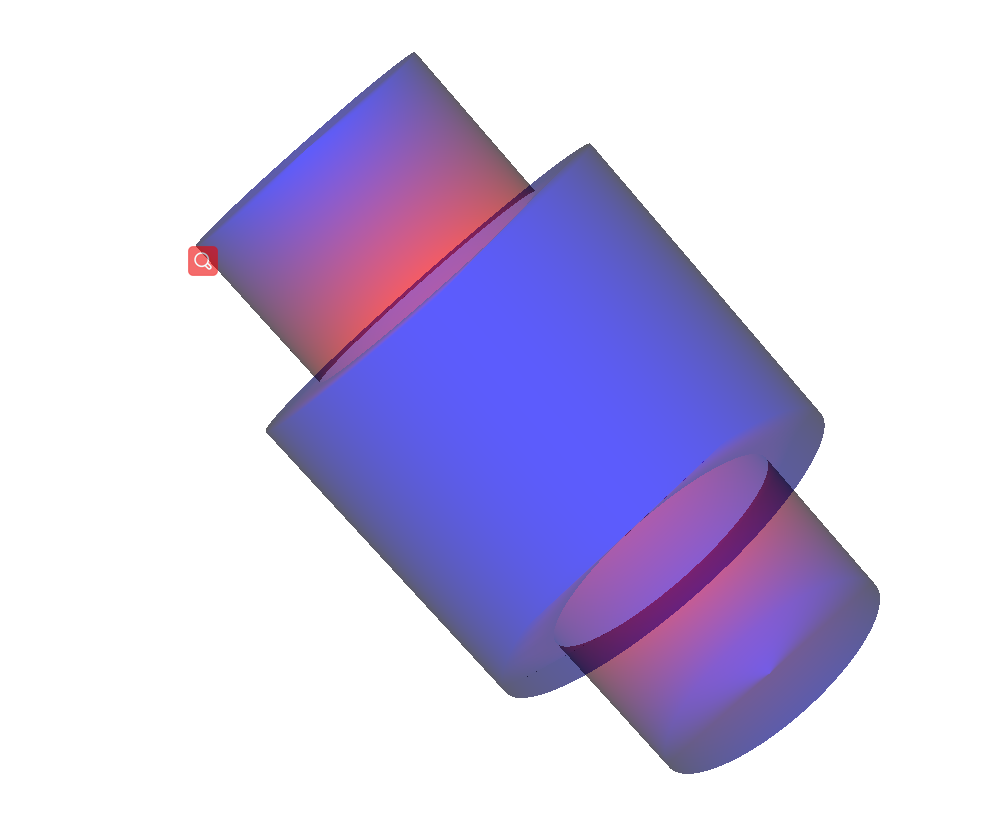
---

<div class="post-metadata">

### Author: ![KeyboardMan](https://discourse.vtk.org/user_avatar/discourse.vtk.org/keyboardman/32/968_2.png) [@KeyboardMan](https://discourse.vtk.org/u/KeyboardMan)
#### Post date: [October 9, 2019, 7:27am UTC](https://discourse.vtk.org/t/what-s-the-problem-somebody-help-me/1890/2 "2019-10-09T07:27:10Z")

</div>

- I changed the code. Get rid of mistakes. \* But there’s no way to change the color

auto cylinder = vtkSmartPointer::New();  
cylinder-\>SetCenter(0,0,0);  
cylinder-\>SetHeight(5);  
cylinder-\>SetRadius(3);  
cylinder-\>SetResolution(100);  
cylinder-\>Update();

```
auto cylinder1 = vtkSmartPointer<vtkCylinderSource>::New();
cylinder1->SetCenter(0,0,0);
cylinder1->SetHeight(10);
cylinder1->SetRadius(2);
cylinder1->SetResolution(100);
cylinder1->Update();

auto triang1 = vtkSmartPointer<vtkTriangleFilter>::New();
triang1->SetInputData(cylinder->GetOutput());
triang1->Update();
auto triang2 = vtkSmartPointer<vtkTriangleFilter>::New();
triang2->SetInputData(cylinder1->GetOutput());
triang2->Update();

auto booleanOperation = vtkSmartPointer<vtkBooleanOperationPolyDataFilter>::New();
booleanOperation->SetOperationToUnion();
booleanOperation->SetInputData(0,triang1->GetOutput());
booleanOperation->SetInputData(1,triang2->GetOutput());
booleanOperation->Update();

auto appendMapper = vtkSmartPointer<vtkPolyDataMapper>::New();
appendMapper->SetInputData(booleanOperation->GetOutput());

auto actor = vtkSmartPointer<vtkActor>::New();
actor->SetMapper(appendMapper);
actor->GetProperty()->SetOpacity(0.4);

auto renderer = vtkSmartPointer<vtkRenderer>::New();
renderer->AddActor(actor);
renderer->SetBackground(255,255,255);

auto window = vtkSmartPointer<vtkGenericOpenGLRenderWindow>::New();
window->AddRenderer(renderer);

```

 ![QQ%E6%88%AA%E5%9B%BE20191009152113](https://discourse.vtk.org/uploads/default/original/1X/c80adeaa61a7e726c83e7af4748d1c20ddc7e849.png)

---

<div class="post-metadata">

### Author: ![marcomusy](https://discourse.vtk.org/user_avatar/discourse.vtk.org/marcomusy/32/95_2.png) [@marcomusy](https://discourse.vtk.org/u/marcomusy)
#### Post date: [October 9, 2019, 11:22am UTC](https://discourse.vtk.org/t/what-s-the-problem-somebody-help-me/1890/3 "2019-10-09T11:22:15Z")

</div>

I think you need to add  
`appendMapper->ScalarVisibilityOff();`

---

<div class="post-metadata">

### Author: ![KeyboardMan](https://discourse.vtk.org/user_avatar/discourse.vtk.org/keyboardman/32/968_2.png) [@KeyboardMan](https://discourse.vtk.org/u/KeyboardMan)
#### Post date: [October 9, 2019, 11:50am UTC](https://discourse.vtk.org/t/what-s-the-problem-somebody-help-me/1890/4 "2019-10-09T11:50:23Z")

</div>

Thanks

---

<div class="post-metadata">

### Author: ![KeyboardMan](https://discourse.vtk.org/user_avatar/discourse.vtk.org/keyboardman/32/968_2.png) [@KeyboardMan](https://discourse.vtk.org/u/KeyboardMan)
#### Post date: [October 9, 2019, 12:13pm UTC](https://discourse.vtk.org/t/what-s-the-problem-somebody-help-me/1890/5 "2019-10-09T12:13:22Z")

</div>

How to set different colors for cylinder1 and clinder2，After the merger。

---

<div class="post-metadata">

### Author: ![marcomusy](https://discourse.vtk.org/user_avatar/discourse.vtk.org/marcomusy/32/95_2.png) [@marcomusy](https://discourse.vtk.org/u/marcomusy)
#### Post date: [October 9, 2019, 7:32pm UTC](https://discourse.vtk.org/t/what-s-the-problem-somebody-help-me/1890/6 "2019-10-09T19:32:49Z")

</div>

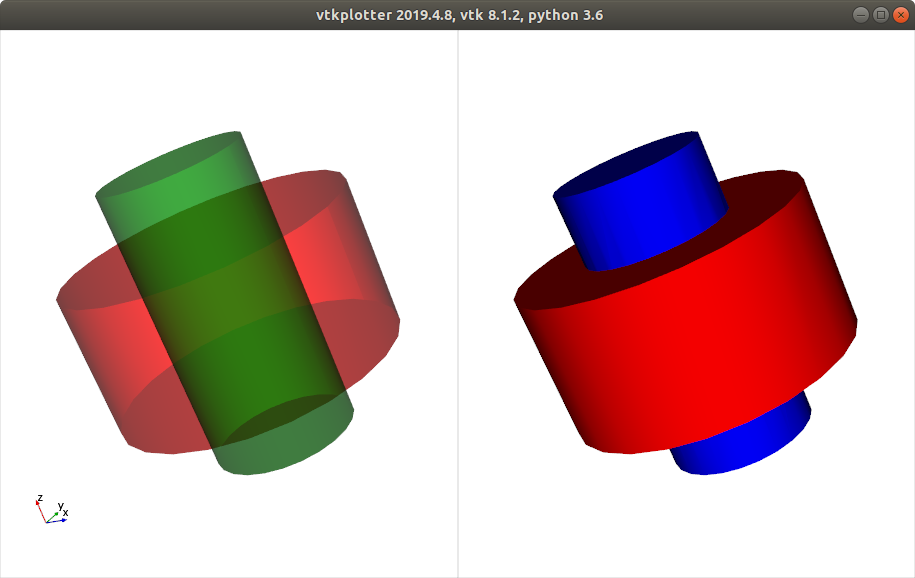
you can use  
`polydata->GetPointData()->SetActiveScalars('PointSource');`

i tested it in python and it does the job:

```auto
from vtkplotter import show, booleanOperation, Cylinder

s1 = Cylinder(r=1.0, height=1, c="r", alpha=0.5).triangle()
s2 = Cylinder(r=0.5, height=2, c="g", alpha=0.5).triangle()

bol = booleanOperation(s1, "+", s2)
bol.computeNormals().scalars('PointSource')

#bol.polydata().GetPointData().SetActiveScalars('PointSource')

show([(s1,s2), bol], N=2, bg='white')

```
 ![Screenshot%20from%202019-10-09%2021-29-06](https://discourse.vtk.org/uploads/default/original/1X/8412f729c7efd1b6a6b44b935307b1467e27b2d8.png)

---

<div class="post-metadata">

### Author: ![KeyboardMan](https://discourse.vtk.org/user_avatar/discourse.vtk.org/keyboardman/32/968_2.png) [@KeyboardMan](https://discourse.vtk.org/u/KeyboardMan)
#### Post date: [October 10, 2019, 2:37am UTC](https://discourse.vtk.org/t/what-s-the-problem-somebody-help-me/1890/7 "2019-10-10T02:37:37Z")

</div>

> [@marcomusy](#):
>
> SetActiveScalars

- Can I only set different colors through scalar data?I want to use actor.

---

<div class="post-metadata">

### Author: ![marcomusy](https://discourse.vtk.org/user_avatar/discourse.vtk.org/marcomusy/32/95_2.png) [@marcomusy](https://discourse.vtk.org/u/marcomusy)
#### Post date: [October 10, 2019, 12:28pm UTC](https://discourse.vtk.org/t/what-s-the-problem-somebody-help-me/1890/8 "2019-10-10T12:28:03Z")

</div>

yes - I would try to set a `vtkLookupTable`.

---

<div class="post-metadata">

### Author: ![KeyboardMan](https://discourse.vtk.org/user_avatar/discourse.vtk.org/keyboardman/32/968_2.png) [@KeyboardMan](https://discourse.vtk.org/u/KeyboardMan)
#### Post date: [October 10, 2019, 12:30pm UTC](https://discourse.vtk.org/t/what-s-the-problem-somebody-help-me/1890/9 "2019-10-10T12:30:06Z")

</div>

Ok, thank you very much
