# Where is the vtkContextView header file?
**URL:** https://discourse.vtk.org/t/where-is-the-vtkcontextview-header-file/977
**Category:** Support
**Created:** [May 16, 2019, 7:00am UTC](https://discourse.vtk.org/t/where-is-the-vtkcontextview-header-file/977 "2019-05-16T07:00:26Z")
**Posts on this page:** 3
**Page:** 1
### Author:  [@Kim\_William](https://discourse.vtk.org/u/Kim_William)
#### Post date: [May 16, 2019, 7:00am UTC](https://discourse.vtk.org/t/where-is-the-vtkcontextview-header-file/977/1 "2019-05-16T07:00:26Z")
Hi all.
I have a question about vtkContextView.
- environment
SDK: VTK 8.9
IDE: Visual Studio 2015
OS: Windows 7 x64
I want to run the Line plot sample code.
But the compiler can’t find vtkContextView header file.
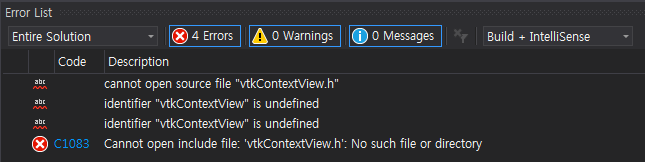
I think my generated library files(include, bin, lib) via CMake has no problem, because of other sample code work well.
GitLab link: [https://gitlab.kitware.com/vtk/vtk](https://gitlab.kitware.com/vtk/vtk)
Could you please help me?
Thank you 🙂
---
### Author:  [@danlipsa](https://discourse.vtk.org/u/danlipsa)
#### Post date: [May 16, 2019, 1:12pm UTC](https://discourse.vtk.org/t/where-is-the-vtkcontextview-header-file/977/2 "2019-05-16T13:12:58Z")
Hi Kim,
The header is in:
Views/Context2D
Also make sure you enable ViewsContext2D module when you compile VTK.
---
### Author:  [@Kim\_William](https://discourse.vtk.org/u/Kim_William)
#### Post date: [May 17, 2019, 12:38am UTC](https://discourse.vtk.org/t/where-is-the-vtkcontextview-header-file/977/3 "2019-05-17T00:38:18Z")
Hi Dan!
Thank you for your help.
I can make it!
Thank you 🙂