# Why are the cells with reversed normal always black even the Backface property got set?

**URL:** https://discourse.vtk.org/t/why-are-the-cells-with-reversed-normal-always-black-even-the-backface-property-got-set/11003
**Category:** Support
**Created:** [March 18, 2023, 4:50am UTC](https://discourse.vtk.org/t/why-are-the-cells-with-reversed-normal-always-black-even-the-backface-property-got-set/11003 "2023-03-18T04:50:18Z")
**Posts on this page:** 3
**Page:** 1

<div class="post-metadata">

### Author: ![AlexLuya](https://discourse.vtk.org/user_avatar/discourse.vtk.org/alexluya/32/4036_2.png) [@AlexLuya](https://discourse.vtk.org/u/AlexLuya)
#### Post date: [March 18, 2023, 4:50am UTC](https://discourse.vtk.org/t/why-are-the-cells-with-reversed-normal-always-black-even-the-backface-property-got-set/11003/1 "2023-03-18T04:50:18Z")

</div>

Hello,I need to set the one face of the cell with reversed normal blue,and the another face to red.Test code like this:

```auto
#include <vtkVersion.h>
#include <vtkNew.h>

#include <vtkPolyDataMapper.h>
#include <vtkProperty.h>
#include <vtkPolyData.h>
#include <vtkRenderer.h>
#include <vtkRenderWindow.h>
#include <vtkRenderWindowInteractor.h>
#include <vtkSphereSource.h>

int main(int argc, char *argv[])
{
	vtkNew<vtkSphereSource> source;
	source->SetPhiResolution(10);
	source->SetThetaResolution(10);
	source->Update();

	vtkNew<vtkPolyDataMapper> mapper;
	mapper->SetInputConnection(source->GetOutputPort());
	mapper->Update();

	vtkNew<vtkActor> actor;
	actor->SetMapper(mapper);

	vtkNew<vtkRenderer> ren;
	vtkNew<vtkRenderWindow> renWin;
	renWin->AddRenderer(ren);
	vtkNew<vtkRenderWindowInteractor> iren;
	iren->SetRenderWindow(renWin);

	ren->AddActor(actor);
	ren->SetBackground(.2, .3, .4);

	for (int id = 0; id < 100; id++)
	{
		dynamic_cast<vtkPolyData*>(actor->GetMapper()->GetInput())->ReverseCell(id);
	}

	actor->GetProperty()->EdgeVisibilityOn();
	actor->GetProperty()->SetColor(0, 0, 1);
	actor->GetProperty()->SetEdgeColor(1, 1, 1);

	vtkProperty *bp = vtkProperty::New();
	bp->SetColor(0, 1, 0);
	actor->SetBackfaceProperty(bp);

	renWin->Render();
	iren->Start();

	return EXIT_SUCCESS;
}

```

But two faces of this kind of cell are always show black like this,
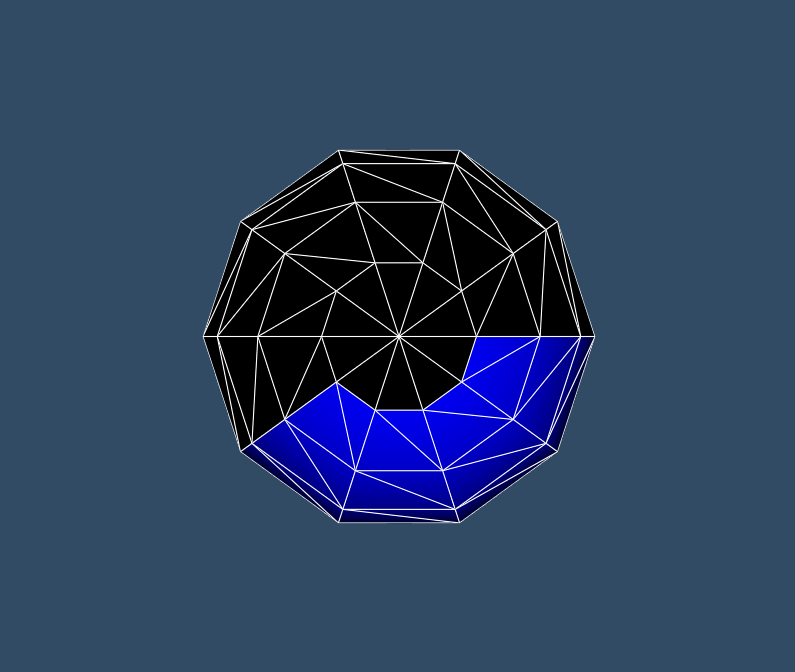
 ![Workspace 1_1596](https://discourse.vtk.org/uploads/default/original/2X/b/bcdb48165c9ab21bf1597f1f167460f680c412b1.png)

even the back face property got set.

So,how to set the different colors for each face of the cell with reversed normal?

---

<div class="post-metadata">

### Author: ![lassoan](https://discourse.vtk.org/user_avatar/discourse.vtk.org/lassoan/32/50_2.png) [@lassoan](https://discourse.vtk.org/u/lassoan)
#### Post date: [March 18, 2023, 7:25pm UTC](https://discourse.vtk.org/t/why-are-the-cells-with-reversed-normal-always-black-even-the-backface-property-got-set/11003/2 "2023-03-18T19:25:17Z")

</div>

They are black because the polygon winding and surface normal direction are inconsistent. If you want colored cells then a better way to do it is by adding a scalar array to the celldata.

---

<div class="post-metadata">

### Author: ![Paulo\_Carvalho](https://discourse.vtk.org/user_avatar/discourse.vtk.org/paulo_carvalho/32/370_2.png) [@Paulo\_Carvalho](https://discourse.vtk.org/u/Paulo_Carvalho)
#### Post date: [March 19, 2023, 2:36pm UTC](https://discourse.vtk.org/t/why-are-the-cells-with-reversed-normal-always-black-even-the-backface-property-got-set/11003/3 "2023-03-19T14:36:06Z")

</div>

Hello,

Please, take a look at this: [Is it possible to set the different color for front/back face of a cell?](https://discourse.vtk.org/t/is-it-possible-to-set-the-different-color-for-front-back-face-of-a-cell/10947)

take care,

PC
