# Why does Nvidia graphics show lower usage and performance than Intel graphics?
**URL:** https://discourse.vtk.org/t/why-does-nvidia-graphics-show-lower-usage-and-performance-than-intel-graphics/14913
**Category:** Support
**Tags:** pyvista, python
**Created:** [November 25, 2024, 1:41am UTC](https://discourse.vtk.org/t/why-does-nvidia-graphics-show-lower-usage-and-performance-than-intel-graphics/14913 "2024-11-25T01:41:57Z")
**Posts on this page:** 2
**Page:** 1
### Author:  [@PHM](https://discourse.vtk.org/u/PHM)
#### Post date: [November 25, 2024, 1:41am UTC](https://discourse.vtk.org/t/why-does-nvidia-graphics-show-lower-usage-and-performance-than-intel-graphics/14913/1 "2024-11-25T01:41:57Z")
Hi I’m a beginner dealing with VTK for the first time.
I was doing a simple GPU test with the Python code below.
> import time
> import numpy as np
> import pyvista as pv
>
> #Size of Point Cloud
> height, width, dim = 480, 640, 3
> p = np.random.rand(height, width, dim)
>
> points = np.stack((p[…, 0], p[…, 1], p[…, 2]), axis=-1).reshape(-1, 3)
> pcd = pv.PolyData(points)
> plotter = pv.Plotter()
> plotter.add\_points(pcd, color=[0.3, 0.3, 0.3], point\_size=2)
> plotter.show(interactive\_update=True, auto\_close=False)
>
> fps\_cnt, fps\_time= 0, time.time()
> while True:
>
> > p = np.random.rand(height, width, dim)
> > points = np.stack((p[…, 0], p[…, 1], p[…, 2]), axis=-1).reshape(-1, 3)
> > pcd.points = points
> > plotter.update()
> > plotter.render()
>
> > fps\_cnt += 1
> > if time.time() - fps\_time \>= 1.0:
> >
> > > print(‘[FPS]’, fps\_cnt)
> > > fps\_cnt, fps\_time = 0, time.time()
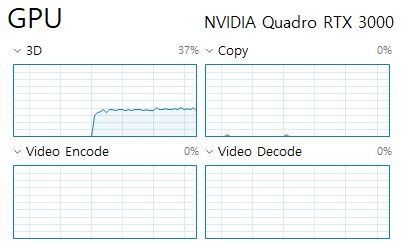
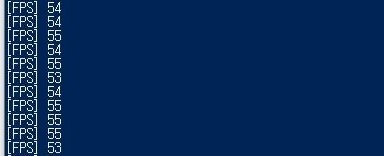
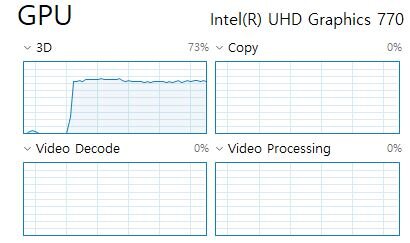
However, as shown in the picture, the test results on Nvidia GPU show lower performance and less usage than Intel GPU.
[](https://ifh.cc/v-h8XXa7)
[](https://ifh.cc/v-09f9nw)
(Nvidia GPU test results)
[](https://ifh.cc/v-VTO6Wv)
[](https://ifh.cc/v-CX8vGa)
(Intel GPU test results)
The same goes for Linux environment and I’ve been struggling with this over the weekend, so now I really want to know why and how to solve it.
(The Nvidia graphics driver version has 553.35 installed and cuda toolkit 11.8 installed.)
---
### Author:  [@dgobbi](https://discourse.vtk.org/u/dgobbi)
#### Post date: [November 26, 2024, 7:11pm UTC](https://discourse.vtk.org/t/why-does-nvidia-graphics-show-lower-usage-and-performance-than-intel-graphics/14913/2 "2024-11-26T19:11:39Z")
If the GPU is underused, then maybe a driver setting is limiting the frame rate? Try going into the nvidia driver settings, and turn off the “Vertical Sync” option.