# Wireframe not visible behind transparent surfaces
**URL:** https://discourse.vtk.org/t/wireframe-not-visible-behind-transparent-surfaces/6671
**Category:** Web
**Created:** [September 22, 2021, 12:08pm UTC](https://discourse.vtk.org/t/wireframe-not-visible-behind-transparent-surfaces/6671 "2021-09-22T12:08:47Z")
**Posts on this page:** 3
**Page:** 1
### Author:  [@j-fu](https://discourse.vtk.org/u/j-fu)
#### Post date: [September 22, 2021, 12:08pm UTC](https://discourse.vtk.org/t/wireframe-not-visible-behind-transparent-surfaces/6671/1 "2021-09-22T12:08:47Z")
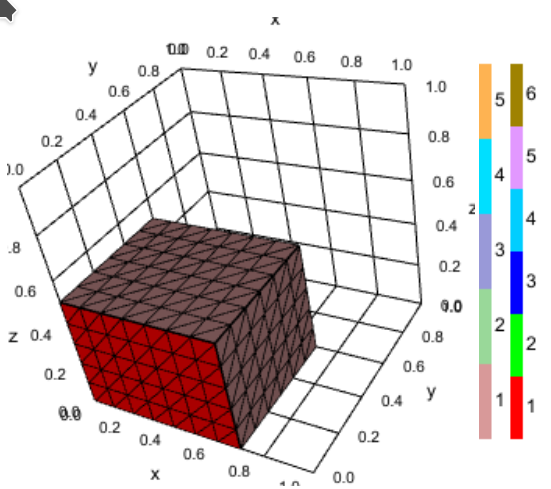
Hi, I am trying to incorporate vtk.js into Julia Pluto notebooks, see [https://github.com/j-fu/PlutoVista.jl](https://github.com/j-fu/PlutoVista.jl). I want to plot cuts of 3d meshes (and later on function isosurfaces), and in addition, a transparent outline of the mesh boundary. I am plotting the cuts twice: as surface, and as wireframe. If I switch on the outline plot, the wireframe becomes invisible:
Plot without outline:
Plot with outline:
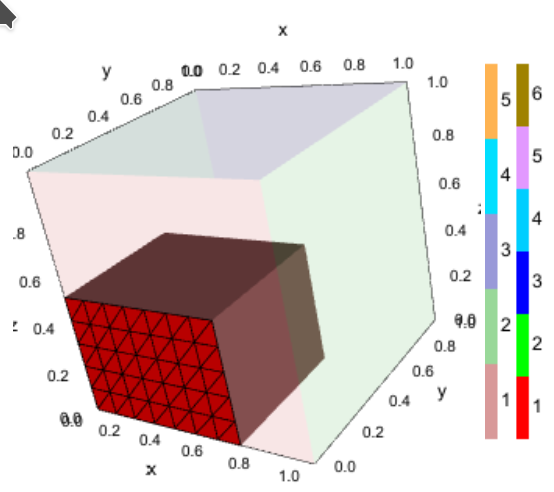
I define the outline dataset via
```auto
var ocolorData = vtk.Common.Core.vtkDataArray.newInstance({
name: 'Colors',
values: ocolors,
numberOfComponents: 4,
});
...
win.odataset = vtk.Common.DataModel.vtkPolyData.newInstance();
win.oactor = vtk.Rendering.Core.vtkActor.newInstance();
var omapper = vtk.Rendering.Core.vtkMapper.newInstance();
omapper.setInputData(win.odataset);
omapper.setColorModeToDirectScalars()
win.oactor.setMapper(omapper);
win.renderer.addActor(win.oactor);
win.odataset.getPoints().setData(opoints, 3);
win.odataset.getPolys().setData(opolys,1);
win.odataset.getCellData().setActiveScalars('Colors');
win.odataset.getCellData().setScalars(ocolorData);
```
and the wireframe dataset via
```auto
win.dataset = vtk.Common.DataModel.vtkPolyData.newInstance();
win.actor = vtk.Rendering.Core.vtkActor.newInstance();
var mapper = vtk.Rendering.Core.vtkMapper.newInstance();
mapper.setColorModeToDefault()
win.actor.getProperty().setRepresentation(1);
win.actor.getProperty().setColor(0, 0, 0);
win.actor.getProperty().setLineWidth(1.5);
mapper.setInputData(win.dataset);
win.actor.setMapper(mapper);
win.renderer.addActor(win.actor);
win.dataset.getPoints().setData(points, 3);
win.dataset.getPolys().setData(polys,1);
win.dataset.modified()
```
Any hints ?
(Anyway: thanks for the great work!)
---
### Author:  [@ken-martin](https://discourse.vtk.org/u/ken-martin)
#### Post date: [September 22, 2021, 3:07pm UTC](https://discourse.vtk.org/t/wireframe-not-visible-behind-transparent-surfaces/6671/2 "2021-09-22T15:07:11Z")
Can you try actor.setForceTranslucent(true); on the translucent parts and see if that fixes it?
---
### Author:  [@j-fu](https://discourse.vtk.org/u/j-fu)
#### Post date: [September 22, 2021, 3:18pm UTC](https://discourse.vtk.org/t/wireframe-not-visible-behind-transparent-surfaces/6671/3 "2021-09-22T15:18:25Z")
Yes, this fixes it! Awesome!
EDIT: here is the screenshot: