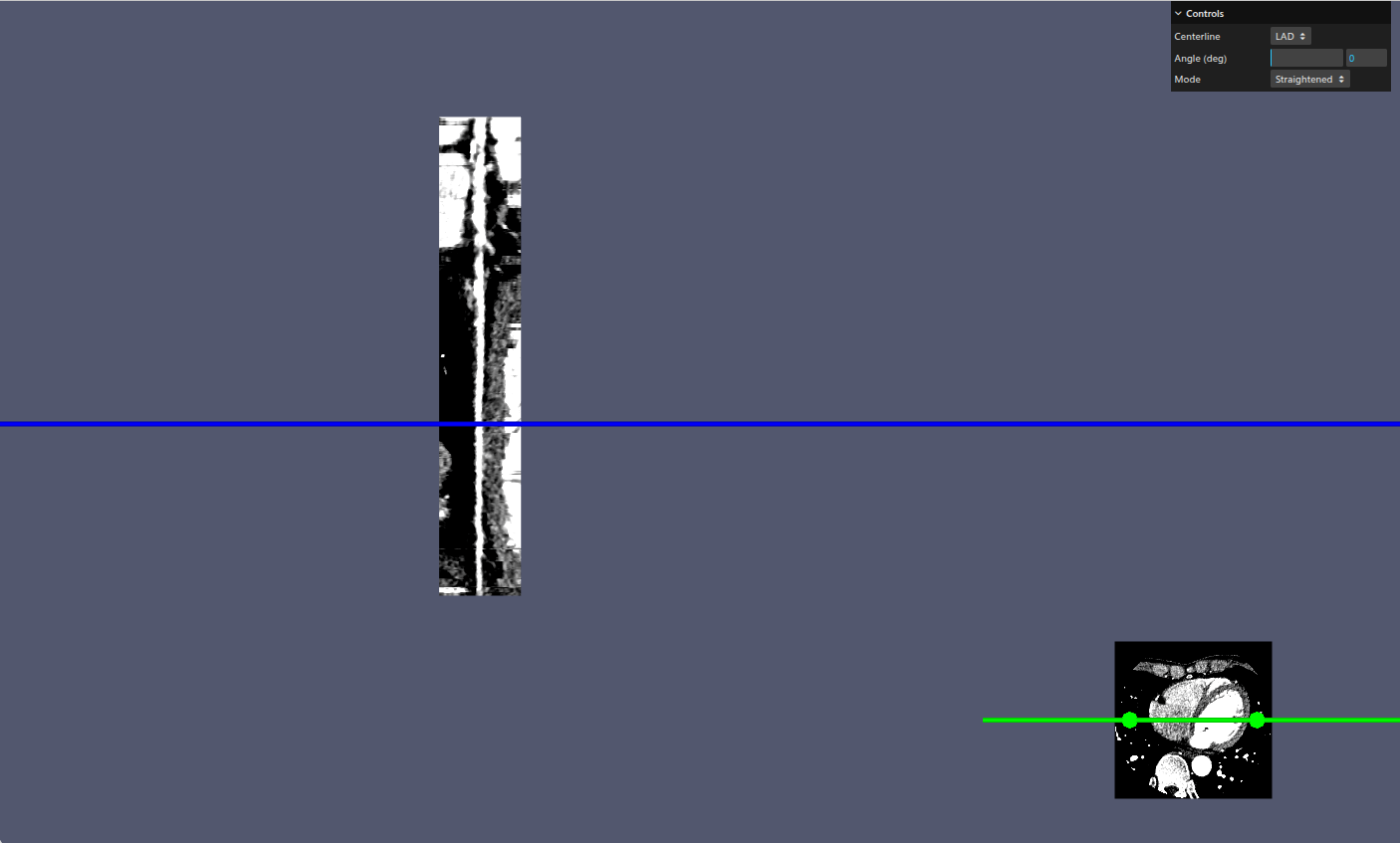
Hello, I’m trying to reproduce the example shown in ImageCPRMapper. I have provided my own volume and centerline coordinates like the following JSON:
{
    "position":
    [
        14.796443176269523,
        -15.353499603271498,
        1761.8749511718745,
        14.962321589958357,
        -15.291916255417995,
        1761.9681812267881,
        15.128200003647192,
        -15.230332907564492,
        1762.0614112817022,
        15.294078417336028,
        -15.168749559710989,
        1762.154641336616,
...
I then compute the 4x4 orientation matrix from the orthonormal basis vectors (normal, tangent and bitangent) using the following functions for each point:
const computeNormal = (centerlinePoints, pointIdx, numPoints) => {
    let normal = vec3.create();
    if (pointIdx === 0) {
      vec3.subtract(normal, centerlinePoints[1], centerlinePoints[0]);
    } else if (pointIdx === numPoints - 1) {
      vec3.subtract(
        normal,
        centerlinePoints[numPoints - 1],
        centerlinePoints[numPoints - 2],
      );
    } else {
      vec3.subtract(
        normal,
        centerlinePoints[pointIdx + 1],
        centerlinePoints[pointIdx],
      );
    }
    vec3.normalize(normal, normal);

    return normal;
  };

  const computeTangent = (normal, bitangent) => {
    const tangent = vec3.create();
    vec3.cross(tangent, bitangent, normal);
    vec3.normalize(tangent, tangent);

    return tangent;
  };

  const computeBitangent = (normal) => {
    // Choose an up vector that is not nearly parallel to normal
    let up = vec3.fromValues(0, 1, 0);
    if (Math.abs(vec3.dot(normal, up)) > 0.99) {
      up = vec3.fromValues(1, 0, 0);
    }
    let bitangent = vec3.create();
    vec3.cross(bitangent, normal, up);
    vec3.normalize(bitangent, bitangent);

    return bitangent;
  };
Then added to the centerline JSON the flattened orientation array using
const computeOrientationsFromPoints = (centerlinePointsFlat) => {
    // Convert input of flattened centerline points into array of vec3 points
    const vecArr = [];
    const numPoints = centerlinePointsFlat.length / 3;
    console.debug("Got number of centerline points", numPoints);
    for (let i = 0; i < centerlinePointsFlat.length; i += 3) {
      const p = vec3.fromValues(
        centerlinePointsFlat[i],
        centerlinePointsFlat[i + 1],
        centerlinePointsFlat[i + 2],
      );
      vecArr.push(p);
    }
    console.debug(
      `Constructed vec3 array of centerline points with length ${vecArr.length}`,
    );
    // Build the 4x4 orientation matrix as flattened array for each centerline point
    const orientations = new Float32Array(numPoints * 16);
    for (let i = 0; i < numPoints; i++) {
      const normal = computeNormal(vecArr, i, numPoints);
      const bitangent = computeBitangent(normal);
      const tangent = computeTangent(normal, bitangent);
      const offset = i * 16;
      const position = vecArr[i];

      // tangent column
      orientations[offset] = tangent[0];
      orientations[offset + 1] = tangent[1];
      orientations[offset + 2] = tangent[2];
      orientations[offset + 3] = 0;

      // bitangent column
      orientations[offset + 4] = bitangent[0];
      orientations[offset + 5] = bitangent[1];
      orientations[offset + 6] = bitangent[2];
      orientations[offset + 7] = 0;

      // normal column
      orientations[offset + 8] = normal[0];
      orientations[offset + 9] = normal[1];
      orientations[offset + 10] = normal[2];
      orientations[offset + 11] = 0;

      // translation column
      orientations[offset + 12] = position[0];
      orientations[offset + 13] = position[1];
      orientations[offset + 14] = position[2];
      orientations[offset + 15] = 1;
    }

    return orientations;
  };
With this I’m able to obtain the correct straightened and stretched centerlines, however, the cross render and cursor widgets don’t seem to work, see here.
Commenting out the updateDistanceAndDirection() function restores the cross render view but I’m not sure which parts do I need to update to get it to work right, any advice would be much appreciated, thank you!