Possible VTK 9.6.0rc2 regression with ghost cell rendering

ugrid.vtu (4.4 KB)

I have attached an UnstructuredGrid mesh file with a 'vtkGhostType' cell array. The top “row” of cells in the dataset are masked.

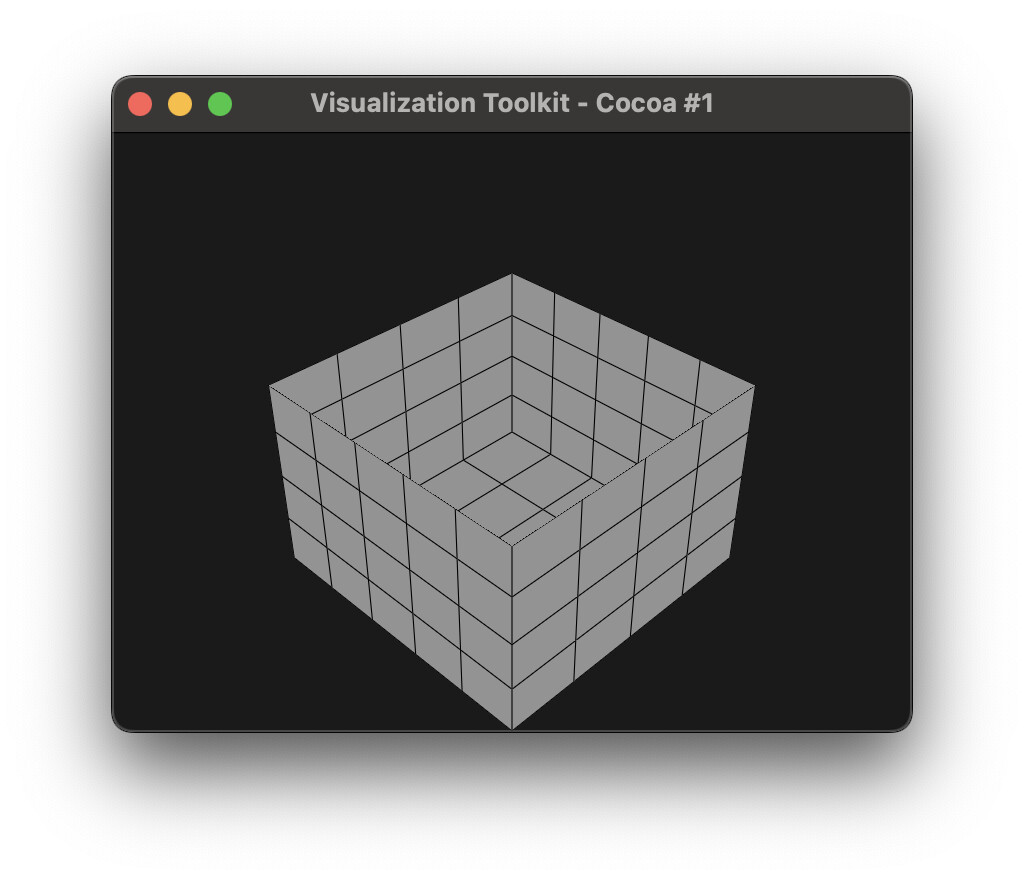
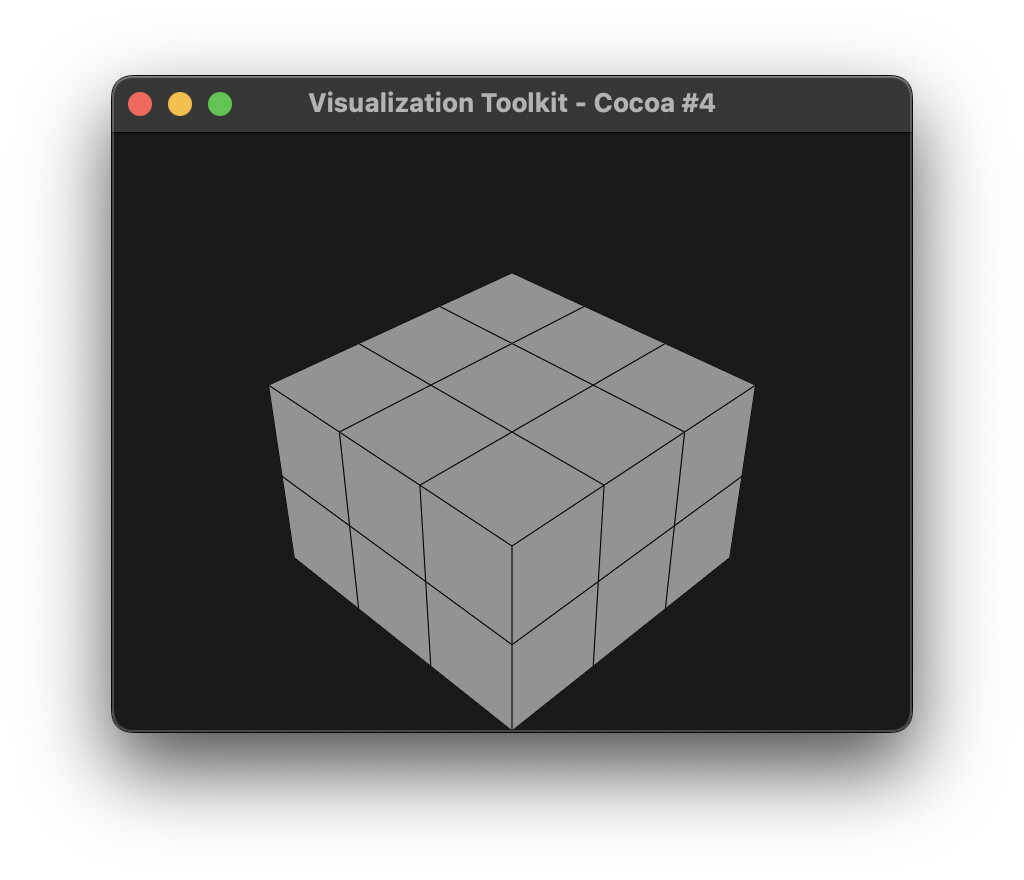
Using the code below with vtk==9.5.20250802.dev0, we get :

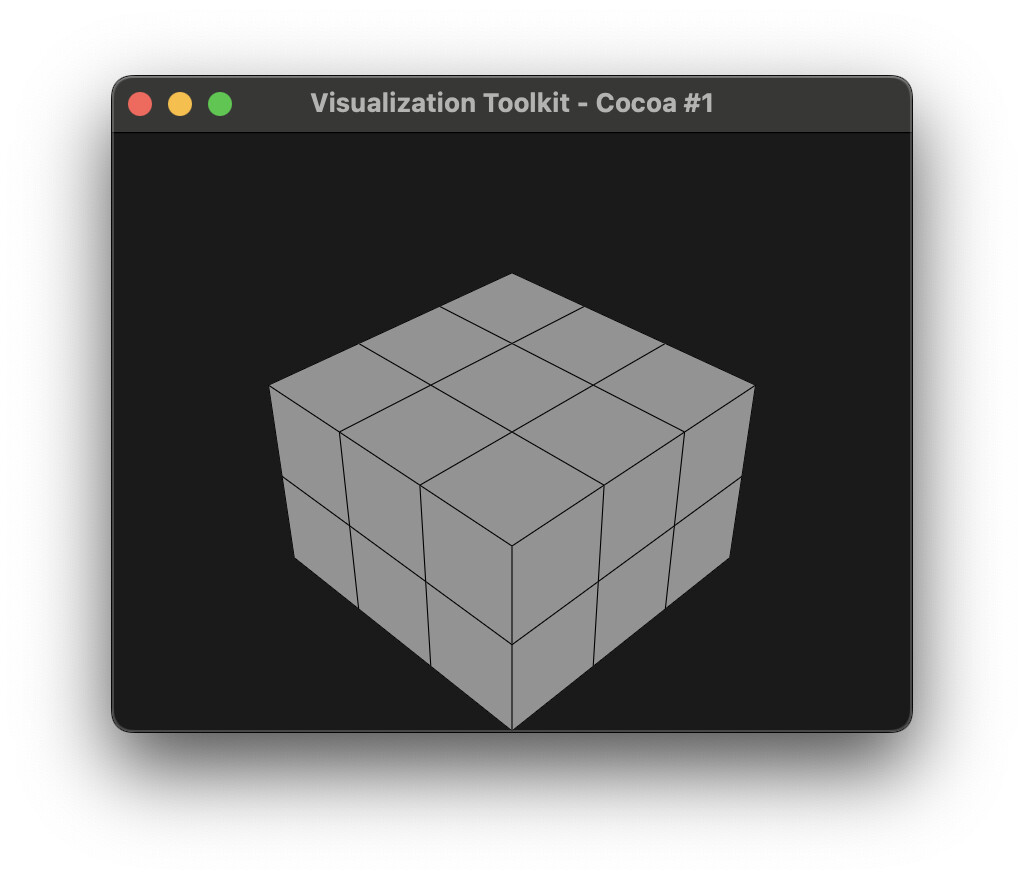
But with vtk==9.5.20250809.dev0, we get this instead, where the interface between the ghost cells and the rest of grid is no longer present, and we can see “inside” the mesh.

I tried looking at the diff Kitware/VTK@6ac70ce…5cda859 between the Aug 2 timestamp Kitware/VTK@6ac70ce and the aug 9 timestamp Kitware/VTK@5cda859 but nothing is jumping out in terms of changes to ghost cells affecting unstructured grids… Haven’t yet bisected to a specific commit.

Is this change intentional? Or is this a bug/regression with VTK 9.6?

import vtk

# Read VTU file
reader = vtk.vtkXMLUnstructuredGridReader()
reader.SetFileName('ugrid.vtu')
reader.Update()
data = reader.GetOutput()

# Mapper
mapper = vtk.vtkDataSetMapper()
mapper.SetInputData(data)

# Actor
actor = vtk.vtkActor()
actor.SetMapper(mapper)

# Make grid white with black lines
prop = actor.GetProperty()
prop.EdgeVisibilityOn()
prop.SetEdgeColor(0.0, 0.0, 0.0)
prop.SetLineWidth(1.0)
prop.SetColor(1.0, 1.0, 1.0)
mapper.SetScalarVisibility(False)

# Renderer
renderer = vtk.vtkRenderer()
renderer.AddActor(actor)
renderer.SetBackground(0.1, 0.1, 0.1)

# Camera
camera = renderer.GetActiveCamera()
camera.SetPosition(1, 1, 1)
camera.SetViewUp(0, 0, 1)
renderer.ResetCamera()

# Render window
render_window = vtk.vtkRenderWindow()
render_window.AddRenderer(renderer)
render_window.SetSize(800, 600)

# Interactor
interactor = vtk.vtkRenderWindowInteractor()
interactor.SetRenderWindow(render_window)

# Start
render_window.Render()
interactor.Start()

Furthermore, this particular mesh can be converted to ExplicitStructuredGrid.

If we insert this code after reading the file:

alg = vtk.vtkUnstructuredGridToExplicitStructuredGrid()
alg.SetInputData(data)
alg.SetInputArrayToProcess(0, 0, 0, 1, 'BLOCK_I')
alg.SetInputArrayToProcess(1, 0, 0, 1, 'BLOCK_J')
alg.SetInputArrayToProcess(2, 0, 0, 1, 'BLOCK_K')
alg.Update()
data = alg.GetOutput()

And re-run the full example for both vtk versions mentioned above, we get the first image both times. This indicates that ghost cell rendering is now inconsistent across mesh types, and to me suggests that there is indeed a regression with how ghost cells are rendered for UnstructuredGrid types.

1 Like

Thanks to @user27182’s hints (2 Aug - 9 Aug) I was able to bisect with:

git bisect start
git bisect good 6ac70ce2dc4520624d3bc398097aa8e264302368
git bisect bad 5cda859050d00a943eb1007d995fc6fdf37eec24

Offending commit is 29253f532082f2804ce39afe3bcd8b45794c2714.

https://gitlab.kitware.com/vtk/vtk/-/merge_requests/12224

@spyridon97 @pieper

This happens because vtkGeometryFilter has RemoveGhostInterfaces on by default. And the rational behind it is that you don’t wanna see the interface cells by default unless you are doing something special and you need them, e.g. the ghost cell generator needs them, or you want to do some post processing on them, and then remove the ghost cells.

TLDR: we know it’s different, the question is, why is it a problem? IMHO it’s more correct

1 Like

Indeed it’s fine if vtkGeometryFilter filter enables this by default, because users are free to configure the filter themselves and use it as they need. It may be “more correct” as you say for a default case, but there are two issues:

  1. its use in the rendering pipeline does not appear to be configurable by users
  2. it is applied inconsistently, since the ghost cell interface is removed for rendering vtkUnstructuredGrid when there are hidden cells, but not for vtkExplicitUnstructuredGrid ( and likely vtkImageData and vtkStructuredGrid too based on downstream testing)

For item (1), it seems this breaking change is acknowledged by @mwestphal here: https://gitlab.kitware.com/vtk/vtk/-/merge_requests/12224#note_1695253, so I guess this is already mentioned in the release notes, and is fine. But the lack of consistency with item (2) still seems like a bug to me.

For downstream users, I guess the workaround or “fix” is to call vtkGeometryFilter manually before rendering, with RemoveGhostInterfacesOff?

My comment is that note was not about behavior but about API.

Are you sure RemoveGhostInterfaces does not behave correctly for vtkimageData and the rest you mentioned? RemoveGhostInterfaces is used in both ExtractDS and ExtractStructured in vtkGeometryFilter.

Making the parameter configurable via vtkDataSetMapper API is something that can be discussed.

Making this configurable would be nice for downstream users. I can confirm that only vtkUnstructuredGrid has this “remove ghost cells interface” behavior in vtk==9.6.0rc2, here’s a reproducer:

import vtk

def render_dataset(dataset):
    # Mapper
    mapper = vtk.vtkDataSetMapper()
    mapper.SetInputData(dataset)

    # Actor
    actor = vtk.vtkActor()
    actor.SetMapper(mapper)

    # Make grid white with black lines
    prop = actor.GetProperty()
    prop.EdgeVisibilityOn()
    prop.SetEdgeColor(0.0, 0.0, 0.0)
    prop.SetLineWidth(1.0)
    prop.SetColor(1.0, 1.0, 1.0)
    mapper.SetScalarVisibility(False)

    # Renderer
    renderer = vtk.vtkRenderer()
    renderer.AddActor(actor)
    renderer.SetBackground(0.1, 0.1, 0.1)

    # Camera
    camera = renderer.GetActiveCamera()
    camera.SetPosition(1, 1, 1)
    camera.SetViewUp(0, 0, 1)
    renderer.ResetCamera()

    # Render window
    render_window = vtk.vtkRenderWindow()
    render_window.AddRenderer(renderer)
    render_window.SetSize(800, 600)

    # Interactor
    interactor = vtk.vtkRenderWindowInteractor()
    interactor.SetRenderWindow(render_window)

    # Start
    render_window.Render()
    interactor.Start()

def create_image_data():
    # Create data with 3x3x3 cells
    dataset = vtk.vtkImageData()
    dataset.SetDimensions(4, 4, 4)
    return dataset

def add_ghost_cell_data(data):
    ghost_array = vtk.vtkUnsignedCharArray()
    ghost_array.SetName(vtk.vtkDataSetAttributes.GhostArrayName())
    ghost_array.SetNumberOfTuples(data.GetNumberOfCells())

    # Bottom layer: first 18 cells are visible
    for i in range(18):
        ghost_array.SetValue(i, 0)

    # Top layer: next 9 cells are hidden
    for i in range(18, 27):
        ghost_array.SetValue(i, vtk.vtkDataSetAttributes.HIDDENCELL)

    data.GetCellData().AddArray(ghost_array)
    data.GetCellData().SetActiveScalars(vtk.vtkDataSetAttributes.GhostArrayName())

def image_data_to_structured_grid(data):
    alg = vtk.vtkImageToStructuredGrid()
    alg.SetInputData(data)
    alg.Update()
    return alg.GetOutput()

def image_data_to_unstructured_grid(data):
    alg = vtk.vtkAppendFilter()
    alg.AddInputData(data)
    alg.Update()
    return alg.GetOutput()

def image_data_to_explicit_structured_grid(data):
    ugrid = image_data_to_unstructured_grid(data)
    
    # Create BLOCK_I/J/K cell arrays
    dims = data.GetDimensions()
    ni, nj, nk = dims[0] - 1, dims[1] - 1, dims[2] - 1
    n_cells = ugrid.GetNumberOfCells()

    arr_i = vtk.vtkIntArray()
    arr_i.SetName("BLOCK_I")
    arr_i.SetNumberOfTuples(n_cells)

    arr_j = vtk.vtkIntArray()
    arr_j.SetName("BLOCK_J")
    arr_j.SetNumberOfTuples(n_cells)

    arr_k = vtk.vtkIntArray()
    arr_k.SetName("BLOCK_K")
    arr_k.SetNumberOfTuples(n_cells)

    cid = 0
    for k in range(nk):
        for j in range(nj):
            for i in range(ni):
                arr_i.SetValue(cid, i)
                arr_j.SetValue(cid, j)
                arr_k.SetValue(cid, k)
                cid += 1

    cd = ugrid.GetCellData()
    cd.AddArray(arr_i)
    cd.AddArray(arr_j)
    cd.AddArray(arr_k)
    
    # Convert to explicit grid
    alg = vtk.vtkUnstructuredGridToExplicitStructuredGrid()
    alg.SetInputData(ugrid)
    alg.SetInputArrayToProcess(0, 0, 0, 1, 'BLOCK_I')
    alg.SetInputArrayToProcess(1, 0, 0, 1, 'BLOCK_J')
    alg.SetInputArrayToProcess(2, 0, 0, 1, 'BLOCK_K')
    alg.Update()
    return alg.GetOutput()

image_data = create_image_data()
assert isinstance(image_data, vtk.vtkImageData)
add_ghost_cell_data(image_data)
render_dataset(image_data)

structured_grid = image_data_to_structured_grid(create_image_data())
assert isinstance(structured_grid, vtk.vtkStructuredGrid)
add_ghost_cell_data(structured_grid)
render_dataset(structured_grid)

unstructured_grid = image_data_to_unstructured_grid(create_image_data())
assert isinstance(unstructured_grid, vtk.vtkUnstructuredGrid)
add_ghost_cell_data(unstructured_grid)
render_dataset(unstructured_grid)

explicit_structured_grid = image_data_to_explicit_structured_grid(create_image_data())
assert isinstance(explicit_structured_grid, vtk.vtkExplicitStructuredGrid)
add_ghost_cell_data(explicit_structured_grid)
render_dataset(explicit_structured_grid)

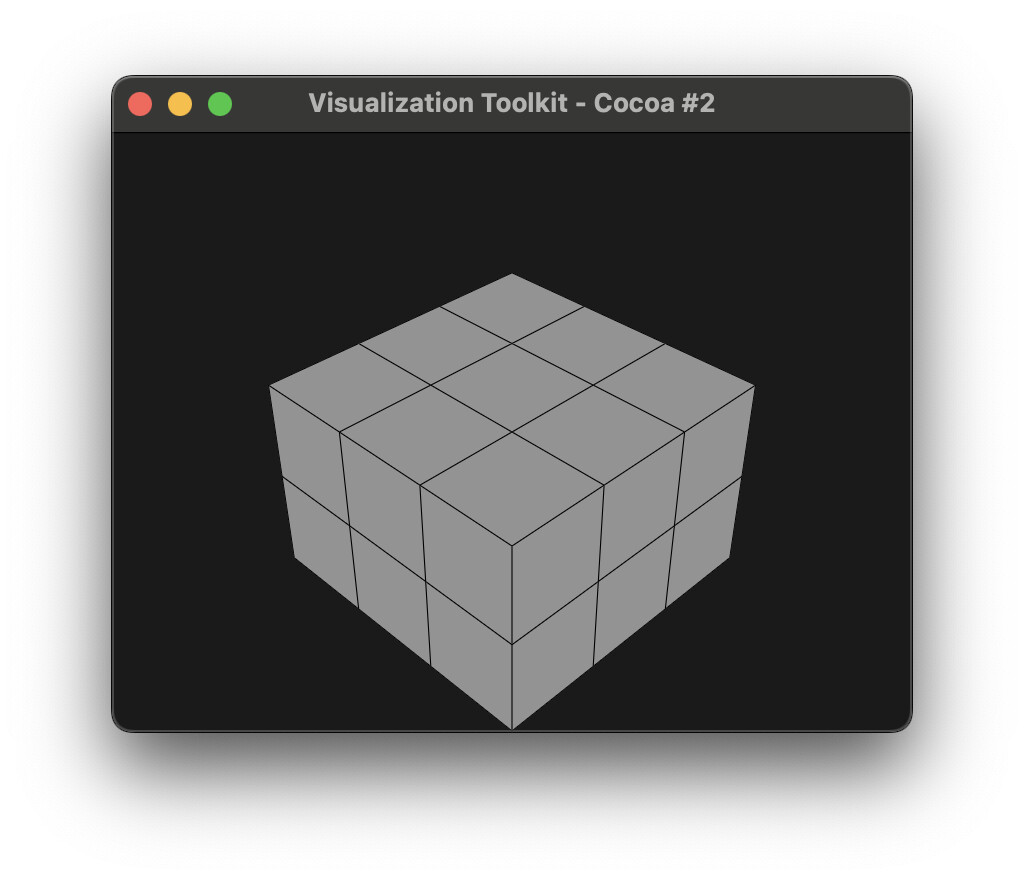
vtkImageData:

vtkStructuredGrid:

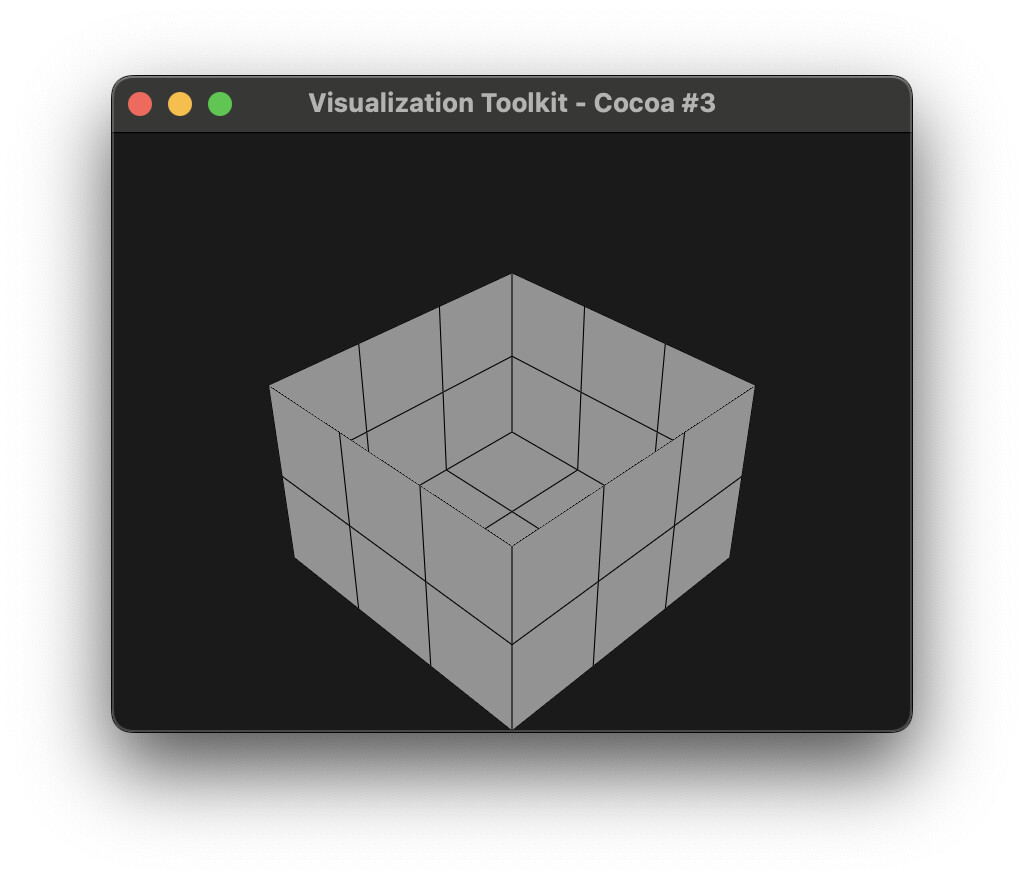
vtkUnstructuredGrid:

vtkExplicitStructuredGrid:

EDIT: Add example for vtkExplicitStructuredGrid
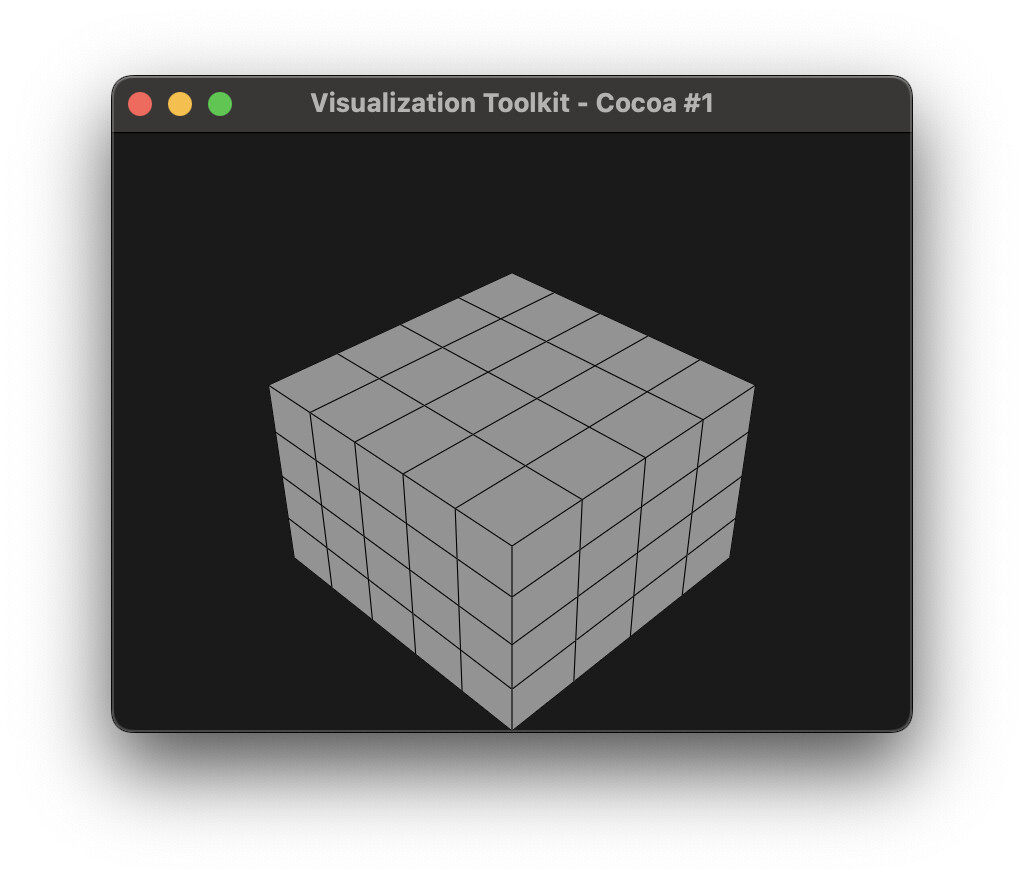
I’m fine with either behavior, but it’s the inconsistency that has me disagreeing with the current implementation. We can document this within PyVista, but I’m curious if this will be “fixed” or made consistent for this upcoming release of VTK.

I also think this change is fine if it’s applied consistently. It sounds like downstream users can already include vtkGeometryFilter explicitly in their own pipelines as a pre-rendering step to control this behavior if they wish to, so there is a workaround available.

But as it is with 9.6.0rc2, the use a of pre-rendering step with vtkGeometryFilter (and possibly with mesh type conversions) will be necessary for downstream users in order to ensure consistent output for cases where ghost cells are used/present.

Please correct me if this information is outdated or if I am mistaken, but I read this VTK blog post on ghosting and blanking:
https://www.kitware.com/ghost-and-blanking-visibility-changes/
and I think I need to clarify some terminology.

The examples given above in this discussion are using blank, or hidden cells:

vtkDataSetAttribute::HIDDENCELL specifies that this cell is not part of the model, it is only used to maintain the connectivity of the grid. This is a blank cell.

This is in contrast to ghost, or duplicate cells:

vtkDataSetAttribute::DUPLICATECELL specifies that this cell is present on multiple processors. This is a ghost cell.

And so I think the title of this discussion “regression with ghost cell rendering” may be misleading, and should perhaps be “regression with blank cell rendering” instead.

Based on these definitions, I would agree that interfaces with a proper ghost cell (i.e. DUPLICATECELL) should not be rendered by default, since we don’t want to see the interface between two blocks of a composite dataset, for example.

In contrast, the boundary between a visible cell and a blank cell (i.e. HIDDENCELL) corresponds to an actual boundary of the model, and not an artificial interface between duplicated data. It therefore seems correct to me that this interface should be rendered by default.

To me, this again suggests that there is regression with how vtkUnstructuredGrid is rendered, and all example plots in this discussion should be rendered as a “closed” surface.

So the gist of the problem is that the interfaces of hidden cells in unstructured grids should not be removed even if RemoveGhostInterfaces is requested because this should only happen for ghost cells and not hidden cells. And this is the case for all the structured dataset types, right?

So the gist of the problem is that the interfaces of hidden cells in unstructured grids should not be removed even if RemoveGhostInterfaces is requested because this should only happen for ghost cells and not hidden cells. And this is the case for all the structured dataset types, right?

Based on the description from the linked blog post, this is my understanding of the expected behavior, yes. But the term “ghost cells” appears to be overloaded, sometimes meaning only DUPLICATECELL (like the blog post), or any cell masked by the vtkGhostType array. For example, in the actual code, these methods both include HIDDENCELL cells as part of the “ghost cells” definition:

  • UnstructuredGrid::RemoveGhostCells removes HIDDENCELL, DUPLICATECELL, and REFINEDCELL:
  • vtkExtractGhostCells uses a threshold filter to extract all masked cells from the vtkGhostType array (including HIDDENCELL, DUPLICATECELL, and REFINEDCELL):

The RemoveGhostInterfaces option for vtkGeometryFilter is a bit different, and seems to suggest that any ghost cells that are not duplicate cells are always removed, even if RemoveGhostInterfaces is False.

Maybe the issue is that vtkUnstructuredGrid doesn’t explicitly support cell blanking? E.g. in the docs, we can see that vtkDataSet::HasAnyBlankCells is only implemented by:
vtkCartesianGrid, vtkExplicitStructuredGrid, and vtkStructuredGrid, and so maybe users should only expect cell blanking to work (and render correctly) with those data types?

Further complicating things, it looks like the numpy interface supports masking using ghost arrays with HIDDENCELL for any dataset, so presumably this should include vtkUnstructuredGrid?

It would be nice to get clarity from VTK devs on what’s supported by VTK and what the expected behavior should be.

  • Is cell blanking supported by vtkUnstructuredGrid or not?
  • Should users expect vtkImageData with hidden cells to render the same as a similar dataset that has type vtkUnstructuredGrid ?
  • Is the issue highlighted by this topic with vtkUnstructuredGrid rendering considered a bug or not?

For completeness, here’s an updated example that also includes vtkRectilinearGrid and generates renderings for both HIDDENCELL and DUPLICATECELL ghost cell values.

import vtk

# -----------------------------------------------------------------------------
# Rendering
# -----------------------------------------------------------------------------

def render_dataset(dataset, title):
    mapper = vtk.vtkDataSetMapper()
    mapper.SetInputData(dataset)
    mapper.SetScalarVisibility(False)

    actor = vtk.vtkActor()
    actor.SetMapper(mapper)

    prop = actor.GetProperty()
    prop.EdgeVisibilityOn()
    prop.SetEdgeColor(0.0, 0.0, 0.0)
    prop.SetLineWidth(1.0)
    prop.SetColor(1.0, 1.0, 1.0)

    text = vtk.vtkTextActor()
    text.SetInput(title)
    tprop = text.GetTextProperty()
    tprop.SetFontSize(18)
    tprop.SetColor(1.0, 1.0, 1.0)
    text.SetPosition(10, 10)

    renderer = vtk.vtkRenderer()
    renderer.AddActor(actor)
    renderer.AddViewProp(text)
    renderer.SetBackground(0.1, 0.1, 0.1)

    # Camera
    camera = renderer.GetActiveCamera()
    camera.SetPosition(1, 1, 1)
    camera.SetViewUp(0, 0, 1)
    renderer.ResetCamera()

    window = vtk.vtkRenderWindow()
    window.AddRenderer(renderer)
    window.SetSize(800, 600)

    interactor = vtk.vtkRenderWindowInteractor()
    interactor.SetRenderWindow(window)

    window.Render()
    
    w2i = vtk.vtkWindowToImageFilter()
    w2i.SetInput(window)
    w2i.Update()

    writer = vtk.vtkPNGWriter()
    filename = f"{title}.png"
    writer.SetFileName(filename)
    writer.SetInputConnection(w2i.GetOutputPort())
    writer.Write()


# -----------------------------------------------------------------------------
# Base dataset
# -----------------------------------------------------------------------------

def create_image_data():
    data = vtk.vtkImageData()
    data.SetDimensions(4, 4, 4)  # 3×3×3 cells
    return data


# -----------------------------------------------------------------------------
# Conversions
# -----------------------------------------------------------------------------

def image_data_to_rectilinear_grid(data):
    dims = data.GetDimensions()
    spacing = data.GetSpacing()
    origin = data.GetOrigin()
    nx, ny, nz = dims

    x = vtk.vtkDoubleArray()
    x.SetNumberOfValues(nx)
    for i in range(nx):
        x.SetValue(i, origin[0] + i * spacing[0])

    y = vtk.vtkDoubleArray()
    y.SetNumberOfValues(ny)
    for j in range(ny):
        y.SetValue(j, origin[1] + j * spacing[1])

    z = vtk.vtkDoubleArray()
    z.SetNumberOfValues(nz)
    for k in range(nz):
        z.SetValue(k, origin[2] + k * spacing[2])

    rgrid = vtk.vtkRectilinearGrid()
    rgrid.SetDimensions(nx, ny, nz)
    rgrid.SetXCoordinates(x)
    rgrid.SetYCoordinates(y)
    rgrid.SetZCoordinates(z)

    rgrid.GetPointData().ShallowCopy(data.GetPointData())
    rgrid.GetCellData().ShallowCopy(data.GetCellData())

    return rgrid


def image_data_to_structured_grid(data):
    alg = vtk.vtkImageToStructuredGrid()
    alg.SetInputData(data)
    alg.Update()
    return alg.GetOutput()


def image_data_to_unstructured_grid(data):
    alg = vtk.vtkAppendFilter()
    alg.AddInputData(data)
    alg.Update()
    return alg.GetOutput()


def image_data_to_explicit_structured_grid(data):
    ugrid = image_data_to_unstructured_grid(data)

    dims = data.GetDimensions()
    ni, nj, nk = dims[0] - 1, dims[1] - 1, dims[2] - 1
    n_cells = ugrid.GetNumberOfCells()

    arr_i = vtk.vtkIntArray()
    arr_i.SetName("BLOCK_I")
    arr_i.SetNumberOfTuples(n_cells)

    arr_j = vtk.vtkIntArray()
    arr_j.SetName("BLOCK_J")
    arr_j.SetNumberOfTuples(n_cells)

    arr_k = vtk.vtkIntArray()
    arr_k.SetName("BLOCK_K")
    arr_k.SetNumberOfTuples(n_cells)

    cid = 0
    for k in range(nk):
        for j in range(nj):
            for i in range(ni):
                arr_i.SetValue(cid, i)
                arr_j.SetValue(cid, j)
                arr_k.SetValue(cid, k)
                cid += 1

    cd = ugrid.GetCellData()
    cd.AddArray(arr_i)
    cd.AddArray(arr_j)
    cd.AddArray(arr_k)

    alg = vtk.vtkUnstructuredGridToExplicitStructuredGrid()
    alg.SetInputData(ugrid)
    alg.SetInputArrayToProcess(0, 0, 0, 1, "BLOCK_I")
    alg.SetInputArrayToProcess(1, 0, 0, 1, "BLOCK_J")
    alg.SetInputArrayToProcess(2, 0, 0, 1, "BLOCK_K")
    alg.Update()

    return alg.GetOutput()


# -----------------------------------------------------------------------------
# Ghost cell injection
# -----------------------------------------------------------------------------

def add_ghost_cell_data(data, ghost_flag):
    ghost = vtk.vtkUnsignedCharArray()
    ghost.SetName(vtk.vtkDataSetAttributes.GhostArrayName())
    ghost.SetNumberOfTuples(data.GetNumberOfCells())

    # Bottom layer visible
    for i in range(18):
        ghost.SetValue(i, 0)

    # Top layer ghosted
    for i in range(18, 27):
        ghost.SetValue(i, ghost_flag)

    cd = data.GetCellData()
    cd.AddArray(ghost)
    cd.SetActiveScalars(vtk.vtkDataSetAttributes.GhostArrayName())


# -----------------------------------------------------------------------------
# Test matrix
# -----------------------------------------------------------------------------

MESH_FACTORIES = {
    "ImageData": create_image_data,
    "RectilinearGrid": lambda: image_data_to_rectilinear_grid(create_image_data()),
    "StructuredGrid": lambda: image_data_to_structured_grid(create_image_data()),
    "UnstructuredGrid": lambda: image_data_to_unstructured_grid(create_image_data()),
    "ExplicitStructuredGrid": lambda: image_data_to_explicit_structured_grid(create_image_data()),
}

GHOST_TYPES = {
    "HIDDENCELL": vtk.vtkDataSetAttributes.HIDDENCELL,
    "DUPLICATECELL": vtk.vtkDataSetAttributes.DUPLICATECELL,
}


# -----------------------------------------------------------------------------
# Run all renders
# -----------------------------------------------------------------------------

for mesh_name, factory in MESH_FACTORIES.items():
    for ghost_name, ghost_flag in GHOST_TYPES.items():
        dataset = factory()
        add_ghost_cell_data(dataset, ghost_flag)

        title = f"{vtk.__version__} - {mesh_name} - {ghost_name}"
        render_dataset(dataset, title)

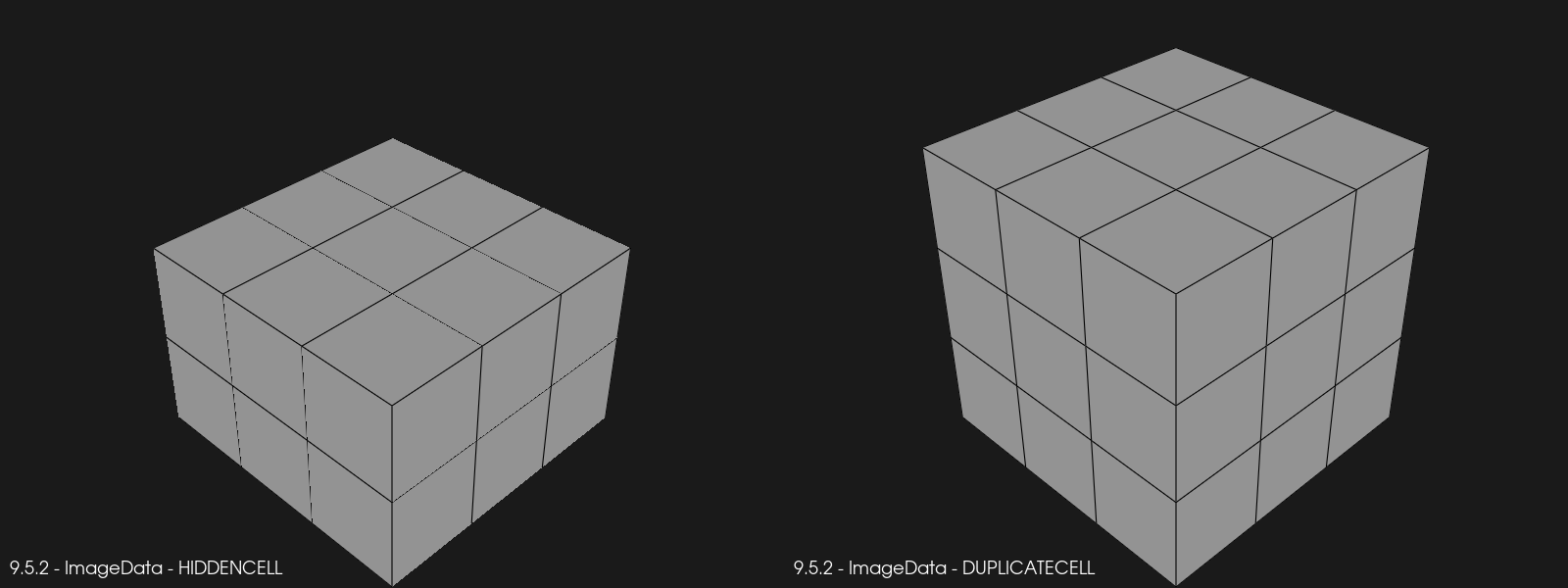
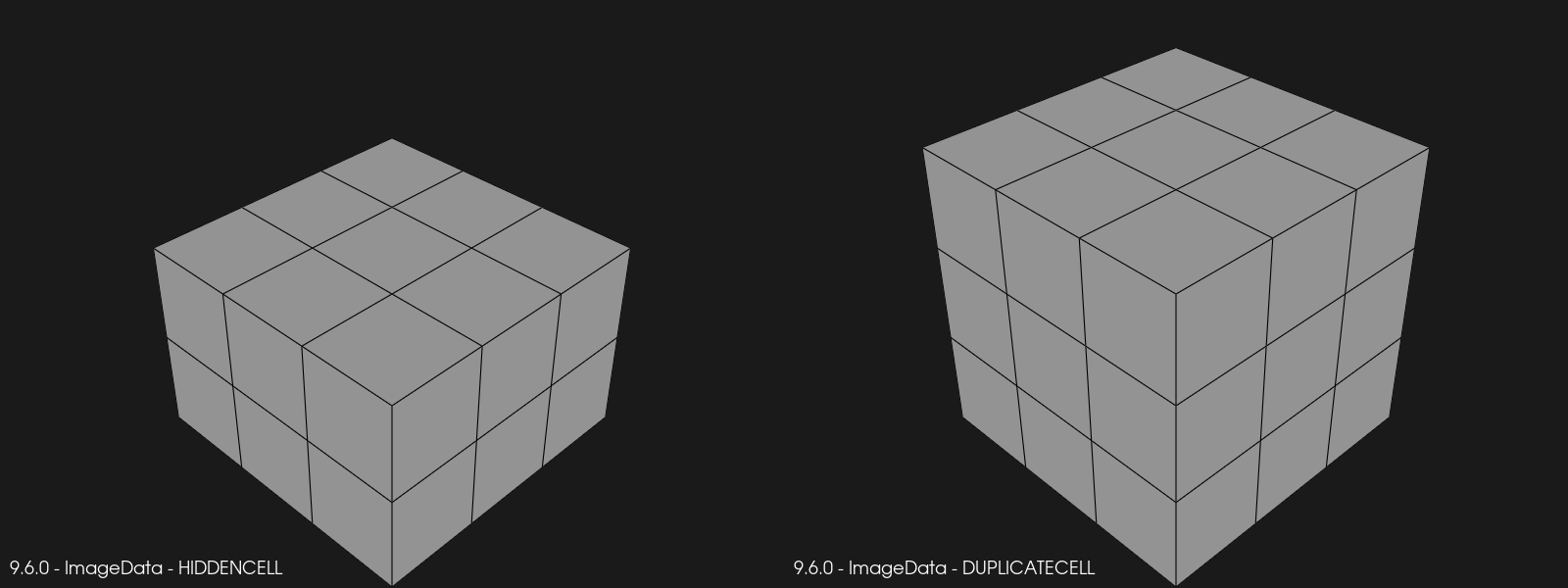
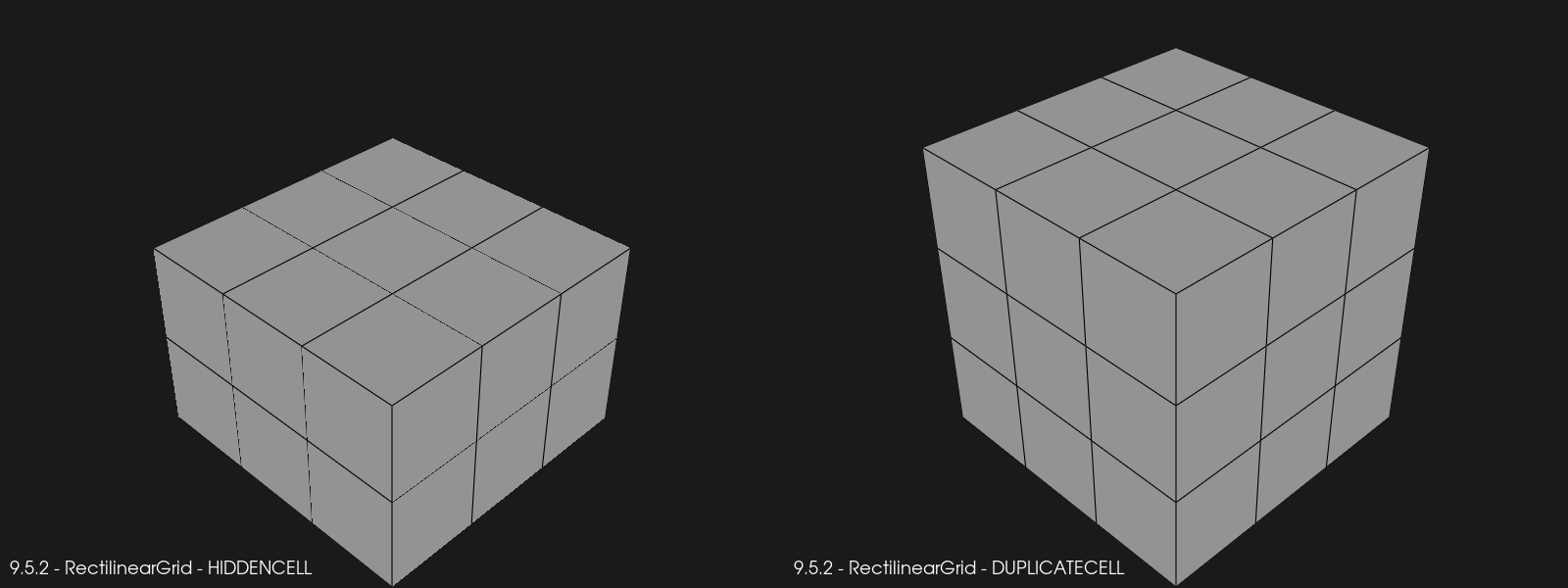
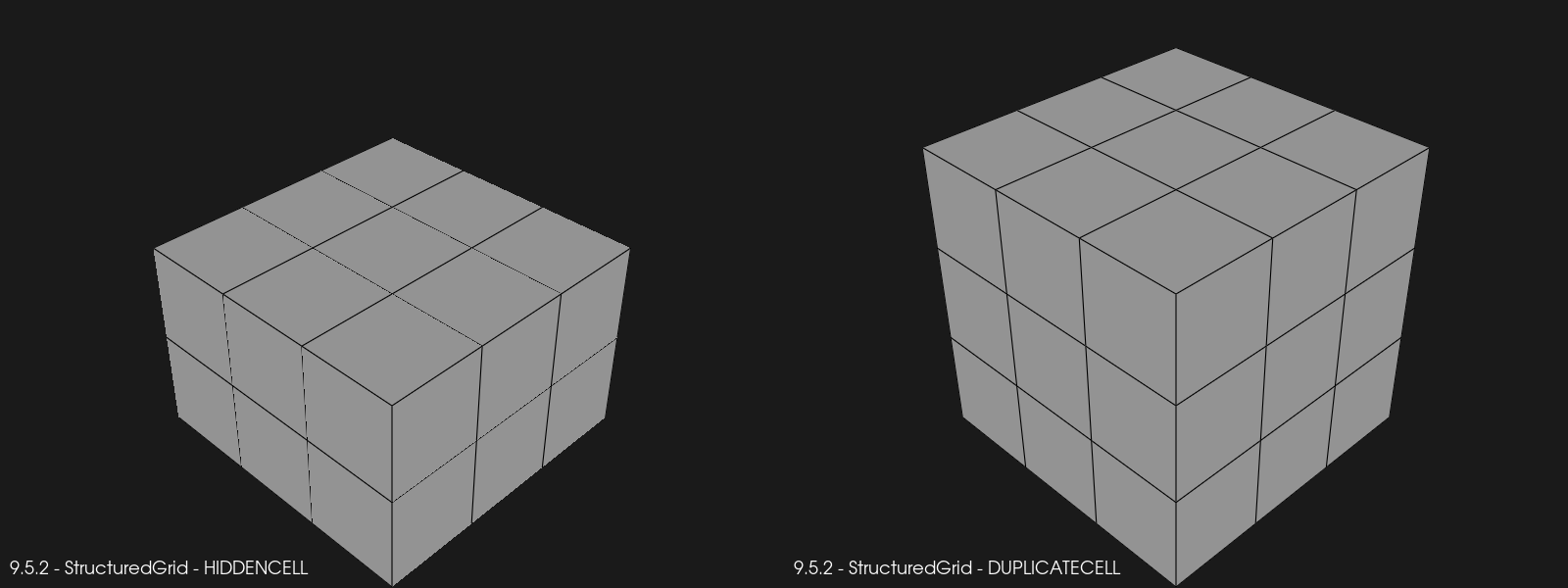
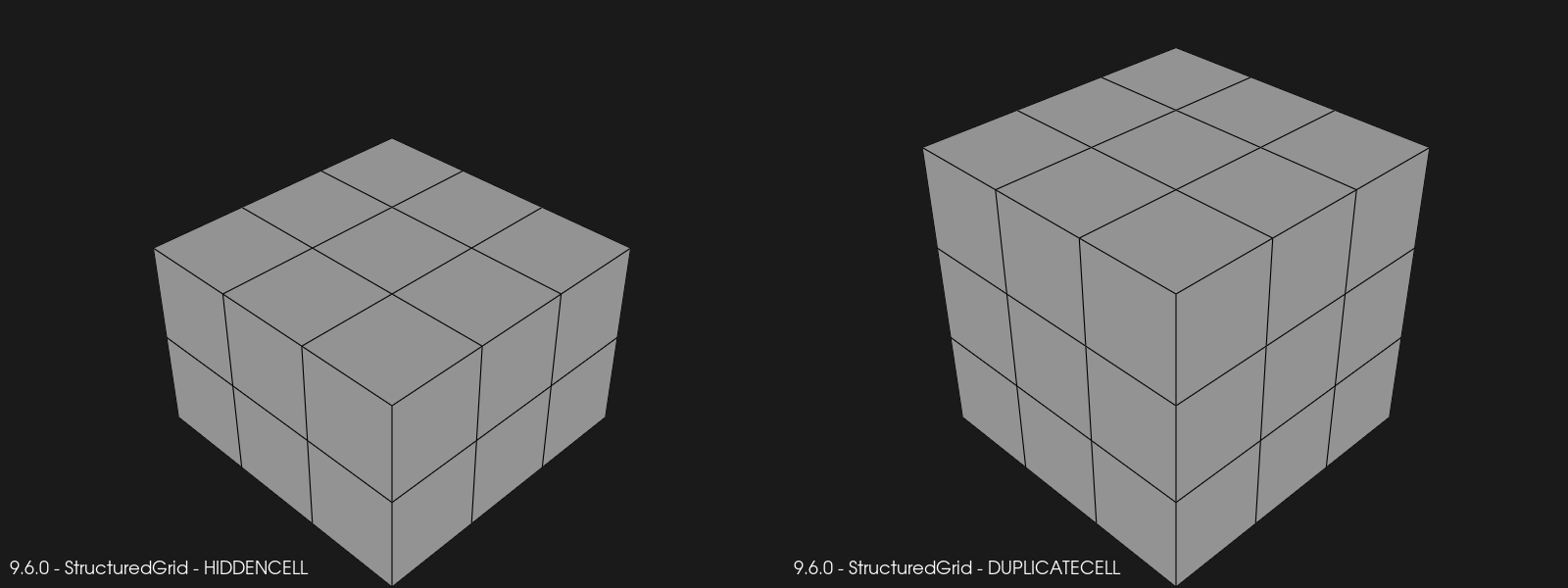
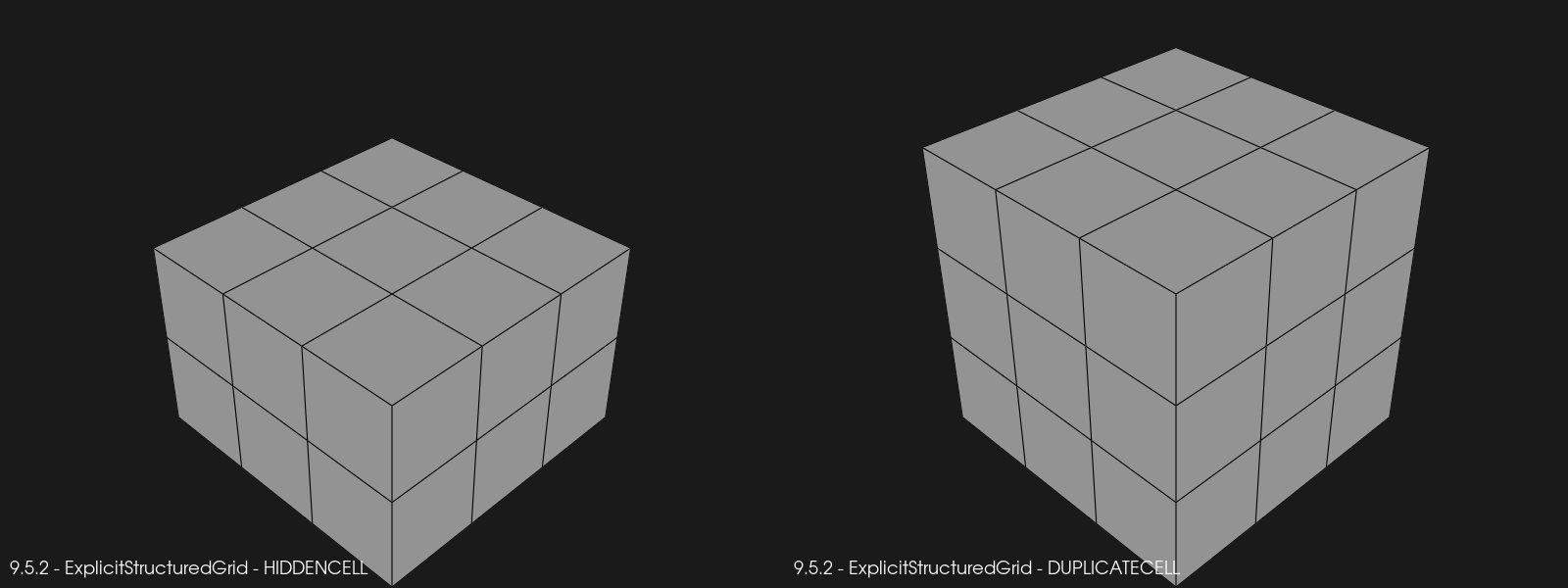
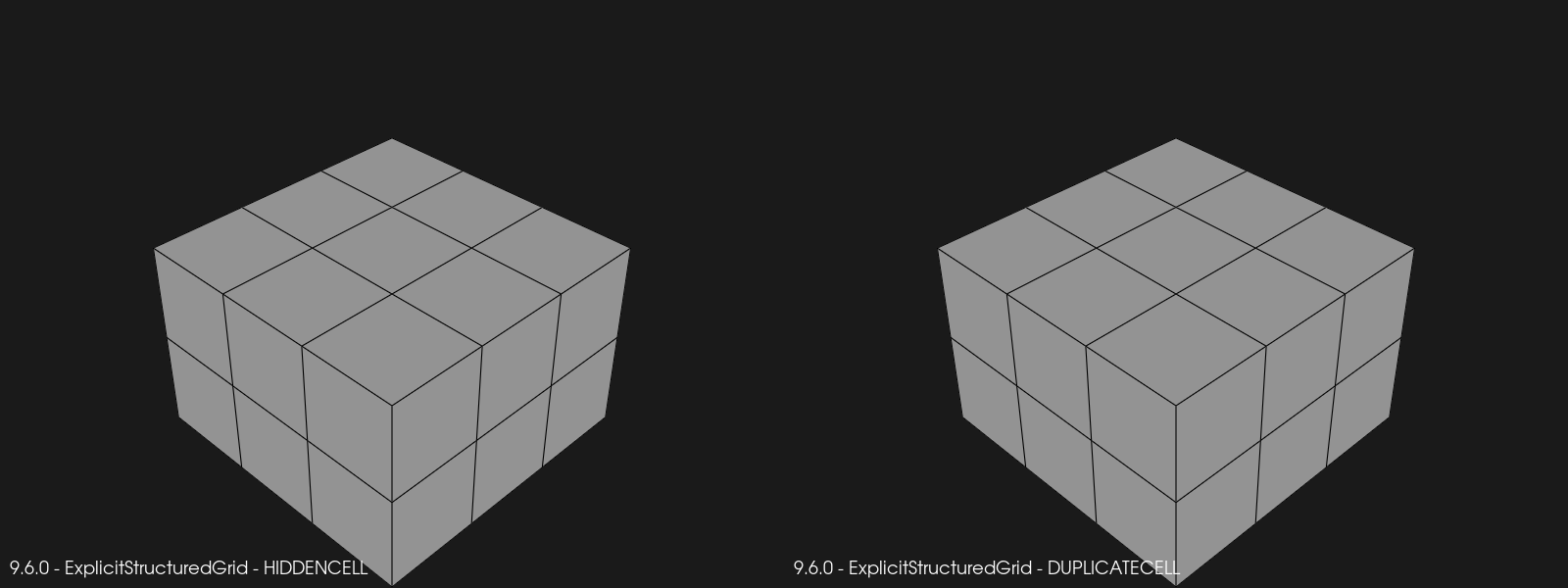
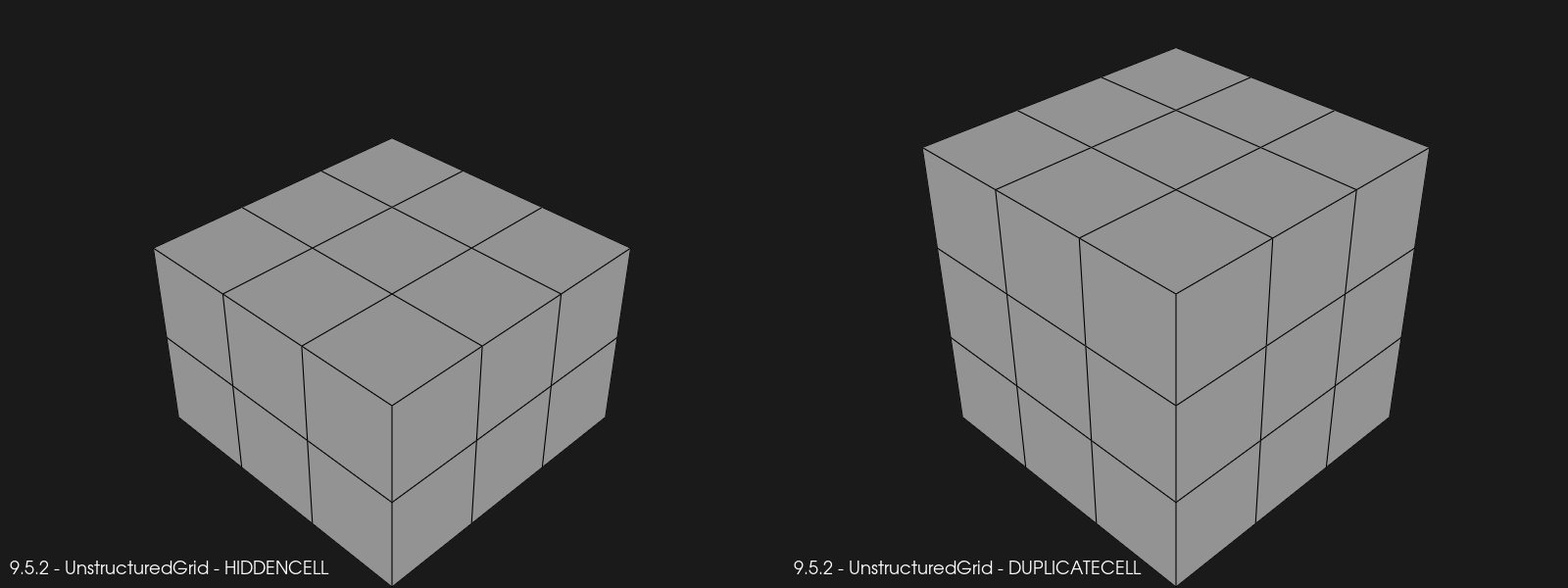
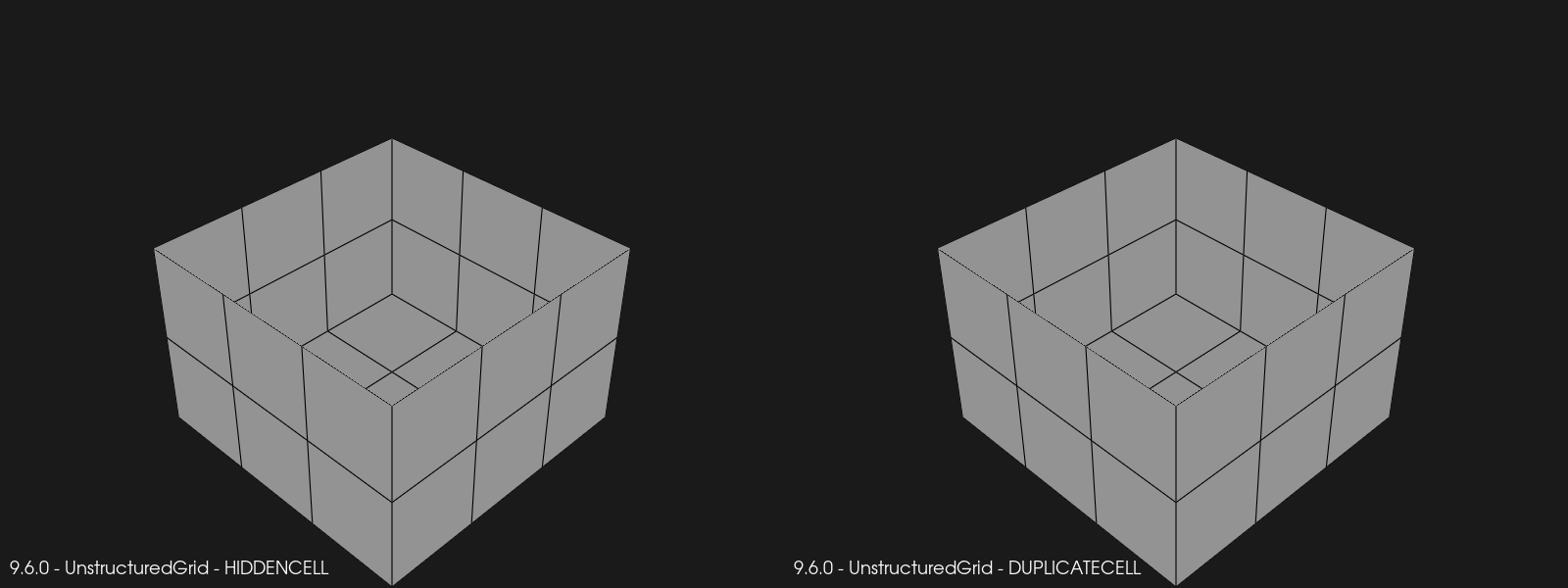
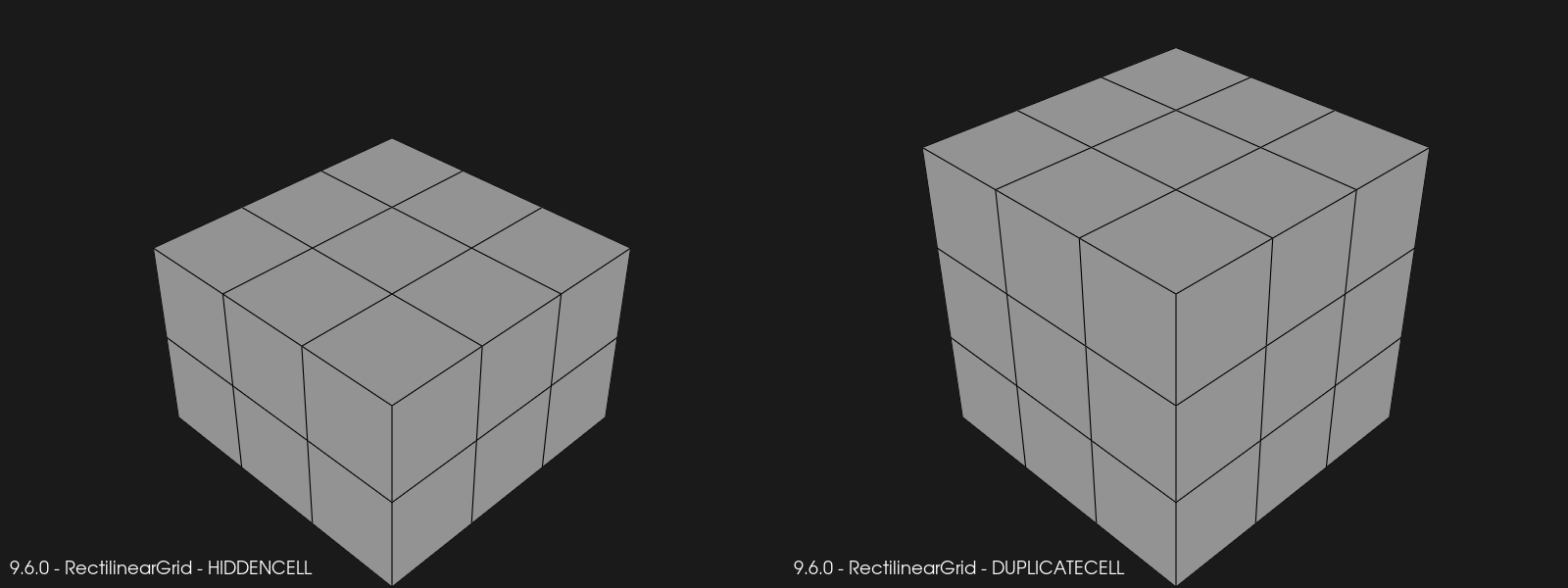
I ran this code with vtk==9.5.2 and vtk==9.6.0rc2. Here’s the generated renderings with the HIDDENCELL case on the left, and the DUPLICATECELL case on the right.

We can make the following observations:

  • Renderings for vtkImageData, vtkRectilinearGrid, vtkStructured are identical across versions.
  • Renderings for vtkExplicitStructuredGrid with HIDDENCELL is identical across versions, but with DUPLICATECELL, the duplicate cells themselves are now removed, but the interface is not removed.
  • Renderings for vtkUntructuredGrid have both changed. Both HIDDENCELL and DUPLICATECELL cells are completely removed, and the interface is removed in both cases.

Whereas in 9.5.2 we had consistent renderings across all mesh types for both HIDDENCELL and DUPLICATECELL values, we now have two different renderings for the HIDDENCELL case, and three different renderings for the DUPLICATECELL case. Seems to me like the ghost cell interfaces are not handled correctly and/or consistently by vtkGeometryFilter. Should I open an issue in GitLab to track this?

2 Likes

Yes, please open an issue cause that’s a lot of information.

https://gitlab.kitware.com/vtk/vtk/-/issues/19922