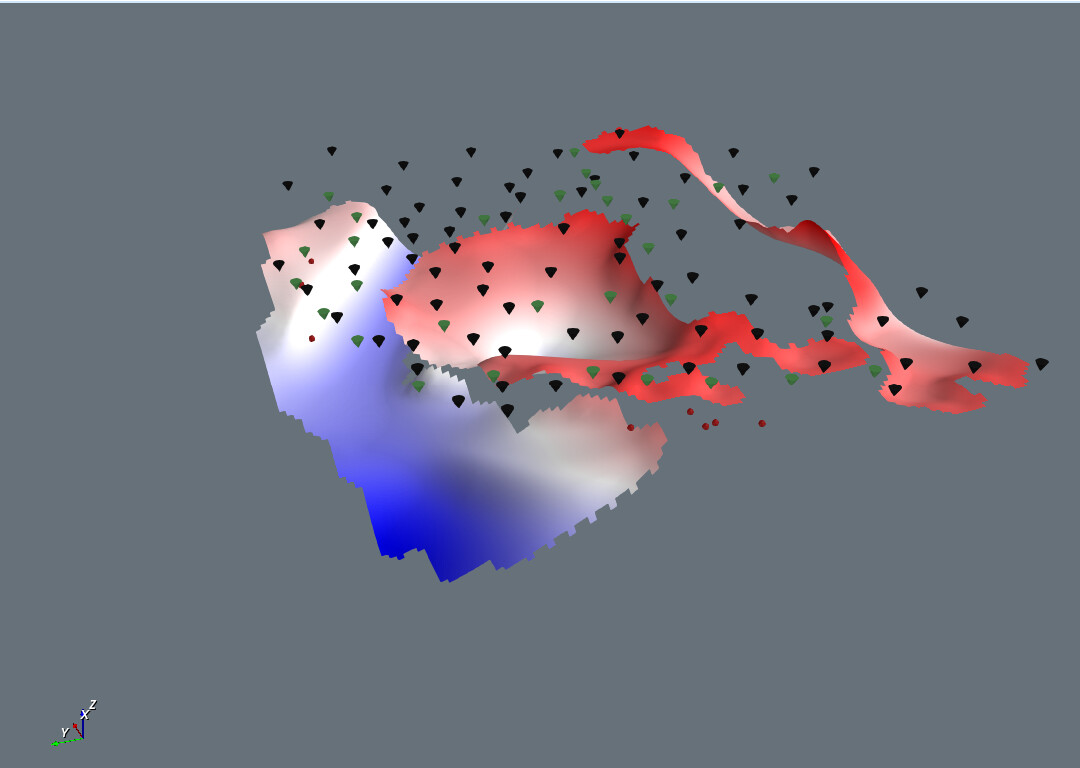
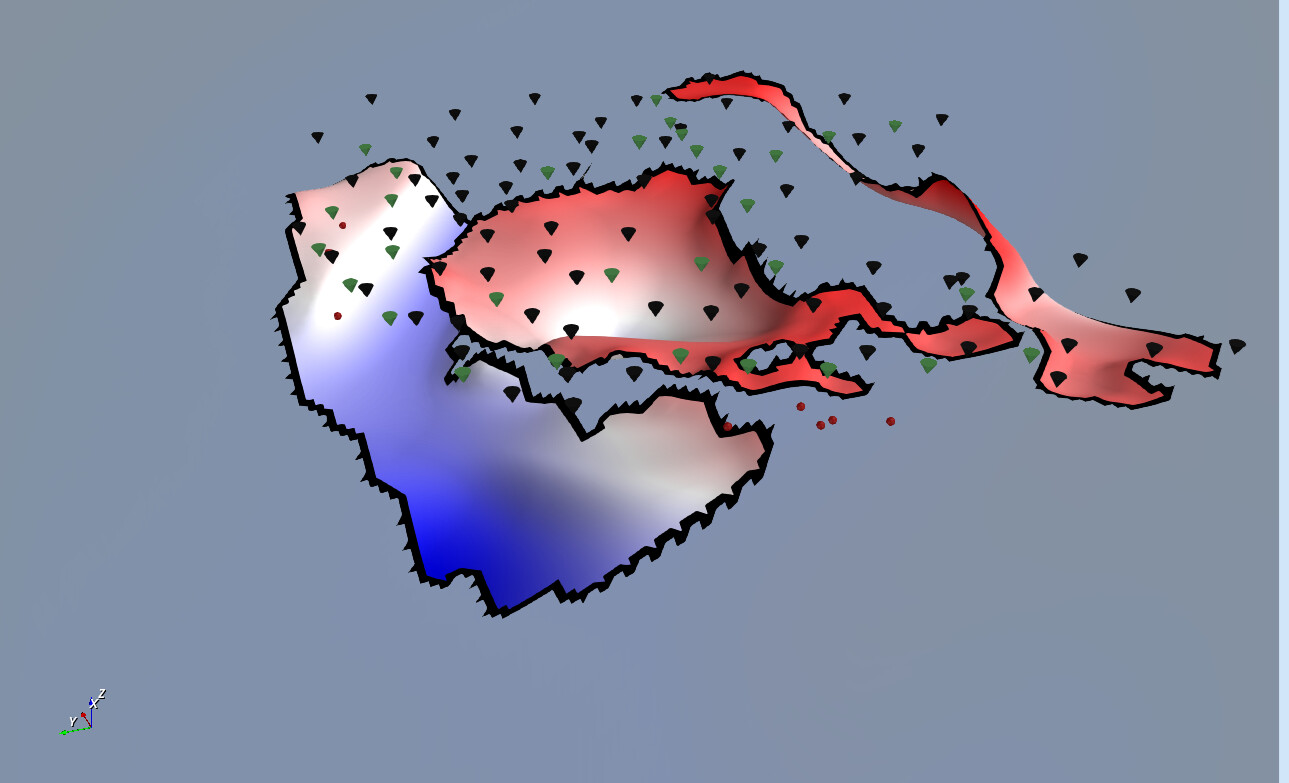
After updating the VTK library in my C++ application (from v. 9.4.2 to .9.6.1), the rendering of some Surfaces shows some unexpected edge artifacts. All is compiled in Release mode. This image is with VTK 9.4.2:
This does not happen on all the surfaces I still haven’t understood the reason. Here is the method with the pipeline that I use for drawing the surface (with some accessory classes/code lines)
	std::tuple<int, vtkSmartPointer<vtkActor>> Geo3DGrid::draw(int sourceId, const GridProperties& properties)
	{
		auto sourceData = m_sourceDataCollector->getItem(sourceId);

		if (sourceData.get() == nullptr)
		{
			char buff[128];
			snprintf(buff, sizeof(buff), "Source data for id: %d does not exists", sourceId);
			throw std::runtime_error{ buff };
		}

		auto* gridData = static_cast<GridSourceData*>(sourceData.get());
		auto* imageData = vtkImageData::SafeDownCast(gridData->getData()); // Do not get ownership

		vtkNew<vtkExtractVOI> extract_voi;
		extract_voi->SetInputData(imageData);
		extract_voi->SetSampleRate(properties.decimation, properties.decimation, 1);
		extract_voi->UpdateWholeExtent();

		vtkNew<vtkWarpScalar> warp;
		warp->SetInputConnection(extract_voi->GetOutputPort());

		vtkNew<vtkStructuredGridGeometryFilter> geo_filter;
		geo_filter->SetInputConnection(warp->GetOutputPort());

		vtkNew<vtkTriangleFilter> triangle_filter;
		triangle_filter->SetInputConnection(geo_filter->GetOutputPort());

		vtkNew<vtkTriangleMeshPointNormals> poly_data_norm;
		poly_data_norm->SetInputConnection(triangle_filter->GetOutputPort());

		auto* scalarRange = imageData->GetScalarRange();

		vtkNew<vtkPolyDataMapper> mapper;
		mapper->SetInputConnection(poly_data_norm->GetOutputPort());
		mapper->SetScalarRange(scalarRange);

		auto actor = vtkSmartPointer<vtkActor>::New();
		actor->SetMapper(mapper);
		actor->SetUserTransform(m_zTransform);
		actor->GetProperty()->SetOpacity(properties.opacity);
		actor->GetProperty()->SetLighting(properties.lighting);

		colorizeGrid(mapper.GetPointer(), actor.GetPointer(), properties.colorByElevation, properties.colorScaleId, properties.color);

		auto elem = std::make_shared<GridVisualElement>(sourceId, properties, extract_voi.GetPointer());
		elem->addActor(ActorIDs::Grid2D, actor);

		auto id = m_visualElementCollector->addItem(elem);
		elem->setId(id); // Store Visual element id

		return { id, actor };
	}
The behavior of vtkGeometryFilter has changed in v9.6.1. Try toggling the RemoveGhostInterfaces i.e. in your code → geo_filter->SetRemoveGhostInterfaces(false);.
However I tried it but It seems not to work, either setting SetRemoveGhostInterfaces(false) or SetRemoveGhostInterfaces(true).
In any case I’ve already changed my code and now I use a vtkUnsignedCharArray (I called it “ValidMask”) to keep a mask value for each NAN. I call a method that replace NAN to 0 and the pipeline code is filtering these values using the mask array and removing cells that are invalid (if any masked value is present):
		auto* gridData = static_cast<GridSourceData*>(sourceData.get());
		auto* imageData = vtkImageData::SafeDownCast(gridData->getData()); // Do not get ownership

		vtkNew<vtkExtractVOI> extract_voi;
		extract_voi->SetInputData(imageData);
		extract_voi->SetSampleRate(properties.decimation, properties.decimation, 1);
		extract_voi->UpdateWholeExtent();

		vtkNew<vtkWarpScalar> warp;
		warp->SetInputConnection(extract_voi->GetOutputPort());

		vtkNew<vtkGeometryFilter> geom;
		geom->SetInputConnection(warp->GetOutputPort());

		// Remove invalid geometry using the ValidMask array
		vtkNew<vtkThreshold> threshold;
		threshold->SetInputConnection(geom->GetOutputPort());
		threshold->SetInputArrayToProcess(0, 0, 0, vtkDataObject::FIELD_ASSOCIATION_POINTS, "ValidMask");
		threshold->SetUpperThreshold(0.5);
		threshold->SetThresholdFunction(vtkThreshold::THRESHOLD_UPPER);
		threshold->SetAllScalars(1); // do not keep cells where any of the point is invalid

		// threshold -> unstructured grid -> back to polydata
		vtkNew<vtkGeometryFilter> geom2;
		geom2->SetInputConnection(threshold->GetOutputPort());

		vtkNew<vtkTriangleFilter> triangle_filter;
		triangle_filter->SetInputConnection(geom2->GetOutputPort());

		vtkNew<vtkTriangleMeshPointNormals> poly_data_norm;
		poly_data_norm->SetInputConnection(triangle_filter->GetOutputPort());

		vtkNew<vtkPolyDataMapper> mapper;
		mapper->SetInputConnection(poly_data_norm->GetOutputPort());
		mapper->SetScalarRange(gridData->getZMin(), gridData->getZMax());
		mapper->SetScalarModeToUsePointData();

		auto actor = vtkSmartPointer<vtkActor>::New();
		actor->SetMapper(mapper);
		actor->SetUserTransform(m_zTransform);
		actor->GetProperty()->SetOpacity(properties.opacity);
		actor->GetProperty()->SetLighting(properties.lighting);
It is working, although it may be not very optimized because I am duplicating the geometry (geom2).