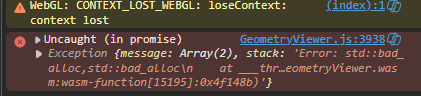
I have been observing regular vtk-wasm crashes with webgl losing context because of bad memory allocation as shown in the below picture.
This was never occurring with the older docker images with version tag 9.6, I am observing this behaviour ever since the vtk 9.7 tags are released.
My setup is similar to how the Geometry Viewer example is setup, so i tried to replicate the same issue with the official example build.
I have observed that I get the same crash as the above picture when the camera orientation widget is on. If it is off or never used, I don’t see the crash happening.
I am uploading the example code with the sample vtp file to replicate the crash.
I have tested the uploaded code both for the latest version docker image and also the tag 9.6.20260522-05a3785034, I have observed crash in latest tag but not in the 9.6 version tag.
After building example, load the vtp file and try to interact more to rotate, pan and zoom for the crash to occur.
Webgpu renderer does not have any crashes, however I face different issues with transparent actors, plane widgets there, I have also observed the webgpu renderer in vtk wasm doesnt render the surfaces generated by the vtkRuledSurfaceFilter class and my actors with opacity look so different when compared to the webgl background. I have setup webgpu similar to the GeometryViewer example as above so could you please let me know if there is wrong with the setup or the example? or since webgpu is still in experimental stage these isssues are common?
Its NVIDIA GeForce RTX 4060 Laptop GPU and I observe this error consistently only when the camera orientation widget is present, when it is turned off It never crashes. Another thing to note is the crash happens only after some interactions with the geometry
Not really sure, I have this behaviour in NVIDIA RTX 4050 too but that is a laptop GPU as well, I will try to reproduce with desktop GPUs but it will take some time. Apart from that the only thing that comes to mind is to load multiple vtk actors instead of the current example that only loads one vtp.
The camera widget being the specific trigger is pretty telling though—if it was just a cache issue you’d expect it to blow up eventually no matter what you’re doing. Might be worth checking if that widget’s code changed in 9.7, or if it’s doing something with memory/texture management differently now. And just to rule stuff out, does the crash happen faster if you crank up the geometry complexity? Wondering if it’s more about sustained GPU pressure on a laptop than an outright memory leak.