Hello,
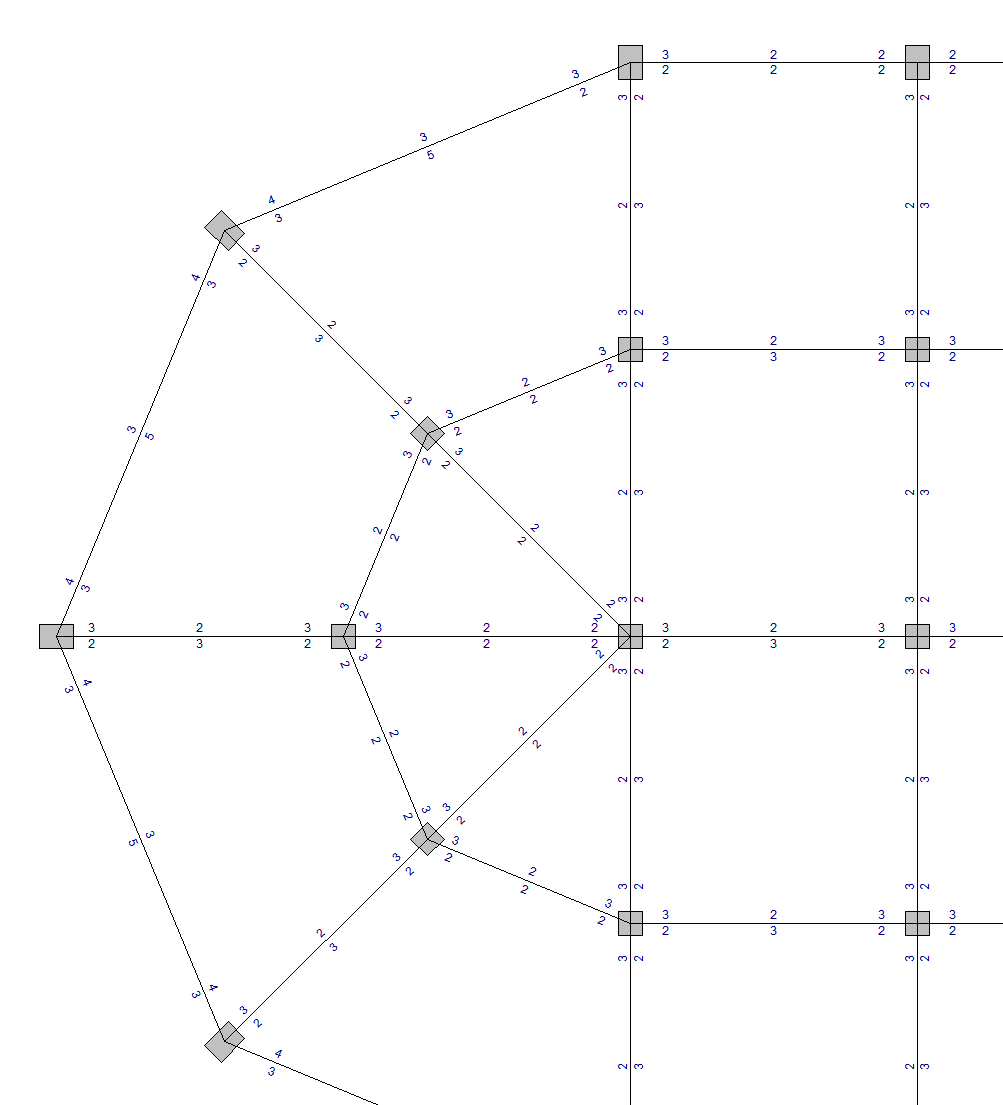
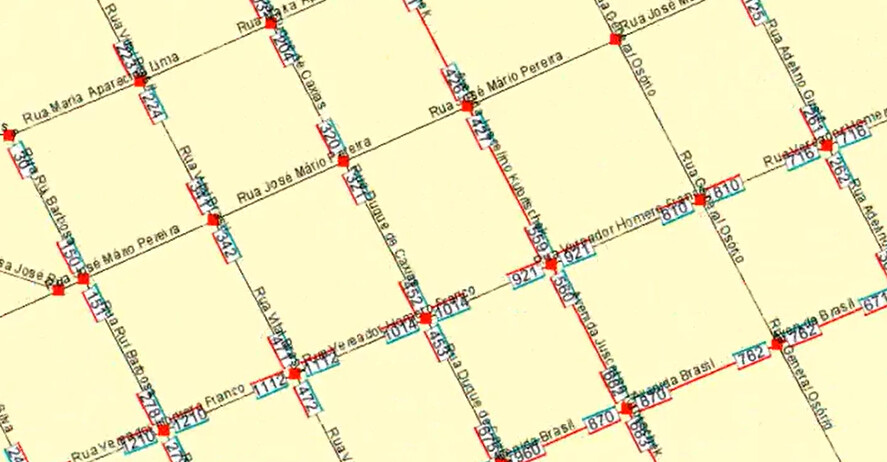
I had that very same problem many years ago when I needed to draw street address numbers along the lines representing the streets:
The complete code to do that follows (in Java, sorry  ):
):
/**
* Calculates the initial coordinates (without applying rotations to align with the arc)
* of the vertices of the rectangle that represents the numbering at a node.
* The parameters, remember, are screen coordinates and not geographic coordinates.
* The parameters are the center of the graphical representation
* of the node for which you want to display the door numbering in question.
*/
private FourCoordinates CalculateNumberingRectangleVertices(int x, int y){
this.fourCoordinates.x1 = x - NUMBER_RECTANGLE_WIDTH / 2;
this.fourCoordinates.y1 = y - NUMBER_RECTANGLE_DISTANCE - NUMBER_RECTANGLE_HEIGHT / 2;
this.fourCoordinates.x2 = x + NUMBER_RECTANGLE_WIDTH / 2;
this.fourCoordinates.y2 = y - NUMBER_RECTANGLE_DISTANCE - NUMBER_RECTANGLE_HEIGHT / 2;
this.fourCoordinates.x3 = x + NUMBER_RECTANGLE_WIDTH / 2;
this.fourCoordinates.y3 = y - NUMBER_RECTANGLE_DISTANCE + NUMBER_RECTANGLE_HEIGHT / 2;
this.fourCoordinates.x4 = x - NUMBER_RECTANGLE_WIDTH / 2;
this.fourCoordinates.y4 = y - NUMBER_RECTANGLE_DISTANCE + NUMBER_RECTANGLE_HEIGHT / 2;
return this.fourCoordinates;
}
/**
* Draws the door numbering of the {@link Node}s corresponding to the {@link Arc}
* passed as a parameter.
*/
private void drawNumbering(Arc arc, Graphics2D g2){
// do nothing if numbering display is not enabled
if(!this.displayNumbering) return;
// these point objects help as auxiliaries
// in calculating the four corners of the rectangle
// that graphically represents a numbering
Point p1 = new Point();
Point p2 = new Point();
Point p3 = new Point();
Point p4 = new Point();
// oriented angle of the arc relative to the vector (1, 0)
double angle;
// rotation angle of the text that will appear, can be 90º or -90º
// this aims to prevent numbers from appearing upside down.
double text_rot_angle;
// the arc nodes
Node node1 = arc.getNode1();
Node node2 = arc.getNode2();
// working variable, receives the textual version of the number.
String text;
// objects that help obtain the screen measurements of the text.
TextLayout layout;
FontRenderContext context = g2.getFontRenderContext();
// geometric shape of the text letters
Shape text_outline;
// determines the oriented angle of the arc relative to the horizontal (vector <1, 0>).
angle = Utilities.angle(node1.getScreenX(), node1.getScreenY(), node2.getScreenX(), node2.getScreenY()) + Math.PI / 2;
// drawing the door numbering of node 1, if it has a defined numbering
// in the direction of node 2
// NOTE: everything changed here must also be done for node 2, further below.
if(node1.isNumberingExists(node2)){
NumberingEntry ne = node1.getNumberingEntry(node2);
// if the number is positive
if(ne.getNumber() > 0){
// processing to draw the text on the screen
text = String.valueOf(ne.getNumber());
// get geometric information to draw the digits on the screen
layout = new TextLayout(text, Fonts.NUMBERING_FONT, context);
// Attention: remember Linear Algebra classes.
// the linear transformations that appear first
// happen last.
// T3: rotate text around the node to coincide with the rectangle
this.transformation.setToRotation(angle, node1.getScreenX(), node1.getScreenY());
if(ne.getEnd() == NumberingEntry.INITIAL_END){
if(angle > Math.PI && angle < Math.PI * 2)
text_rot_angle = Math.PI/2;
else
text_rot_angle = -Math.PI/2;
}else{
if(angle > Math.PI && angle < Math.PI * 2)
text_rot_angle = -Math.PI/2;
else
text_rot_angle = Math.PI/2;
}
// T2: place the text oriented sideways to stay along the rectangle
this.transformation.rotate(text_rot_angle, node1.getScreenX(), node1.getScreenY() - this.NUMBER_RECTANGLE_DISTANCE);
// T1: place the text a little above the node.
this.transformation.translate(node1.getScreenX() - layout.getAdvance()/2, node1.getScreenY() - this.NUMBER_RECTANGLE_DISTANCE + layout.getAscent()/2 - 2);
// obtain the final geometry of the text, considering all linear
// transformations applied above.
text_outline = layout.getOutline(this.transformation);
// saves this geometry in the path that will be rendered later by paintComponent().
this.numberingTextPath.append(text_outline, false);
}
// processing to calculate the screen coordinates of the four corners of the rectangle
// they are a function of the node's screen position.
this.fourCoordinates = this.CalculateNumberingRectangleVertices(node1.getScreenX(), node1.getScreenY());
// fill auxiliary objects with initial rectangle dimensions
p1.x = this.fourCoordinates.x1; p1.y = this.fourCoordinates.y1;
p2.x = this.fourCoordinates.x2; p2.y = this.fourCoordinates.y2;
p3.x = this.fourCoordinates.x3; p3.y = this.fourCoordinates.y3;
p4.x = this.fourCoordinates.x4; p4.y = this.fourCoordinates.y4;
// move the rectangle close to the origin, as if its node were at the origin.
int xt = node1.getScreenX();
int yt = node1.getScreenY();
p1.translate(-xt, -yt);
p2.translate(-xt, -yt);
p3.translate(-xt, -yt);
p4.translate(-xt, -yt);
// rotate the rectangle at the same angle as the arc
p1.rotate(angle);
p2.rotate(angle);
p3.rotate(angle);
p4.rotate(angle);
// move the rectangle back to its place near its node.
p1.translate(xt, yt);
p2.translate(xt, yt);
p3.translate(xt, yt);
p4.translate(xt, yt);
// save the found coordinates in the path that will be drawn on screen by paintComponent().
this.numberingRectanglesPath.moveTo(p1.x, p1.y);
this.numberingRectanglesPath.lineTo(p2.x, p2.y);
this.numberingRectanglesPath.lineTo(p3.x, p3.y);
this.numberingRectanglesPath.lineTo(p4.x, p4.y);
this.numberingRectanglesPath.closePath();
// use the same coordinates in the three paths for numbering type indicators
// presence or absence in them is a function of the numbering type in the
// node's numbering entry.
switch(ne.getEnd()){
case NumberingEntry.FINAL_END:
switch(ne.getLtype()){
case NumberingEntry.TYPE_EVENS_AND_ODDS:
this.bothSidesIndicatorPath.moveTo(p2.x, p2.y);
this.bothSidesIndicatorPath.lineTo(p3.x, p3.y);
break;
case NumberingEntry.TYPE_ODDS_ONLY:
this.oddSideIndicatorPath.moveTo(p2.x, p2.y);
this.oddSideIndicatorPath.lineTo(p3.x, p3.y);
break;
case NumberingEntry.TYPE_EVENS_ONLY:
this.evenSideIndicatorPath.moveTo(p2.x, p2.y);
this.evenSideIndicatorPath.lineTo(p3.x, p3.y);
break;
}
switch(ne.getRtype()){
case NumberingEntry.TYPE_EVENS_AND_ODDS:
this.bothSidesIndicatorPath.moveTo(p1.x, p1.y);
this.bothSidesIndicatorPath.lineTo(p4.x, p4.y);
break;
case NumberingEntry.TYPE_ODDS_ONLY:
this.oddSideIndicatorPath.moveTo(p1.x, p1.y);
this.oddSideIndicatorPath.lineTo(p4.x, p4.y);
break;
case NumberingEntry.TYPE_EVENS_ONLY:
this.evenSideIndicatorPath.moveTo(p1.x, p1.y);
this.evenSideIndicatorPath.lineTo(p4.x, p4.y);
break;
}
break;
case NumberingEntry.INITIAL_END:
switch(ne.getLtype()){
case NumberingEntry.TYPE_EVENS_AND_ODDS:
this.bothSidesIndicatorPath.moveTo(p1.x, p1.y);
this.bothSidesIndicatorPath.lineTo(p4.x, p4.y);
break;
case NumberingEntry.TYPE_ODDS_ONLY:
this.oddSideIndicatorPath.moveTo(p1.x, p1.y);
this.oddSideIndicatorPath.lineTo(p4.x, p4.y);
break;
case NumberingEntry.TYPE_EVENS_ONLY:
this.evenSideIndicatorPath.moveTo(p1.x, p1.y);
this.evenSideIndicatorPath.lineTo(p4.x, p4.y);
break;
}
switch(ne.getRtype()){
case NumberingEntry.TYPE_EVENS_AND_ODDS:
this.bothSidesIndicatorPath.moveTo(p2.x, p2.y);
this.bothSidesIndicatorPath.lineTo(p3.x, p3.y);
break;
case NumberingEntry.TYPE_ODDS_ONLY:
this.oddSideIndicatorPath.moveTo(p2.x, p2.y);
this.oddSideIndicatorPath.lineTo(p3.x, p3.y);
break;
case NumberingEntry.TYPE_EVENS_ONLY:
this.evenSideIndicatorPath.moveTo(p2.x, p2.y);
this.evenSideIndicatorPath.lineTo(p3.x, p3.y);
break;
}
break;
}//switch to draw numbering type indicators
// take advantage of processing to store the four screen coordinates
// of the numbering entry's graphical representation inside the
// NumberingEntry object. This aims to allow the user to click a number to edit it.
ne.getScreen_points().x1 = p1.x;
ne.getScreen_points().y1 = p1.y;
ne.getScreen_points().x2 = p2.x;
ne.getScreen_points().y2 = p2.y;
ne.getScreen_points().x3 = p3.x;
ne.getScreen_points().y3 = p3.y;
ne.getScreen_points().x4 = p4.x;
ne.getScreen_points().y4 = p4.y;
}
// Now we do the same thing for node 2 of the arc. //////////////////////////
// drawing the door numbering of node 2, if it has a defined numbering
// in the direction of node 1
// NOTE: everything changed here must also be done for node 1, further above.
if(node2.isNumberingExists(node1)){
NumberingEntry ne = node2.getNumberingEntry(node1);
// if the number is positive
if(ne.getNumber() > 0){
// processing to draw the text on the screen
text = String.valueOf(ne.getNumber());
// get geometric information to draw the digits on the screen
layout = new TextLayout(text, Fonts.NUMBERING_FONT, context);
// Attention: remember Linear Algebra classes.
// the linear transformations that appear first
// happen last.
// T3: rotate text around the node to coincide with the rectangle
this.transformation.setToRotation(angle - Math.PI, node2.getScreenX(), node2.getScreenY());
if(ne.getEnd() == NumberingEntry.INITIAL_END){
if(angle > Math.PI && angle < Math.PI * 2)
text_rot_angle = Math.PI/2;
else
text_rot_angle = -Math.PI/2;
}else{
if(angle > Math.PI && angle < Math.PI * 2)
text_rot_angle = -Math.PI/2;
else
text_rot_angle = Math.PI/2;
}
// T2: place the text oriented sideways to stay along the rectangle
this.transformation.rotate(text_rot_angle, node2.getScreenX(), node2.getScreenY() - this.NUMBER_RECTANGLE_DISTANCE);
// T1: place the text a little above the node.
this.transformation.translate(node2.getScreenX() - layout.getAdvance()/2, node2.getScreenY() - this.NUMBER_RECTANGLE_DISTANCE + layout.getAscent()/2 - 2);
// obtain the final geometry of the text, considering all linear
// transformations applied above.
text_outline = layout.getOutline(this.transformation);
// saves this geometry in the path that will be rendered later by paintComponent().
this.numberingTextPath.append(text_outline, false);
}
// processing to calculate the screen coordinates of the four corners of the rectangle
// they are a function of the node's screen position.
this.fourCoordinates = this.CalculateNumberingRectangleVertices(node2.getScreenX(), node2.getScreenY());
// fill auxiliary objects with initial rectangle dimensions
p1.x = this.fourCoordinates.x1; p1.y = this.fourCoordinates.y1;
p2.x = this.fourCoordinates.x2; p2.y = this.fourCoordinates.y2;
p3.x = this.fourCoordinates.x3; p3.y = this.fourCoordinates.y3;
p4.x = this.fourCoordinates.x4; p4.y = this.fourCoordinates.y4;
// move the rectangle close to the origin, as if its node were at the origin.
int xt = node2.getScreenX();
int yt = node2.getScreenY();
p1.translate(-xt, -yt);
p2.translate(-xt, -yt);
p3.translate(-xt, -yt);
p4.translate(-xt, -yt);
// rotate the rectangle at the same angle as the arc, but since it's the opposite end,
// deduct 180º from the angle.
p1.rotate(angle - Math.PI);
p2.rotate(angle - Math.PI);
p3.rotate(angle - Math.PI);
p4.rotate(angle - Math.PI);
// move the rectangle back to its place near its node.
p1.translate(xt, yt);
p2.translate(xt, yt);
p3.translate(xt, yt);
p4.translate(xt, yt);
// save the found coordinates in the path that will be drawn on screen by paintComponent().
this.numberingRectanglesPath.moveTo(p1.x, p1.y);
this.numberingRectanglesPath.lineTo(p2.x, p2.y);
this.numberingRectanglesPath.lineTo(p3.x, p3.y);
this.numberingRectanglesPath.lineTo(p4.x, p4.y);
this.numberingRectanglesPath.closePath();
// use the same coordinates in the three paths for numbering type indicators
// presence or absence in them is a function of the numbering type in the
// node's numbering entry.
switch(ne.getEnd()){
case NumberingEntry.FINAL_END:
switch(ne.getLtype()){
case NumberingEntry.TYPE_EVENS_AND_ODDS:
this.bothSidesIndicatorPath.moveTo(p2.x, p2.y);
this.bothSidesIndicatorPath.lineTo(p3.x, p3.y);
break;
case NumberingEntry.TYPE_ODDS_ONLY:
this.oddSideIndicatorPath.moveTo(p2.x, p2.y);
this.oddSideIndicatorPath.lineTo(p3.x, p3.y);
break;
case NumberingEntry.TYPE_EVENS_ONLY:
this.evenSideIndicatorPath.moveTo(p2.x, p2.y);
this.evenSideIndicatorPath.lineTo(p3.x, p3.y);
break;
}
switch(ne.getRtype()){
case NumberingEntry.TYPE_EVENS_AND_ODDS:
this.bothSidesIndicatorPath.moveTo(p1.x, p1.y);
this.bothSidesIndicatorPath.lineTo(p4.x, p4.y);
break;
case NumberingEntry.TYPE_ODDS_ONLY:
this.oddSideIndicatorPath.moveTo(p1.x, p1.y);
this.oddSideIndicatorPath.lineTo(p4.x, p4.y);
break;
case NumberingEntry.TYPE_EVENS_ONLY:
this.evenSideIndicatorPath.moveTo(p1.x, p1.y);
this.evenSideIndicatorPath.lineTo(p4.x, p4.y);
break;
}
break;
case NumberingEntry.INITIAL_END:
switch(ne.getLtype()){
case NumberingEntry.TYPE_EVENS_AND_ODDS:
this.bothSidesIndicatorPath.moveTo(p1.x, p1.y);
this.bothSidesIndicatorPath.lineTo(p4.x, p4.y);
break;
case NumberingEntry.TYPE_ODDS_ONLY:
this.oddSideIndicatorPath.moveTo(p1.x, p1.y);
this.oddSideIndicatorPath.lineTo(p4.x, p4.y);
break;
case NumberingEntry.TYPE_EVENS_ONLY:
this.evenSideIndicatorPath.moveTo(p1.x, p1.y);
this.evenSideIndicatorPath.lineTo(p4.x, p4.y);
break;
}
switch(ne.getRtype()){
case NumberingEntry.TYPE_EVENS_AND_ODDS:
this.bothSidesIndicatorPath.moveTo(p2.x, p2.y);
this.bothSidesIndicatorPath.lineTo(p3.x, p3.y);
break;
case NumberingEntry.TYPE_ODDS_ONLY:
this.oddSideIndicatorPath.moveTo(p2.x, p2.y);
this.oddSideIndicatorPath.lineTo(p3.x, p3.y);
break;
case NumberingEntry.TYPE_EVENS_ONLY:
this.evenSideIndicatorPath.moveTo(p2.x, p2.y);
this.evenSideIndicatorPath.lineTo(p3.x, p3.y);
break;
}
break;
}//switch to draw numbering type indicators
// take advantage of processing to store the four screen coordinates
// of the numbering entry's graphical representation inside the
// NumberingEntry object. This aims to allow the user to click a number to edit it.
ne.getScreen_points().x1 = p1.x;
ne.getScreen_points().y1 = p1.y;
ne.getScreen_points().x2 = p2.x;
ne.getScreen_points().y2 = p2.y;
ne.getScreen_points().x3 = p3.x;
ne.getScreen_points().y3 = p3.y;
ne.getScreen_points().x4 = p4.x;
ne.getScreen_points().y4 = p4.y;
}
}
The code is thoroughly commented, so you may figure the logic by just reading the comments. I really hope this gets you started.
best,
PC