Hi all,
I’m displaying 2D images using QVTKNativeWidget and I’m seeing zigzag/jagged edges along high-contrast boundaries. I’ve attached two screenshots:
-
Current issue: edges look stair-stepped/pixelated
-
Desired output: smooth edges
Two things are needed to achieve smooth edges:
This can be achieved with vtkImageResliceMapper if the right settings are used.
Can you briefly describe the pipeline that you’re currently using to render the images?
thanks for the reply, I tried your suggestion but couldn’t achieve the required smoothness. In another project, they accomplished this by editing vtkOpenGLImageSliceMapper in the VTK source(VTK v5). Is there a way to achieve similar smoothness using vtkOpenGLImageSliceMapper (in VTK9)?
There is no easy way achieve what you want with vtkImageSlicerMapper or with vtkOpenGLImageSliceMapper. That’s why I wrote the vtkImageResliceMapper, because it can do things that vtkImageSliceMapper cannot do. This time I have included a reasonably sophisticated example below (click the arrow to expand).
#! /usr/bin/env python

"""
This is a program to demonstrate 2D image display with the
vtkImageResliceMapper class.  If given no filename, it defaults
to generating a simple image of a disk.  If given a filename,
the file must be a 16-bit png, assumed to be a CT image.
"""

from vtkmodules.vtkCommonCore import vtkLookupTable
from vtkmodules.vtkCommonDataModel import vtkSphere
from vtkmodules.vtkImagingHybrid import vtkSampleFunction
from vtkmodules.vtkImagingMath import vtkImageMathematics
from vtkmodules.vtkIOImage import vtkPNGReader
from vtkmodules.vtkInteractionStyle import vtkInteractorStyleImage
from vtkmodules.vtkRenderingImage import vtkImageResliceMapper
import vtkmodules.vtkInteractionStyle
import vtkmodules.vtkRenderingFreeType
import vtkmodules.vtkRenderingOpenGL2

from vtkmodules.vtkImagingCore import (
    vtkImageBSplineCoefficients,
    vtkImageBSplineInterpolator,
    vtkImageSincInterpolator,
    vtkImageShiftScale,
    vtkImageThreshold,
)

from vtkmodules.vtkRenderingCore import (
    vtkImageProperty,
    vtkImageSlice,
    vtkRenderWindow,
    vtkRenderWindowInteractor,
    vtkRenderer,
)

import os
import sys
import math
import argparse

def makeDiskImage(dims=(256, 256), r=10.0):
    """Generate an image of a disk, type 'short', range [-1000,3000]."""

    # we want the disk to have a smooth boundary, so we make an
    # image where the pixel value is the signed distance from the
    # edge of the disk, and then threshold the pixel values
    # between -1 and +1 to get a linear ramp at the edge

    # use vtkSphere to create a map of distance squared from center
    sphere = vtkSphere()
    sphere.SetRadius(0.0)
    sphere.SetCenter((dims[0] - 1)/2.0, (dims[1] - 1)/2.0, 0.0)

    # sample vtkSphere to get an image of distance squared
    sample = vtkSampleFunction()
    sample.SetImplicitFunction(sphere)
    sample.SetOutputScalarTypeToFloat()
    sample.SetSampleDimensions(dims[0], dims[1], 1)
    sample.SetModelBounds(0, dims[0]-1, 0, dims[1]-1, 0, 0)
    sample.ComputeNormalsOff()

    # take square root to get distance from center
    radius = vtkImageMathematics()
    radius.SetInputConnection(sample.GetOutputPort())
    radius.SetOperationToSquareRoot()

    # subtract radius to get distance from edge of disk
    subtract = vtkImageMathematics()
    subtract.SetInputConnection(radius.GetOutputPort())
    subtract.SetOperationToAddConstant()
    subtract.SetConstantC(-r)

    # clamp distance map (upper clamp)
    thresh1 = vtkImageThreshold()
    thresh1.SetInputConnection(subtract.GetOutputPort())
    thresh1.ThresholdByUpper(1.0)
    thresh1.SetInValue(1.0)
    thresh1.ReplaceInOn()

    # clamp distance map (lower clamp)
    thresh2 = vtkImageThreshold()
    thresh2.SetInputConnection(thresh1.GetOutputPort())
    thresh2.ThresholdByLower(-1.0)
    thresh2.SetInValue(-1.0)
    thresh2.ReplaceInOn()

    # create a 16-bit image with range [0, 2000], note that we
    # invert the image so that 'inside' is bright
    convert = vtkImageShiftScale()
    convert.SetInputConnection(thresh2.GetOutputPort())
    convert.SetShift(-0.5)
    convert.SetScale(-2000.0)
    convert.SetOutputScalarTypeToShort()

    # return the image
    convert.Update()
    return convert.GetOutput()

def main(quality='high',
         interpolation='linear',
         focus=None,
         zoom=10.0,
         fullscale=False,
         filename=None):

    if filename is not None:
        reader = vtkPNGReader()
        if not reader.CanReadFile(filename):
            print(f"Cannot read file \"{filename}\".")
            return
        reader.SetFileName(filename)
        reader.Update()
        imageToInterpolate = reader.GetOutput()
    else:
        # generate a high-contrast test image
        imageToInterpolate = makeDiskImage()

    dataRange = imageToInterpolate.GetPointData().GetScalars().GetRange()
    print('range', dataRange)
    if dataRange[1] - dataRange[0] < 256:
        print("Warning: this is not a 16-bit image!\n")

    size = imageToInterpolate.GetDimensions()[0:2]
    print('size', size)

    # create the interactor
    style = vtkInteractorStyleImage()
    style.SetInteractionModeToImage2D()
    iren = vtkRenderWindowInteractor()
    iren.SetInteractorStyle(style)

    # create the renderer and window
    renderer = vtkRenderer()
    rw = vtkRenderWindow()
    rw.SetSize(size)
    rw.AddRenderer(renderer)
    rw.SetInteractor(iren)

    # make a grayscale lookup table
    table = vtkLookupTable()
    table.SetValueRange(0.0, 1.0)
    table.SetSaturationRange(0.0, 0.0)
    table.SetHueRange(0.0, 0.0)
    table.SetAlphaRange(0.0, 1.0)
    table.SetRampToLinear()
    table.Build()

    # make the mapper
    im = vtkImageResliceMapper()
    im.SetInputData(imageToInterpolate)
    im.SliceFacesCameraOn()
    im.SliceAtFocalPointOn()
    im.JumpToNearestSliceOn()
    im.SeparateWindowLevelOperationOn()
    if quality == 'auto':
        im.AutoAdjustImageQualityOn()
        im.ResampleToScreenPixelsOn()
    elif quality == 'high':
        im.AutoAdjustImageQualityOff()
        im.ResampleToScreenPixelsOn()
    elif quality == 'low':
        im.AutoAdjustImageQualityOff()
        im.ResampleToScreenPixelsOff()

    # make the property
    ip = vtkImageProperty()
    ip.SetLookupTable(table)

    if fullscale:
        # full range
        ip.SetColorWindow(dataRange[1] - dataRange[0])
        ip.SetColorLevel(0.5*(dataRange[0] + dataRange[1]))
    elif dataRange[0] < -100.0:
        # tight window (signed data)
        ip.SetColorWindow(255.0)
        ip.SetColorLevel(-0.5)
    else:
        # tight window (unsigned data)
        ip.SetColorWindow(255.0)
        ip.SetColorLevel(999.5)

    # make the actor
    ia = vtkImageSlice()
    ia.SetMapper(im)
    ia.SetProperty(ip)
    renderer.AddViewProp(ia)

    # default is linear interpolation
    if interpolation == 'linear':
        ip.SetInterpolationTypeToLinear()

    # nearest-neighbor interpolation
    if interpolation == 'nearest':
        ip.SetInterpolationTypeToNearest()

    # cubic interpolation
    if interpolation == 'cubic':
        ip.SetInterpolationTypeToCubic()

    # b-spline interpolation
    if interpolation == 'bspline':
        bspline = vtkImageBSplineCoefficients()
        bspline.SetSplineDegree(3)
        bspline.SetInputData(imageToInterpolate)
        bspline.Update();
        interp = vtkImageBSplineInterpolator()
        interp.SetSplineDegree(3)
        im.SetInterpolator(interp)
        im.SetInputData(bspline.GetOutput())

    # sinc interpolation
    if interpolation == 'sinc':
        interp = vtkImageSincInterpolator()
        interp.SetWindowFunctionToBlackman()
        im.SetInterpolator(interp)

    # sinc interpolation with antialiasing
    # (takes effect when image pixels are smaller than screen pixels,
    # for example when the zoom factor is smaller than 1.0)
    if interpolation == 'antialiased':
        interp = vtkImageSincInterpolator()
        interp.SetWindowFunctionToBlackman()
        interp.AntialiasingOn()
        im.SetInterpolator(interp)

    # default focus to center of the image
    bounds = imageToInterpolate.GetBounds()
    if not focus:
        focusX = 0.5*(bounds[0] + bounds[1])
        focusY = 0.5*(bounds[2] + bounds[3])
        focusZ = 0.5*(bounds[4] + bounds[5])
    else:
        focusX, focusY = focus
        focusZ = 0.5*(bounds[4] + bounds[5])

    # camera setup
    camera = renderer.GetActiveCamera()
    camera.ParallelProjectionOn()
    camera.SetParallelScale(0.5*(bounds[3] - bounds[2])/zoom)
    camera.SetFocalPoint(focusX, focusY, focusZ)
    camera.SetPosition(focusX, focusY, focusZ + 1.0)
    camera.SetClippingRange(0.5, 1.5)

    # render the image, start the interactor
    rw.Render()
    iren.Start()

if __name__ == "__main__":
    parser = argparse.ArgumentParser(description="ResliceMapper example.")
    parser.add_argument('--quality', required=False,
                        choices=["auto", "high", "low"],
                        help="Rendering quality.")
    parser.add_argument('--interpolation', required=False,
                        choices=["nearest", "linear", "cubic", "bspline",
                                 "sinc", "antialiased"],
                        help="Interpolator to use.")
    parser.add_argument("--fullscale", required=False, action="count",
                        help="View full data range (do not window).")
    parser.add_argument("filename", nargs="*",
                        help="PNG image (must be 16-bit)")
    args = parser.parse_args()

    if args.filename:
        filename = args.filename[0]
        if not os.path.isfile(filename):
            sys.stderr.write(f"Cannot find file: \"{filename}\"\n")
            sys.exit(1)
        if os.path.splitext(filename)[1] not in (".png", ".PNG"):
            sys.stderr.write(f"Expected a png: \"{filename}\"\n")
            sys.exit(1)
    else:
        filename = None

    main(quality=args.quality,
         interpolation=args.interpolation,
         fullscale=args.fullscale,
         filename=filename)
The trick to achieving high-quality image display is to have an image rendering pipeline that applies the steps in the right order:
The problem with vtkImageSliceMapper is that it applies the operations in the wrong order. First it does window/level, and then it lets the GPU perform linear interpolation. In comparison, vtkImageResliceMapper applies the operations in the correct order (as long as ResampleToScreenPixels is On, which is the default for this mapper). Other benefits of vtkImageResliceMapper is that it uses floating-point for all intermediate calculations, and it allows higher-order interpolation.
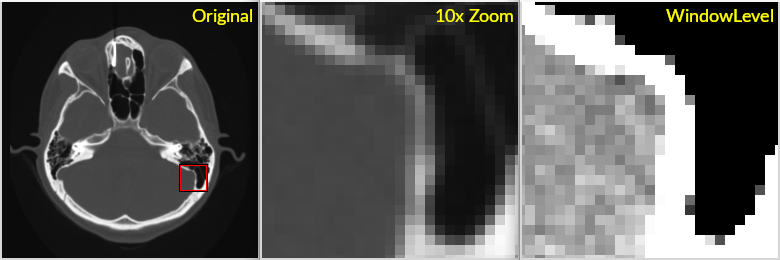
Here are some sample images to demonstrate the difference. First, here’s what the result of a window/level operations looks like (without any interpolation):
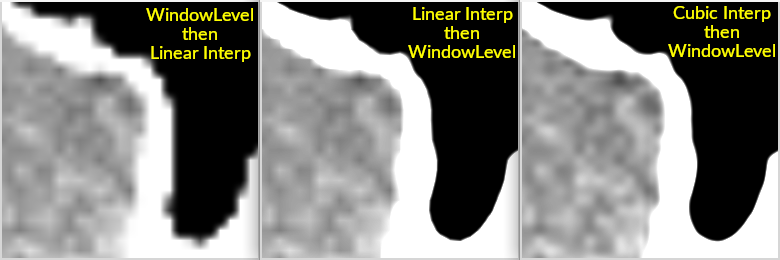
Next, here’s the difference between interpolating after window/level versus interpolating before window/level. The image on the left is what you get with vtkImageSliceMapper, the images on the right are what you get with vtkImageResliceMapper.
As you can see, the jagged edges are the result of doing the operations in the wrong order. Essentially, the window/level reduces the dynamic range of the data and this mucks up the interpolation. It’s the same basic problem as distortion due to clipping for audio signals: any digital signal needs to have sufficient headroom and footroom or else even basic filtering operations like interpolation can result in distortion.
Ideally, someone could contribute a fixed vtkOpenGLImageSliceMapper back to VTK. The fix would be roughly as follows: load the full dynamic range image onto the GPU (either as short, unsigned short, or float), and provide shader programs for interpolation and window/level (plus colormap) on the full dynamic range data.
@dgobbi Thanks for the detailed explanation. We’re planning to replace vtkOpenGLImageSliceMapper with vtkImageResliceMapper. I have one more question: is vtkImageResliceMapper as fast as vtkOpenGLImageSliceMapper, or can it be even faster? Are there specific APIs or settings we should use to optimize performance with vtkImageResliceMapper? We need performance that’s better than what we currently get with vtkOpenGLImageSliceMapper. Could you explain how to tune vtkImageResliceMapper for maximum performance so we can keep those points in mind during implementation?
It will only be faster than vtkOpenGLImageSliceMapper when the image size is larger than the GPU’s maximum texture size. In other cases, it will be the same speed or slower.
For information on how to use vtkImageResliceMapper, see the example that I posted in my second reply.
Thanks for the details @dgobbi , we will update once changes are done.
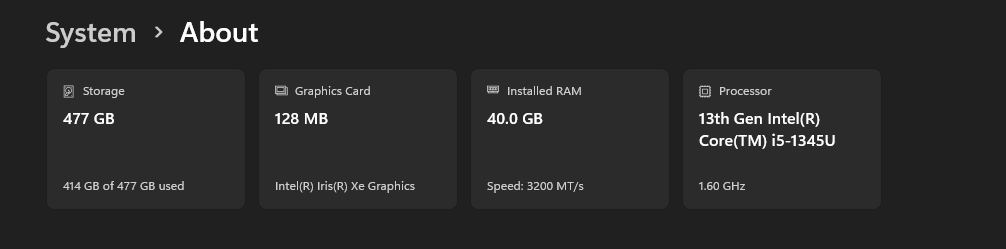
Hi @dgobbi, I replaced the existing 2D pipeline using vtkOpenGLImageSliceMapper with vtkImageResliceMapper, and it is functioning correctly. During slice scrolling, the performance of both mappers is same. However, during oblique rotation, vtkOpenGLImageSliceMapper performs noticeably faster than vtkImageResliceMapper for my test data, which consists of 2151 images with a resolution of 512 × 512.
Could you please help suggest optimization techniques for improving the oblique rotation performance of vtkImageResliceMapper? I have followed the same API calls as used in the reference sample program.
It seems strange, because I have a very old linux box (8-core AMD 5700G), and I get over 80 frames per second for oblique rotation with a 512x512x2000 image drawing into a 2560x1440 window. If the speed that you are seeing is significantly slower than 80 fps, I wonder if VTK is not properly using all the CPU cores on your computer.
As an experiment, add this before you create your vtkImageResliceMapper:
vtkThreadedImageAlgorithm::SetGlobalDefaultEnableSMP(0);
That line changes the method that VTK image filters use for multi-threading. If it significantly improves performance, it indicates a configuration problem with SMP. You can also combine that line with manually setting the number of threads that the VTK image filters will use, as a way of checking that the number of threads impacts the performance as it should:
    vtkThreadedImageAlgorithm::SetGlobalDefaultEnableSMP(0);
    int n = vtkMultiThreader::GetGlobalDefaultNumberOfThreads();
    vtkMultiThreader::SetGlobalDefaultNumberOfThreads(n/2);
There are also settings specific to vtkImageResliceMapper that impact the speed, these were already covered in the example in my second post:
    # turning this On speeds up window/level but slows down slicing
    im.SeparateWindowLevelOperationOff()

    # these settings provide speed vs. quality tradeoffs:
    if quality == 'auto':
        im.AutoAdjustImageQualityOn()
        im.ResampleToScreenPixelsOn()
    elif quality == 'high':
        im.AutoAdjustImageQualityOff()
        im.ResampleToScreenPixelsOn()
    elif quality == 'low':
        im.AutoAdjustImageQualityOff()
        im.ResampleToScreenPixelsOff()
@dgobbi Thanks for the reply. When I switch to Low Quality, I’m getting over 80 FPS, and rotation/interaction is smooth. However, the low-quality settings introduce noticeable jagged edges. I also tried Auto Quality, i didn’t see any jagged edges but I’m still encountering the same issue.
Did the SetGlobalDefaultEnableSMP(0) setting have any effect? How many CPU cores are there in your test machine? What FPS do you get in high-quality mode? As I mentioned above, I get 80 fps in even for high quality mode. Low quality mode would give me 400 fps if my monitor was capable.
Thanks for the details, i think i have some issue in implementation. i am getting few error from VTK while oblique roatation. @dgobbi do you have any idea why this issue occurs.
[2026-04-04 11:58:36.933] ERR: vtkLogForwarder.cpp(13): ERROR: In vtkOpenGLProperty.cxx, line 59
vtkOpenGLProperty (000001BE52BACC50): failed after Render 1 OpenGL errors detected
0 : (1280) Invalid enum
[2026-04-04 11:58:36.935] ERR: vtkLogForwarder.cpp(13): ERROR: In vtkOpenGLRenderer.cxx, line 292
vtkOpenGLRenderer (000001BE37401200): failed after DeviceRender 1 OpenGL errors detected
0 : (1280) Invalid enum
The above errors coming in only oblique view.
Have you tried updating the GPU drivers on that machine? The “invalid enum” error means there is some OpenGL feature that the drivers do not implement.
@dgobbi can you please provide a sample program which you’re using for testing FPS for Oblique mode. it will be helpful.
Here’s an example program that has an FPS meter in the corner.
Please let me know what results it gives on the hardware that you are using.
#! /usr/bin/env python3

"""
This is a program to benchmark 3D image display with vtkImageResliceMapper.
It uses a sphere image to very approximately simulate a CT bone image.
"""

from vtkmodules.vtkCommonCore import vtkLookupTable, vtkMultiThreader
from vtkmodules.vtkCommonDataModel import vtkSphere
from vtkmodules.vtkCommonExecutionModel import vtkThreadedImageAlgorithm
from vtkmodules.vtkImagingCore import vtkImageShiftScale
from vtkmodules.vtkImagingHybrid import vtkSampleFunction
from vtkmodules.vtkImagingMath import vtkImageMathematics
from vtkmodules.vtkImagingSources import vtkImageGridSource
from vtkmodules.vtkIOImage import vtkNIFTIImageReader
from vtkmodules.vtkRenderingImage import vtkImageResliceMapper

import vtkmodules.vtkInteractionStyle
import vtkmodules.vtkRenderingFreeType
import vtkmodules.vtkRenderingOpenGL2

from vtkmodules.vtkRenderingCore import (
    vtkActor2D,
    vtkImageProperty,
    vtkImageSlice,
    vtkRenderWindow,
    vtkRenderWindowInteractor,
    vtkRenderer,
    vtkTextMapper,
)

from vtkmodules.vtkInteractionStyle import (
    vtkInteractorStyleImage,
    vtkInteractorStyleSwitch,
)

try:
    from vtkmodules.vtkImagingCore import vtkImageBinaryThreshold
    vtkImageThresholdFilter = vtkImageBinaryThreshold
except ImportError:
    from vtkmodules.vtkImagingCore import vtkImageThreshold
    vtkImageThresholdFilter = vtkImageThreshold

import os
import sys
import math
import argparse
import time

def makeSphereImage(dims=(512, 512, 1024), r=200.0):
    """Generate an image of a sphere, type 'short', range [-1000,3000].

    The sphere is intended to simulate (very approximately) a CT image.
    """

    # we want the sphere to have a smooth boundary, so we make an
    # image where the pixel value is the signed distance from the
    # edge of the sphere, and then threshold the pixel values
    # between -1 and +1 to get a linear ramp at the edge

    # use vtkSphere to create a map of distance squared from center
    sphere = vtkSphere()
    sphere.SetRadius(0.0)
    sphere.SetCenter((dims[0] - 1)/2.0, (dims[1] - 1)/2.0, (dims[2] - 1)/2.0)

    # sample vtkSphere to get an image of distance squared
    sample = vtkSampleFunction()
    sample.SetImplicitFunction(sphere)
    sample.SetOutputScalarTypeToFloat()
    sample.SetSampleDimensions(dims[0], dims[1], dims[2])
    sample.SetModelBounds(0, dims[0]-1, 0, dims[1]-1, 0, dims[2]-1)
    sample.ComputeNormalsOff()
    sample.ReleaseDataFlagOn()

    # take square root to get distance from center
    radius = vtkImageMathematics()
    radius.SetInputConnection(sample.GetOutputPort())
    radius.SetOperationToSquareRoot()
    radius.ReleaseDataFlagOn()

    # subtract radius to get distance from edge of disk
    subtract = vtkImageMathematics()
    subtract.SetInputConnection(radius.GetOutputPort())
    subtract.SetOperationToAddConstant()
    subtract.SetConstantC(-r)
    subtract.ReleaseDataFlagOn()

    # clamp distance map (upper clamp)
    thresh1 = vtkImageThresholdFilter()
    thresh1.SetInputConnection(subtract.GetOutputPort())
    try:
        thresh1.ThresholdByUpper(1.0)
    except AttributeError:
        thresh1.SetLowerThreshold(1.0)
        thresh1.SetThresholdFunction(vtkImageThresholdFilter.THRESHOLD_UPPER)
    thresh1.SetInValue(1.0)
    thresh1.ReplaceInOn()
    thresh1.ReleaseDataFlagOn()

    # clamp distance map (lower clamp)
    thresh2 = vtkImageThresholdFilter()
    thresh2.SetInputConnection(thresh1.GetOutputPort())
    try:
        thresh2.ThresholdByLower(-1.0)
    except AttributeError:
        thresh2.SetUpperThreshold(-1.0)
        thresh2.SetThresholdFunction(vtkImageThresholdFilter.THRESHOLD_LOWER)
    thresh2.SetInValue(-1.0)
    thresh2.ReplaceInOn()
    thresh2.ReleaseDataFlagOn()

    # add a grid to supply some texture to the image
    grid = vtkImageGridSource()
    grid.SetDataExtent(0, dims[0]-1, 0, dims[1]-1, 0, dims[2]-1)
    grid.SetGridSpacing(40, 40, 0)
    grid.SetGridOrigin(15,15,0)
    grid.SetFillValue(1.0)
    grid.SetLineValue(0.0)
    grid.ReleaseDataFlagOn()

    # combine the grid with the sphere
    imath = vtkImageMathematics()
    imath.SetInputConnection(0, thresh2.GetOutputPort())
    imath.SetInputConnection(1, grid.GetOutputPort())
    imath.SetOperationToMultiply()
    imath.ReleaseDataFlagOn()

    # create a 16-bit image with range [-1000, 3000]
    convert = vtkImageShiftScale()
    convert.SetInputConnection(imath.GetOutputPort())
    convert.SetShift(-0.5)
    convert.SetScale(-2000.0)
    convert.SetOutputScalarTypeToShort()

    # return the image
    convert.Update()
    return convert.GetOutput()

def main(quality='auto',
         interpolation='linear',
         focus=None,
         zoom=1.0,
         window='auto',
         threads=-1,
         interaction='generic',
         filename=None):

    vtkThreadedImageAlgorithm.SetGlobalDefaultEnableSMP(0)
    if threads > 0:
        n = vtkMultiThreader.GetGlobalDefaultNumberOfThreads()
        if threads <= n:
            vtkMultiThreader.SetGlobalDefaultNumberOfThreads(threads)
        else:
            print(f"Maximum number of threads is \"{n}\".")

    if filename is not None:
        reader = vtkNIFTIImageReader()
        if not reader.CanReadFile(filename):
            print(f"Cannot read file \"{filename}\".")
            return
        reader.SetFileName(filename)
        reader.Update()
        imageToInterpolate = reader.GetOutput()
        if window == 'auto':
            window = 'full'
    else:
        # generate a high-contrast test image
        imageToInterpolate = makeSphereImage()
        if window == 'auto':
            window = 'tight'

    dataRange = imageToInterpolate.GetPointData().GetScalars().GetRange()
    print('data range', dataRange)
    if dataRange[1] - dataRange[0] < 256:
        print("Warning: this is not a 16-bit image!\n")

    size = imageToInterpolate.GetDimensions()[0:2]
    print('window size', size)

    # create the interactor
    if interaction == "image":
        style = vtkInteractorStyleImage()
        style.SetInteractionModeToImage3D()
    else:
        style = vtkInteractorStyleSwitch()
        style.SetCurrentStyleToTrackballCamera()

    iren = vtkRenderWindowInteractor()
    iren.SetInteractorStyle(style)

    # create the renderer and window
    renderer = vtkRenderer()
    renderer.SetBackground(0.2, 0.0, 0.1)
    renderer.lasttime = time.perf_counter()
    renderer.lastfps = 60.0
    renderer.lastfps2 = 60.0

    # add text to the window
    text = vtkTextMapper()
    text.SetInput("")
    text.GetTextProperty().SetFontSize(24)
    ta = vtkActor2D()
    ta.SetMapper(text)
    ta.SetPosition(5, 5)
    ta.GetProperty().SetColor(0.0, 1.0, 1.0)
    renderer.AddViewProp(ta)

    def printFPS(ren, ev):
        newtime = time.perf_counter()
        fps = 1.0/(newtime - ren.lasttime)
        ren.lasttime = newtime
        fps2 = 1.0/ren.GetLastRenderTimeInSeconds()
        # use a running average of the FPS
        ren.lastfps = 0.8*ren.lastfps + 0.2*fps
        ren.lastfps2 = 0.8*ren.lastfps2 + 0.2*fps2
        text.SetInput(f"FPS: {int(ren.lastfps)} ({int(ren.lastfps2)})")

    renderer.AddObserver('EndEvent', printFPS)

    rw = vtkRenderWindow()
    rw.SetSize(size)
    rw.AddRenderer(renderer)
    rw.SetInteractor(iren)

    # make a grayscale lookup table
    table = vtkLookupTable()
    table.SetValueRange(0.0, 1.0)
    table.SetSaturationRange(0.0, 0.0)
    table.SetHueRange(0.0, 0.0)
    table.SetAlphaRange(1.0, 1.0)
    table.SetRampToLinear()
    table.Build()

    # make the mapper
    im = vtkImageResliceMapper()
    im.SetInputData(imageToInterpolate)
    im.SliceFacesCameraOn()
    im.SliceAtFocalPointOn()
    im.JumpToNearestSliceOn()
    if interaction == 'image':
        im.SeparateWindowLevelOperationOn()
    else:
        im.SeparateWindowLevelOperationOff()
    if quality == 'auto':
        im.AutoAdjustImageQualityOn()
        im.ResampleToScreenPixelsOn()
    elif quality == 'high':
        im.AutoAdjustImageQualityOff()
        im.ResampleToScreenPixelsOn()
    elif quality == 'low':
        im.AutoAdjustImageQualityOff()
        im.ResampleToScreenPixelsOff()

    # make the property
    ip = vtkImageProperty()
    ip.SetLookupTable(table)

    if window == 'full':
        # full range
        ip.SetColorWindow(dataRange[1] - dataRange[0])
        ip.SetColorLevel(0.5*(dataRange[0] + dataRange[1]))
    elif dataRange[0] < -100.0:
        # tight window (signed data)
        ip.SetColorWindow(255.0)
        ip.SetColorLevel(-0.5)
    else:
        # tight window (unsigned data)
        ip.SetColorWindow(255.0)
        ip.SetColorLevel(999.5)

    # make the actor
    ia = vtkImageSlice()
    ia.SetMapper(im)
    ia.SetProperty(ip)
    renderer.AddViewProp(ia)

    # default is linear interpolation
    if interpolation == 'linear':
        ip.SetInterpolationTypeToLinear()

    # nearest-neighbor interpolation
    if interpolation == 'nearest':
        ip.SetInterpolationTypeToNearest()

    # cubic interpolation
    if interpolation == 'cubic':
        ip.SetInterpolationTypeToCubic()

    # default focus to center of the image
    bounds = imageToInterpolate.GetBounds()
    if not focus:
        focusX = 0.5*(bounds[0] + bounds[1])
        focusY = 0.5*(bounds[2] + bounds[3])
        focusZ = 0.5*(bounds[4] + bounds[5])
    else:
        focusX, focusY = focus
        focusZ = 0.5*(bounds[4] + bounds[5])

    # camera setup
    camera = renderer.GetActiveCamera()
    camera.ParallelProjectionOn()
    camera.SetParallelScale(0.5*(bounds[3] - bounds[2])/zoom)
    camera.SetFocalPoint(focusX, focusY, focusZ)
    camera.SetPosition(focusX, focusY, focusZ + 1000)
    camera.SetClippingRange(0.5, 2000)

    # render the image, start the interactor
    rw.Render()
    iren.Start()

if __name__ == "__main__":
    info = """
    If no image file is provided, this example will display a simulated image.
    The lower left corner displays the frames-per-second as two values:
      1. FPS limited by the display refresh rate.
      2. FPS not limited by the display refresh rate.
    The second value is computed as 1.0/GetLastRenderTimeInSeconds().

    For good benchmarks, resize the window so that the viewport is the same
    size as you would expect in your application.  Larger viewports require
    more CPU power than smaller viewports.

    The '--threads' option can be used to adjust the number of threads used.
    The '--quality' and '--interpolation' options will affect performance.
    The '--window' should be set to 'tight' to show high-contrast edges.

    The generic mouse interaction will obliquely slice the image.
    Use '--interaction image' to apply vtkInteractorStyleImage (see the VTK
    documentation for more information on this class, or experiment with the
    three mouse buttons and the CTRL and SHIFT modifiers).
    """

    parser = argparse.ArgumentParser(prog="ResliceMapper3D",
                                     description="ResliceMapper 3D benchmark example",
                                     formatter_class=argparse.RawDescriptionHelpFormatter,
                                     epilog=info)
    parser.add_argument('filename', nargs="*",
                        help="(optional) NIFTI image, must be 16-bit")
    parser.add_argument('--threads', required=False,
                        type=int, default=-1,
                        help="defaults to maximum thread count")
    parser.add_argument('--quality', required=False,
                        choices=['auto', 'high', 'low'],
                        default='auto')
    parser.add_argument('--interpolation', required=False,
                        choices=['nearest', 'linear', 'cubic'],
                        default='linear')
    parser.add_argument('--window', required=False,
                        choices=['auto', 'full', 'tight'],
                        default='auto')
    parser.add_argument('--interaction', required=False,
                        choices=['generic', 'image'],
                        default='generic')
    args = parser.parse_args()

    if args.filename:
        filename = args.filename[0]
        if not os.path.isfile(filename):
            sys.stderr.write(f"Cannot find file: \"{filename}\"\n")
            sys.exit(1)
        if os.path.splitext(filename)[1] not in (".nii", ".gz"):
            sys.stderr.write(f"Expected a NIFTI file \"{filename}\"\n")
            sys.exit(1)
    else:
        filename = None

    main(quality=args.quality,
         interpolation=args.interpolation,
         window=args.window,
         interaction=args.interaction,
         threads=args.threads,
         filename=filename)