Dear VTK users/developers,
I have the super simple script below (in Python). Even running with VTK 9.5.2 (from PyPI) on Windows 11 64 bit and Python 3.9, I get rendering artifacts:
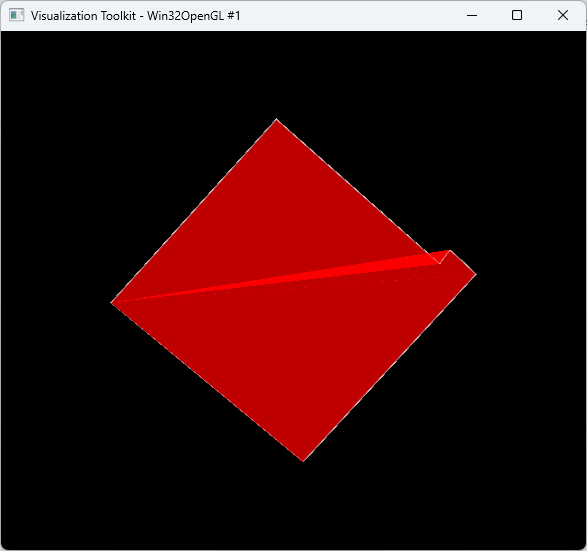
The picture is just a simple polyhedron, and I set its opacity to 0.5 and I set to use edge visibility.
Maybe what I am trying to do cannot be done, or (highly likely) I am doing something wrong with the code. Any suggestion would be most appreciated, thank you.
Code:
import vtk

# Original points
points_data = [(0.0, 0.0, 0.0),
               (7868.484899999923, 8717.047000000253, 0.0),
               (15621.25689999992, 1851.4080000002868, 0.0),
               (16122.679899999988, 2507.1150000002235, 0.0),
               (17356.952099999995, 1349.9850000003353, 0.0),
               (9136.155671230983, -7562.280203491449, 0.0),
               (0.0, 0.0, 0.0)]

# Extrusion height
height = 300

# Create VTK points
points = vtk.vtkPoints()
num_points = len(points_data)

# Insert top points (z = 0)
for x, y, _ in points_data:
    points.InsertNextPoint(x, y, 0)

# Insert bottom points (z = -height)
for x, y, _ in points_data:
    points.InsertNextPoint(x, y, -height)

# Create top face polygon
top_face = vtk.vtkPolygon()
top_face.GetPointIds().SetNumberOfIds(num_points)
for i in range(num_points):
    top_face.GetPointIds().SetId(i, i)

# Create bottom face polygon
bottom_face = vtk.vtkPolygon()
bottom_face.GetPointIds().SetNumberOfIds(num_points)
for i in range(num_points):
    bottom_face.GetPointIds().SetId(i, i + num_points)

polys = vtk.vtkCellArray()

# Create side faces (quads)
side_faces = vtk.vtkCellArray()
polys.InsertNextCell(top_face)

for i in range(num_points-1):
    quad = vtk.vtkQuad()
    quad.GetPointIds().SetId(0, i)
    quad.GetPointIds().SetId(1, i + 1)
    quad.GetPointIds().SetId(2, i + 1 + num_points)
    quad.GetPointIds().SetId(3, i + num_points)
    polys.InsertNextCell(quad)

polys.InsertNextCell(bottom_face)

# Create polydata
polydata = vtk.vtkPolyData()
polydata.SetPoints(points)
polydata.SetPolys(polys)

# Mapper and actor
mapper = vtk.vtkPolyDataMapper()
mapper.SetInputData(polydata)

actor = vtk.vtkActor()
actor.SetMapper(mapper)

# Set properties
prop = actor.GetProperty()
prop.SetColor(1, 0, 0)           # Red surface
prop.SetEdgeVisibility(1)        # Show edges
prop.SetEdgeColor(1, 1, 1)       # White edges
prop.SetLineWidth(1)
prop.SetOpacity(0.5)

# Renderer
renderer = vtk.vtkRenderer()
renderer.AddActor(actor)
render_window = vtk.vtkRenderWindow()
render_window.AddRenderer(renderer)

interactor = vtk.vtkRenderWindowInteractor()
interactor.SetRenderWindow(render_window)

render_window.Render()
interactor.Start()