I’m using vtkOpenGLImageSliceMapper to render more than 2000 image slices. When performing oblique slice operations in 2D or scrolling through slices, the interaction becomes noticeably slow. Are there recommended ways to improve performance with large volumetric datasets when using vtkOpenGLImageSliceMapper?
The most important thing is to ensure that the entire volume is in memory, which you can do by calling UpdateWholeExtent() on your reader. Otherwise, the mapper might be updating the pipeline (and therefore the reader) slice-by-slice as you scroll through the volume.
It’s hard to give specific advice without seeing how you have coded your pipeline.
Thanks for the reply. I re‑checked our implementation and confirmed that we are indeed loading the entire volume into memory using UpdateWholeExtent(). However, the rendering speed of vtkOpenGLImageSliceMapper is still not as fast as we expected, especially when dealing with oblique slicing and large datasets.
We also learned that some projects have rewritten parts of vtkOpenGLImageSliceMapper and implemented custom shader‑based rendering (similar to the image shown). How can we achieve this type of shader‑accelerated slice rendering in VTK 9?
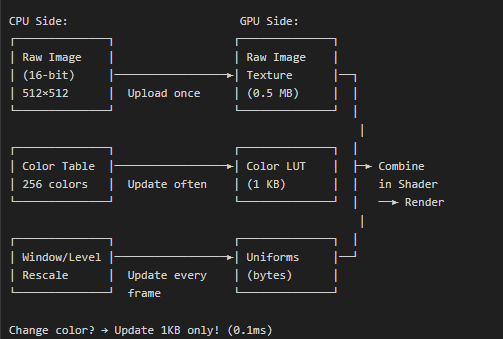
If other people have already done it, why not just ask them to share their code?
Unfortunately, we don’t have access to the custom implementation used in that project. Because of that, I’m looking for any open‑source projects such as 3D Slicer or ParaView.. Are there existing VTK‑based projects or examples that demonstrate optimized shader-driven 2D slice rendering for large volumes?
@lassoan do you know anyone connected to NA-MIC that has an open-source shader-based implementation of image slicing?
@sankhesh i seen your code changes in vtkopenglsliceimagemapper, the above shader‑accelerated slice rendering as shown in above picture can be achieved?
Hi @Manjunath_AV, what you’re describing is available via the vtkGPUVolumeRayCastMapper by setting SetBlendModeToSlice. The pipeline would change quite a bit but take a look at TestGPURayCastSlicePlace for an example.
Thanks for the reply. I am currently working on switching my 2D pipeline to use vtkGPUVolumeRayCastMapper. In the meantime, I have a question: I always thought that vtkGPUVolumeRayCastMapper is meant only for 3D volume rendering. Does this class also support axial, sagittal, coronal, and oblique slice rendering?
We use CPU-based volume reslicing in 3D Slicer due to complications with GPU-based approaches. Essenetially, we still need to have a CPU-based pipeline anyway for compatibility with many computers and large images. So far we could not justify investing into the implementation and maintenance of a GPU-based pipeline in addition to the CPU-based pipeline. But as VTK’s support for using GPU for computation improves, it may give more motivation to leverage GPUs more in Slicer.
The only application in the broader NA-MIC family that uses GPU for reslicing is CustusX. They had to apply some workarounds in VTK to share an image between multiple renderers.
You could also look at how cornerstone3d and ohif viewer do this in javascript. I haven’t followed the exact implementation currently, but my first prototypes for this used the volume renderer in vtkjs to implement the reslicing logic and I’m pretty sure that’s still how they do it.
https://github.com/dcmjs-org/dcmjs/blob/master/examples/vtkDisplay/index.html
The trick is to set the orthographic camera and the front clipping plane to be the reslice plane and then make the volume fully opaque with no lighting and rely on the early ray termination of the volume renderer to stop a full opacity. So it effectively samples just one pixel and the interpolation is done in hardware by the texture lookup.
I’m sure the same could be done in C++ VTK using the normal volume renderer and no custom GPU code, just the right setup of camera, lights, and transfer function. You can also composite segmentations on the slices as in the example code linked above. I think this is a very elegant way to do it but I do recall we needed to fix a few bugs in the vtkjs shader code to get the rendering just right.
The other thing we did for OHIF was to use just one renderwindow context with the volume to render all the slice views and then blit them into the correct parts of the canvas (so we wouldn’t have multiple volumes loaded).
This GPU approach works great as long as the volumes fit in GPU memory, which supports a lot of use cases, but recently I heard that the ohif team also implemented a CPU based scheme as a fallback if the GPU runs out of memory.
I’ve never tried the volume rendering approach in Slicer for the reasons Andras mentions. The CPU approach using David’s multithreaded code is generally fast enough and it already support all his great transform pipeline classes too.