Problem Description:
I’m using vtkOpenGLGPUVolumeRayCastMapper to render volumetric data imported via vtkImageImport. The data source is a series of 128×128 CV_8UC1 images, as implemented in my ShowImageData() function (code attached below). The initial render works correctly and produces acceptable results (Figure 1).
Current Setup:
- VTK Version: 9.1.0
- Data type:
CV_8UC1images converted to vtkImageData
Current Problem: Window Refresh Artifact and Hide/Show Artifact
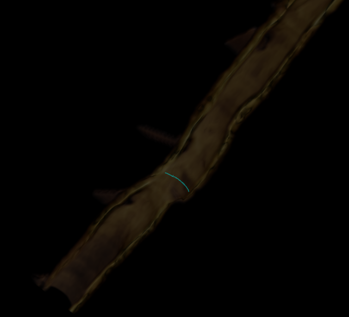
After the initial successful rendering, when I refresh the 3D window by calling the same model generation function (Refresh3DVolumeZoom()), or when I hide the current volume model to display a different surface-rendered model and then show the original volume model again, the rendering quality degrades significantly (Figure 2). The volume appears darker with noticeable artifacts.
Same function (Refresh3DVolumeZoom()) is called for both initial render and refresh, and no parameters are changed between calls.
Code Snippets:
unsigned char *m_p3DVisualizationDataLumenZoomIn;
void ShowImageData()
{
	int frames = m_n3DFrames;
	int imSize = 128 * 128;
	for (int frameInd = 0; frameInd < frames; ++frameInd)
	{
		cv::Mat output, imgC = cv::Mat::zeros(128,128,CV_8UC1);
		......
		......
		memcpy(m_p3DVisualizationDataLumenZoomIn + frameInd * imSize, imgC.data, imSize * sizeof(char));
	}

	double sizeV = 700;
	double size3D = 128;
	double vol = sizeV / size3D;
	m_p3DImageImportZoom->SetDataSpacing(m_d3DSpaceXY * vol, m_d3DSpaceXY * vol, m_d3DSpaceZ);
	m_p3DImageImportZoom->SetDataOrigin(0, 0, 0);
	m_p3DImageImportZoom->SetWholeExtent(0, 127, 0, 127, 0, frames - 1);
	m_p3DImageImportZoom->SetDataExtentToWholeExtent();
	m_p3DImageImportZoom->SetDataScalarTypeToUnsignedChar();
	m_p3DImageImportZoom->SetNumberOfScalarComponents(1);
	m_p3DImageImportZoom->RemoveAllInputs();
	m_p3DImageImportZoom->SetImportVoidPointer(m_p3DVisualizationDataLumenZoomIn);
	m_p3DImageImportZoom->Update();

	m_p3DRenWin->Render();
}

void Refresh3DVolumeZoom()
{
	m_p3DVolumeMapper1 = vtkSmartPointer<vtkOpenGLGPUVolumeRayCastMapper>::New();
	m_p3DVolume1->SetMapper(m_p3DVolumeMapper1);

	m_p3DVolumeProperty1->SetInterpolationTypeToLinear();
	m_p3DVolumeProperty1->ShadeOn();
	m_p3DVolumeProperty1->SetAmbient(1.2);
	m_p3DVolumeProperty1->SetDiffuse(0.2);
	m_p3DVolumeProperty1->SetSpecular(0.1);

	m_p3DGaussian1->SetInputConnection(m_p3DImageImportZoom->GetOutputPort());
	m_p3DGaussian1->SetDimensionality(3);
	m_p3DGaussian1->SetRadiusFactor(1.0);
	m_p3DGaussian1->SetStandardDeviation(1.0);
	m_p3DGaussian1->Update();
	m_p3DImageImportZoom->GetOutput()->ShallowCopy(m_p3DGaussian1->GetOutput());

	m_p3DVolumeMapper1->SetBlendModeToComposite();
	m_p3DVolumeMapper1->SetInputData(m_p3DImageImportZoom->GetOutput());
	m_p3DVolumeMapper1->SetSampleDistance(0.0005);
	m_p3DVolumeMapper1->AutoAdjustSampleDistancesOff();

	m_p3DVolumeComposite1->RemoveAllPoints();
	m_p3DVolumeComposite1->AddPoint(0, 0.0);
	m_p3DVolumeComposite1->AddPoint(10, 0.0);
	m_p3DVolumeComposite1->AddPoint(11, 0.3);
	m_p3DVolumeComposite1->AddPoint(30, 0.5);
	m_p3DVolumeComposite1->AddPoint(50, 0.7);
	m_p3DVolumeComposite1->AddPoint(70, 0.9);
	m_p3DVolumeComposite1->AddPoint(128, 0.99);
	m_p3DVolumeComposite1->AddPoint(255, 1.0);

	m_p3DVolumeGradient1->RemoveAllPoints();
	m_p3DVolumeGradient1->AddPoint(0, 1.0);
	m_p3DVolumeGradient1->AddPoint(1, 1.0);
	m_p3DVolumeGradient1->AddPoint(1.1, 1.0);
	m_p3DVolumeGradient1->AddPoint(255, 1.0);

	m_p3DVolumeColor1->RemoveAllPoints();
	m_p3DVolumeColor1->AddRGBPoint(0, 0.0, 0.0, 0.0);
	m_p3DVolumeColor1->AddRGBPoint(10, 0.0, 0.0, 0.0);
	for (int i = 11; i <= 255; i++) {
		m_p3DVolumeColor1->AddRGBPoint(i, m_vSepiaMap[i], m_vSepiaMap[i + 256], m_vSepiaMap[i + 512]);
		//m_vSepiaMap is an immutable constant value.
	}

	double* dataSpace = m_p3DImageImportZoom->GetDataSpacing();
	int* dataExtent = m_p3DImageImportZoom->GetDataExtent();
	m_p3DVolume1->SetOrigin((dataExtent[1] + 1) * dataSpace[0] / 2.0, (dataExtent[3] + 1) * dataSpace[1] / 2.0, 0);
	m_p3DVolumeProperty1->Modified();
	m_p3DVolumeMapper1->Modified();
	m_p3DVolume1->Modified();

	m_p3DSurfRenderer->SetUseDepthPeeling(1);
	m_p3DSurfRenderer->ResetCameraClippingRange();
	m_p3DRenWin->Render();
}
Screenshots :
Image1:
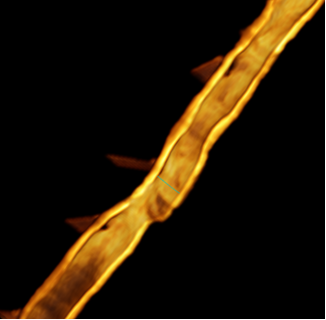
Image2:
Thank you for any guidance!